# Stoneblock 4
Guides and Tutorials for Stoneblock 4!
# Introduction | Stoneblock 4
|  |
| sb4.siriusmc.net Version · 1.16.0 |
| Getting started in Stoneblock 4 on SiriusMC? This guide covers everything you need to know, from choosing your starting base to crafting hammers, crooks, and brushes to begin gathering resources.
Stoneblock 4 is a skyblock-style modpack where you start in the middle of your own dimension, surrounded by stone. Rather than punching trees, you will be breaking stone into pebbles, converting materials through hammering and brushing, and building up your base from just a small hole deep within the dimension's core. This guide will walk you through your first steps to getting started on SiriusMC's version of Stoneblock 4.
|
## The Echo of Guidance and Creating Your Base
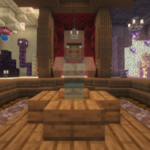When you first join the server you will spawn at a dedicated spawn point. Ahead of you is the **Echo of Guidance**, an NPC you must interact with before you can access your dimension. Walk over to them and right-click to open the dialogue GUI. After reading, or listening through an audio button, you will notice at the bottom there is a **Complete Stage** button. Press this button to unlock access to the "Getting Started" chapter in your quest book, and to access the World Selection Portal.
Head up the stairs behind the Echo and walk through the large portal at the far end. Here you can choose which type of starting base you would like. Once selected, you will be taken to your dimension and can begin your adventure.
After completing the quest **Initialization**, you can purchase a Quest Book from the Echo of Guidance for 1 coin. Alternatively, it can be found in the top-left corner of your inventory screen at any time.
### Base Types
There are 6 different types of bases you can start with, with varying difficulties:
| A dark and eerie blackout zone
A small area covered with Black AntiBlocks. The player is unable to see anything.
Extreme | | A dark and mysterious cave
A small area similar to the blackout zone, but with a single torch to prevent mob spawning.
Hard |
| |
| A vibrant and colorful cherry tree
A larger lit area featuring a custom-built tree with cherry leaves, grass, moss, and mud blocks.
Medium | | A ruined pre-industrial complex
Stone brick pillars with spruce wood platforms, ladders, and torches to prevent mob spawning.
Medium |
| |
| A rugged and resilient tuff cave
Walls of tuff, cobblestone, and moss with braziers and cobblestone staircases.
Medium | | A lush and warm mangrove cave
Mangrove trees, a lily pad pond, braziers for lighting, and several types of stone. Recommended for new players.
Easy |
## Getting Started
In Stoneblock 4, stone replaces wood as the primary crafting material. You can craft stone crafting tables, stone sticks, and stone tools using the same recipes you would normally use for their wooden equivalents.
Start by breaking stone with your fists to collect pebbles. Each stone block you break will drop between 1 and 3 pebbles. You can then combine 4 pebbles together to craft 1 cobblestone, this will act as your wood equivalent for now. You make a stone crafting table using 4 cobblestone, or stone sticks using two cobblestone to help you get started.
### Crafting and Using Hammers, Brushes and Crooks
Next you will need some specialised tools to progress, these include hammers, crooks, and brushes. There are two different types of hammers, ones from the mod FTB Stuff & Things allows you to transform blocks into different blocks, the hammers from the mod Just Hammers allows you to break several blocks at once, stone crooks can be used on different blocks to gain materials associated with them, and brushes allow you to brush blocks for essential items.
#### Hammers
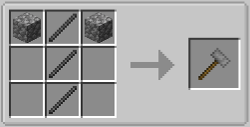Using stone sticks and cobblestone you can craft a **Stone Hammer** from the mod FTB Stuff & Things. These types of hammers break down blocks into different ones, forming the core of your early resource chain:
Cobblestone ⮕ Gravel ⮕ Dirt ⮕ Sand ⮕ Dust
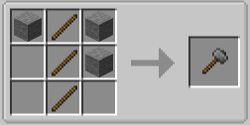You can also use hammers from the Just Hammers mod, these allow you to break blocks in certain patterns, at the start it will be in a 3x3x1 pattern, but you can upgrade these hammers to break in a 3x3x3, 5x5x1, 5x5x3, or 5x5x5 pattern. To make one of these hammers you will need to smelt cobblestone into stone, and use wooden sticks instead of stone sticks.
#### Stone Crook
Craft a **Crook** using 4 stone sticks. The crook is used to break blocks into a variety of different items. For example, using a crook on dirt can yield a range of saplings, using it on sand will yield a bunch of different crops, ranging from sugarcane, cactus, kelp and bamboo, all the way to Demon's Dream seeds, cocoa seeds, and canola seeds. It is an essential tool for generating resources early on.
#### Brushes
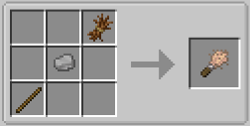Brushes are your main source of material gathering, these are what allow for you to get various ores, seeds, and gems. However, to gather better materials you will need to increase your Unearther level, this is done by completing quests that have the level up icon  in their rewards.
The type of brush you use doesn't change the items blocks drop, however, it can help the process be less tedious. The first brush you will get is the Crude Brush, made using a wooden stick, a pebble, and a piece of straw, it's good, but it will only brush 128 blocks before breaking. As you gather more materials you will be able to upgrade your brushes:
Crude Brush ⮕ 128 blocks
Brush ⮕ 384 blocks
Reinforced Brush ⮕ 1,152 blocks
Unbreakable Brush ⮕ infinite blocks
**How to Upgrade Brushes
**Upgrading brushes is a huge quality of life improvement, especially when mass brushing or using Unearthers. Better brushes last longer, reducing how often you need to craft replacements. Each tier requires progressively better materials, but all are achievable in early to mid-game.
#### From Crude Brushes To Brushes
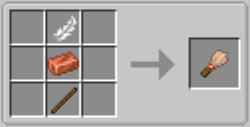Brushes, also known as "regular brushes" are crafted using **1x feather, 1x copper ingot, and 1x wooden stick**. It has a durability of 384 blocks, three times as long as the Crude Brush.
#### From Brushes To Reinforced Brushes
The Reinforced Brush is made in a smithing table using **1x brush, 1x diamond, and 1x smithing template**. It has a durability of 1,152 blocks, three times as long as the "Regular" Brush. Diamonds can be obtained by brushing gravel once you reach Unearther Level 3.
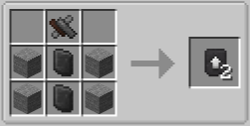Smithing templates can be crafted using **4x stone, 2x gem-fused slates, and 1x mysterious scrap metal**, or purchased from the Echo of Guidance for 10 coins after completing Unknowing - Task 3.
#### From Reinforced Brushes To Unbreakable Brushes
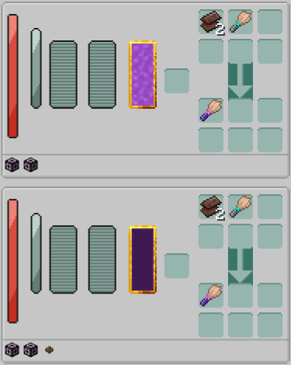Unbreakable brushes are the best tier of brush you can get. These brushes have unlimited durability, but cost a lot more than the previous brushes. The materials you need to craft an unbreakable brush are 2x netherite scrap, and 1x reinforced brush.
In addition to the base materials you will need, you also have to have upgraded your World Engine to contain either:
1\. 2x Sourcestone and 64x World Engine Machine Block (Ars Nouvaeu Pathway)
2\. 20x Shadow Casing, 64x World Engine Machine Block (Create Pathway)
**Using the Ars Pathway:**
When using the Ars Nouvaeu pathway you will need to supply the World Engine with Source. This can only be done once you have completed the "Meet The Magician" quest line from the quest chapter Tier 1: Foundation. You must have a minimum of 1,000 Source in the World Engine for the cores to begin crafting.
**Using the Create Pathway:**
When using the Create pathway you will need to supply the World Engine with kinetic energy. This can only be done once you have completed the "Meet The Machinist" quest line from the quest chapter Tier 1: Foundation. You must have a minimum of 32 rotations per minute (RPM) before the cores will begin crafting. **Note:** The stress impact during crafting is 16x RPM
Now that you have your core tools and understand the basic resource loop, you are ready to start making your base into a fully fledged home. The next steps are growing your first trees and getting a water source set up, if you haven't chosen a base with water and trees already on it, and eventually automating your brushing and hammering to free up your time for bigger projects. Check out our other guides for more information about Stoneblock 4!
To install Stoneblock 4 and learn more about the server and scheduled restarts, visit the [Stoneblock 4 Server Card](https://wiki.siriusmc.net/link/115#bkmrk-stoneblock-4).
It is recommended to allocate between 8GB and 10GB of RAM for Stoneblock 4.
SiriusMC bans certain items to protect server performance, the in-game economy, and claimed player bases. Use **/banneditems** in-game to see the full list of banned items on the server, or expand the Banned Items list below.
Banned Items ▼
Item-based chunk loaders
Watch of Flowing Time
Nuke
Ice Bomb
Paradox Machine
Infinity Nuke
Harvest Goddess Band
Dimensional Stabilizer
Advanced Time Wand
Time Twister
Spatial Anchor
Ticker
Time Sand Pouch
Time Wand
Confiscation Module
Upgrade Anchor
ItemStack Insert Transfer Label
ItemStack Extract Transfer Label
FluidStack Insert Transfer Label
FluidStack Extract Transfer Label
---
| Ready to Play?
Open Minecraft, select Multiplayer, and add a new server with the address below.
sb4.siriusmc.net
[Installation guide](https://wiki.siriusmc.net/link/115#bkmrk-installing-a-modpack-1) [Server rules](https://wiki.siriusmc.net/books/the-siriusmc-networks/page/server-rules-siriusmc) [Join Discord](https://discord.gg/siriusmc)
|
| Guide
[Automation Guide](https://wiki.siriusmc.net/books/modpack-guides-and-tutorials/page/automation-guide-stoneblock-4)
Set up cobble generators, auto hammers, and Unearthers to automate your resource chain.
| Boss Guide
[Mighty Ender Chicken](https://wiki.siriusmc.net/books/modpack-guides-and-tutorials/page/boss-guide-mighty-ender-chicken-stoneblock-4)
Defeat this boss to keep progressing, learn how to summon and defeat it.
| Boss Guide
[Chesed](https://wiki.siriusmc.net/books/modpack-guides-and-tutorials/page/boss-guide-chesed-stoneblock-4)
The first major boss. Learn how to defeat it and what drops you can earn.
|
# Automation Guide | Stoneblock 4
| At the beginning in Stoneblock 4 you'll be manually gathering resources through mining, hammering and brushing blocks. But, as you progress you'll unlock a multiblock called an Unearther, and machines called Cobble Generators, and Auto Hammers. This guide will take you through how to unlock them, how they work, and how to set them up.
|
## Unearthers
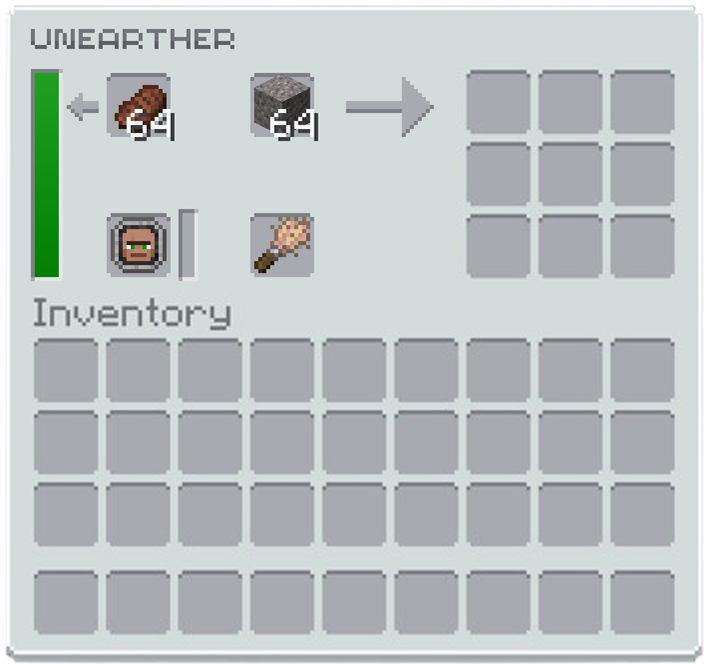Unearthers are 3x3x3 structures that allow you to use villagers to automate the brushing process. The structure is crafted using 5 tinted glass and 3 polished deepslate slabs, and you only need one Unearther block to build it.
To operate an Unearther you will need the following:
- A Villager Worker Token from an employed villager
- A brush
- Blocks to brush
- Food (optional, but increases brushing speed)
### Step 1: Getting a Villager
First, complete the quest **Chronon Generator** in the **Getting Started** chapter. This rewards you with **Dreadful Dirt**, which causes hostile mobs to spawn on it more frequently than usual. Place it in a dark area to allow a zombie villager to spawn.
Next, complete **Unknowing Task 3** from the Echo of Guidance to obtain the **Ender Lead**. Use it to pick up the zombie villager that spawns on the Dreadful Dirt.
### Step 2: Healing the Zombie Villager
Take the zombie villager to the **Healing Spring**, located to the north of your base's spawn point. Open your map with **M** to find it; it appears as a colourful circle on the map. Place the zombie villager down inside the Healing Spring, and it will begin converting into a regular villager.
### Step 3: Crafting the Echo Encoder
Head to the **World Engine** and craft an **Echo Encoder**. You will need the following materials:
- **Amethyst Resonance Charm:** Crafted from 1 amethyst shard (obtained from the Healing Spring) and 4 leather (from killing cows or smelting rotten flesh on a campfire).
- **Iron Stick:** Place 1 iron ingot in the top-right corner of the crafting table, with two wooden sticks diagonally below it.
Place the Amethyst Resonance Charm and Iron Stick into the World Engine. It will engage one of its cores and begin crafting the Echo Encoder.
### Step 4: Employing a Villager
With the Echo Encoder in hand, you can convert villagers into Worker Tokens. There are three Worker Token types that work in the Unearther, each requiring a specific workstation:
- **Archeologist** | Workstation: Decorative Pot | Brushes: Dirt, Dust, Mud, Sand
- **Geologist** | Workstation: Salvaging Table | Brushes: Gravel, Soul Sand, Crushed Kivi
- **Dimensionalist** | Workstation: Resonanz Engineering Block | Brushes: Netherrack, End Stone, Otherrock
Place down the workstation for the worker type you need, then place the villager nearby, and they will take on that job role. Once employed, use the Echo Encoder on the villager to pick them up as a Worker Token.
### Step 5: Setting Up the Unearther
Insert the Worker Token into the Unearther along with a brush and the blocks you want brushed. The villager will begin brushing automatically.
To fully automate the process, connect a chest filled with brushable blocks, brushes (unless using an Unbreakable Brush), and optionally food to increase speed. Use item pipes to feed items into the Unearther from the chest.
It is strongly recommended to use **Mekanism Logistical Transporters** as your item pipes. They can pull multiple different item types from the same chest simultaneously. Opaque Item Pipes from Oritech Machines will only extract the first item type in the chest and will ignore the rest.
## Auto Hammers and Cobble Generators
Once you have a handle on manually hammering and brushing, the next step is automating the process. This guide covers setting up a Stone Cobble Generator and chaining it into an Auto Hammer to produce resources passively.
### Step 1: The Stone Cobble Generator
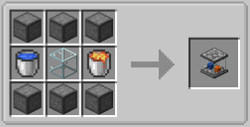Craft a **Stone Cobble Generator** using 6 compressed stone blocks, 1 lava bucket, 1 water bucket, and 1 glass. Once placed, it will automatically generate 1 cobblestone per tick.
The Stone Cobble Generator will generate 1 cobblestone per tick, but can be upgraded to iron, gold, diamond, and netherite versions by placing the generator into a casting basin, and pouring the corresponding molten ore on top of it, for example, to turn the Stone Cobble Generator into an Iron Cobble Generator you will pour molten iron onto it whilst it is inside a casting basin.
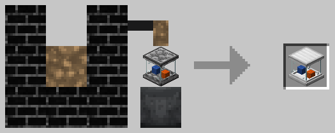
### Step 2: Collecting the Cobblestone
Place an inventory directly on top of the generator to collect the cobblestone it produces, these can be chests, barrels, or drawers. There are a couple of things to keep in mind:
- **Stone Chests** from the Stone Chest mod do not work with the generator.
- **Compacting Drawers** from Functional Storage must have a piece of cobblestone manually placed inside them before they will begin collecting from the generator.
### Step 3: Piping into the Auto Hammer
Now you need item pipes to move the cobblestone into the Auto Hammer, when starting out you can use the Opaque Item Pipes from Oritech Machines or Item Pipes from Pipez, however it is recommended to use Logistical Transporters, which are Mekanism's version of item pipes. Several options are available:
- **Opaque Item Pipes** from Oritech Machines: a good early option
- **Item Pipes** from Pipez: another early game alternative
- **Logistical Transporters** from Mekanism: recommended for the best performance and reliability
### Step 4: Chaining Auto Hammers
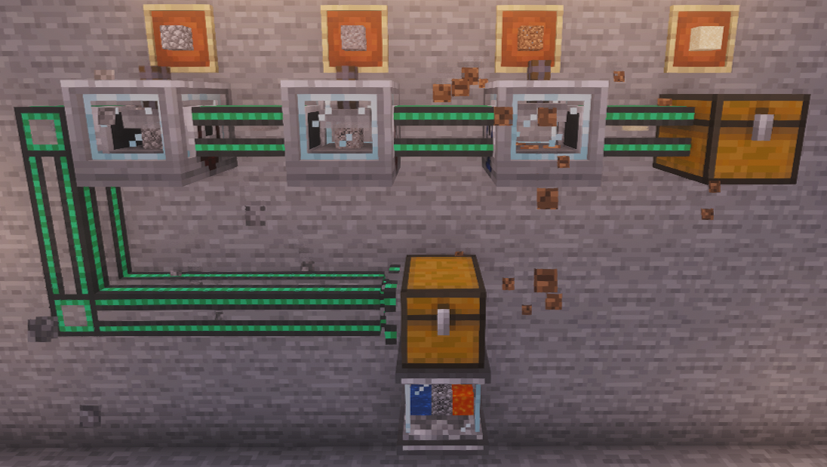Auto Hammers can be chained together to convert cobblestone all the way down the conversion chain, into dust, in a single pass. The number of hammers you need depends on the output you are after.
For example, to produce sand for brushing into gold chunks, you would chain 3 Auto Hammers together:
Cobblestone ⮕ Gravel ⮕ Dirt ⮕ Sand
| Introduction
[Introduction](https://wiki.siriusmc.net/books/modpack-guides-and-tutorials/page/introduction-stoneblock-4)
An introduction into Stoneblock 4, including how to get started and what mods are featured.
| Boss Guide
[Mighty Ender Chicken](https://wiki.siriusmc.net/books/modpack-guides-and-tutorials/page/boss-guide-mighty-ender-chicken-stoneblock-4)
Defeat this boss to keep progressing, learn how to summon and defeat it.
| Boss Guide
[Chesed](https://wiki.siriusmc.net/books/modpack-guides-and-tutorials/page/boss-guide-chesed-stoneblock-4)
The first major boss. Learn how to defeat it and what drops you can earn.
|
# Boss Guide (Chesed) | Stoneblock 4
|  |
| Chesed is a powerful boss that cannot be damaged directly. You must use the environment and mechanics of the arena to defeat it. A diamond axe is not just recommended; it is essential. All damage from Chesed ignores resistances, and the arena cannot be easily escaped from.
|
## Walkthrough
### Phase 1
A diamond axe is more than just recommended for defeating Chesed, it is essential. You cannot damage Chesed directly and must use your surroundings to deal damage to it, making the diamond axe the best early game weapon for this purpose. With the diamond axe you can disable the Chesed Monoliths. Chesed Monoliths have 50HP each, and you'll know when they've been disabled because they stop spinning. This is particularly important, because during the ability "Tenebrae Aeternae" Chesed drains power from the monoliths and uses it to unleash a lightning strike that damages everyone in the arena, and the amount of damage given depends on how many monoliths are in an active state. Deactivated monoliths become active again after this ability ends.
To defeat Chesed, you'll need to wait for the Crystals phase. This is when blue crystals will appear in the corners of the arena. Following this, Chesed activates the "Lightning Ray" ability that follows the player's movement. While charging the attack, Chesed tries to anticipate the player's movements, and aims slightly beyond the target's movement direction, and stops aiming seconds before releasing the lightning ray.
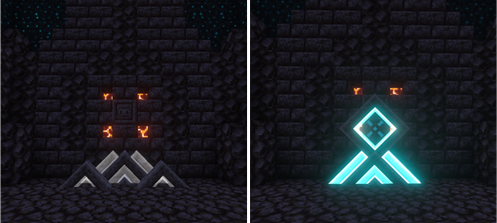Using your axe, break one of the blue crystals from the "Crystals" ability, and then find a Lightning Ray Reflector at the far sides of the arena. You'll notice when you approach one with the Energized II effect, it will rise from the ground and glow blue. And, if aimed correctly, means that when Chesed fires a lightning ray, it will reflect from the Reflector and hit Chesed, dealing 1 point of damage.
### Phase 2 (below 50% HP)
When Chesed drops below 50% HP it enters its second phase, causing the Monoliths to regenerate with an additional 50 HP, bringing them to 100 HP each. Same as in phase 1, you will need to destroy them again to ensure that during the ability "Tenebrae Aeternae" you are not taking significant damage. Then you can wait again for the Crystals and Lightning Ray phase, and damage Chesed in the same way you did in phase 1.
## Abilities
### Passive
**Mightiness**
Chesed cannot be hurt directly, and its arena cannot be easily escaped from. All damage it inflicts ignores resistances. Gives all combatants Night Vision while alive. If a player looks away from Chesed, they are inflicted with Chesed Gaze. Second phase begins when HP drops below 50%.
**Electrified Air**
The air above Chesed crackles with power. Any entity that interacts with it takes damage.
**Monoliths**
Spawns 4 monoliths when summoned. Monoliths deactivate upon death and cannot be damaged further. Gain an additional 50 HP in second phase.
**Crystals**
Cast before the lightning ray attack. Destroys all existing crystals then summons 1 on each side of the battlefield. If a player destroys a crystal, they become Energized II.
### Active
**Block Barrage**
Tears out blocks from the earth and hurls them at the target.
**Earthquake**
Slams the earth, emitting a shockwave and lightnings that travel outward from Chesed's position. During second phase, more lightnings are summoned and they move faster.
**Tempest Core**
Releases ball lightnings that travel outward from Chesed. These cannot be reflected.
**Rolling Thunder**
Rolls around the arena damaging and knocking back anyone in its path. During second phase, leaves a fire trail behind.
**Rockfall**
Fires a lightning beam at the ceiling causing it to crumble, while summoning lightnings around all combatants. During second phase the frequency and quantity of lightnings are increased.
**Kinetic Field** *(second phase only)*
Traps players in a kinetic field that prevents escape. Periodically summons lightnings inside all active kinetic fields.
## Drops
### Lightning Core
A core that Chesed draws its power from, and can be applied to any weapon by using a crafting table. When attacking entities with a weapon that is enhanced with a Lightning Core there is a 33% chance to strike the target with Chesed lightning, summoning a lightning bolt that will deal 100% of the weapons damage whilst also inflicting the Shocked effect on the target. The Shocked effect reduces the target's outgoing damage by 25% for 200 ticks (10 seconds)
### Phase Sphere
The Phase Sphere allows you phase through blocks at high speed for 200 ticks (10 seconds), with a 100 tick (5 second) cooldown before you can use it again. However, you are only immune to suffocating inside blocks, and mobs can still damage you while phasing. So, it is recommended to use this as a mobility and traversal tool, and not to escape from combat.
### Chesed Trophy
A trophy of Chesed that you can place down to showcase your heroic deeds in defeating this boss.
| Introduction
[Introduction](https://wiki.siriusmc.net/books/modpack-guides-and-tutorials/page/introduction-stoneblock-4)
An introduction into Stoneblock 4, including how to get started and what mods are featured.
| Guide
[Automation Guide](https://wiki.siriusmc.net/books/modpack-guides-and-tutorials/page/automation-guide-stoneblock-4)
Set up cobble generators, auto hammers, and Unearthers to automate your resource chain.
| Boss Guide
[Mighty Ender Chicken](https://wiki.siriusmc.net/books/modpack-guides-and-tutorials/page/boss-guide-mighty-ender-chicken-stoneblock-4)
Defeat this boss to keep progressing, learn how to summon and defeat it.
|
# Boss Guide (Mighty Ender Chicken) | Stoneblock 4
|  |
| The Mighty Ender Chicken is a powerful boss found in the End rings, with several highly dangerous abilities at its disposal, and resembling a huge enderman-style chicken with a zombie on its back. It must be summoned using a specific item and can only be damaged through removing its shield mechanic.
|
## Finding and Summoning
The Mighty Ender Chicken can be found in the north and south parts of the End ring. To summon it, you will need to locate a **Dislocator Receptacle** 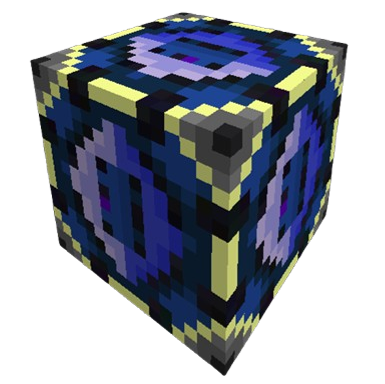 from the mod Draconic Evolution, then use a **Mighty Ender Chicken Egg** on it.
The Mighty Ender Chicken Egg is crafted using the following materials:
- 4 Dimensional Shard Gems
- 4 Ender Pearls
- 1 Dark Matter
Once summoned, the chicken will grow from a regular sized chicken into a giant one and will be protected by a shield that grants it full immunity to damage. To break the shield you must hit the Mighty Ender Chicken **4 times with the Chicken Stick** to deactivate the shield before you can deal any damage to it. Once the shield has been deactivated you have 30 seconds to damage it, after 30 seconds the shield regenerates, and you must deactivate it again to continue damaging it.
## Abilities
**Spinning Attack**
Generates a charging up sound before spinning around and shooting out Dragon Eggs that explode on impact.
**Clearing an Area**
Lets out a cry and quickly moves around the arena, breaking any blocks in its path.
**Forcefield Retaliate**
Regenerates its shield after 30 seconds. When this happens you will need to hit it with the Chicken Stick again to deactivate it.
**Clearing away Entities**
If it senses entities nearby it may begin flapping its wings to blow them away from it.
## Drops
1x Dragon Egg
6x - 10x Dragonskin
| Introduction
[Introduction](https://wiki.siriusmc.net/books/modpack-guides-and-tutorials/page/introduction-stoneblock-4)
An introduction into Stoneblock 4, including how to get started and what mods are featured.
| Guide
[Automation Guide](https://wiki.siriusmc.net/books/modpack-guides-and-tutorials/page/automation-guide-stoneblock-4)
Set up cobble generators, auto hammers, and Unearthers to automate your resource chain.
| Boss Guide
[Chesed](https://wiki.siriusmc.net/books/modpack-guides-and-tutorials/page/boss-guide-chesed-stoneblock-4)
The first major boss. Learn how to defeat it and what drops you can earn.
|
# Boss Guide (Malkuth) | Stoneblock 4
| 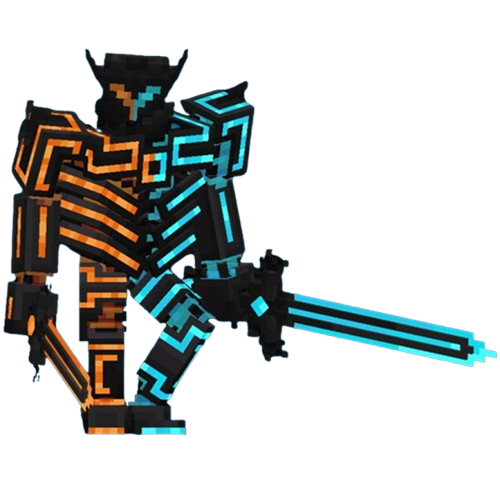 |
| Malkuth is a powerful boss found in the Void ring, also known as the Void Chasms. The Qliphoth of Malkuth, a benevolent king who ruled over a once-prosperous land, whose blind, excessive generosity became his kingdom's demise. Players cannot directly damage Malkuth and must instead use cannons to fight him on equal ground.
|
To get Malkuth to return to the players' side of the arena, move near the lava side to prompt him to jump back.
Flying over to the lava side of the arena will cause instant death.
### Malkuth's Marks
All combatants receive a **Mark of a Knight** at the start of the boss fight. If a combatant leaves the arena before the fight ends, they will be instantly killed in seconds, and the Mark of a Knight transforms into a **Mark of a Coward**. Stepping back into the arena with a Mark of a Coward will change it back to a Mark of a Knight.
## Abilities
**Divine Armor**
Malkuth wields impenetrable armor, capable of neglecting any damage.
**Fire and Ice**
While in the arena, combatants may be weak to Fire or Ice. Malkuth's abilities deal three types of damage: Basic (regular damage), Fire (makes targets weaker to Fire damage, deals reduced damage to targets weak to Ice), and Ice (makes targets weaker to Ice damage, deals reduced damage to targets weak to Fire).
**Fair Duel**
Combatants can use two cannons on their side to fight on equal ground with Malkuth. Right-click a cannon to fire a shot. Combatants can only use the cannon of the type they are currently weak to. After firing a shot, the cannon becomes unusable until the next use of Cannonade.
**Knights Duty**
During the boss fight all combatants receive Mark of a Knight. When a combatant escapes the arena before the fight ends, Mark of a Knight transforms into Mark of a Coward. When a combatant with Mark of a Coward steps into the arena once again, it changes back to Mark of a Knight.
**Slashes**
Charges one of his swords and releases an aerial slash traveling towards the target. The damage type of the slash is based on the sword that was charged. This slash is capable of slicing through crystals.
**Cannonade**
Malkuth jumps on the wall behind him and orders his cannons to fire devastating shots at the target. When this ability is cast, combatants' cannons can be used once again, unless they are broken. Second phase: Malkuth orders his cannons to break the cannons on the combatants' side.
**Arcslash**
Malkuth charges up his swords and releases aerial slashes in arcs, covering the whole arena.
**Boulder Volley**
Malkuth tears up boulders from the earth, imbues them with his magic, and hurls them at the player.
**Impaling Doom**
Malkuth slams the earth, releasing either Fire or Ice spikes that travel in the slam direction. When colliding with combatants, those spikes hurl them up into the air.
**Earthshatter**
Malkuth leaps to the target and crushes the earth, hurling everyone caught in the attack into the air. During the second phase, if there are broken cannons on the combatants' side, spawns a special crystal at the attack location that is capable of repairing cannons.
**Chainpunch**
Malkuth pulls every combatant who was in the air and punches them with overwhelming force.
**Tsars Wrath**
Malkuth summons two giant swords and orders them to slam the ground with devastating force. Second phase: Also fires his cannons before the attack lands.
**Hellshaper**
Malkuth slams the earth, summoning floating islands, hurling everyone into the air and rendering the floor impossible to walk on. Launches fireballs at these islands thereafter.
## Drops
**Fire and Ice Core**
The core of Malkuth. Can be attached to any item that has durability to summon Malkuth fireballs. Use an item to release a fireball that deals a percentage of item damage and ignites targets. Crouch while using an item to release an iceball that slows targets instead.
**Emberfrost Gauntlet**
In right hand: acts as a grappling hook for blocks, casting Malkuth's crush attack at the grapple position. If used on the ground while facing downwards, propels the user up into the air. In left hand: acts as a grappling hook for entities, making the user automatically attack the target before knocking them back. Combo: using the item in the left hand and then switching it to the right hand resets its cooldown.
**Malkuth Trophy**
A trophy of Malkuth to showcase your heroic deeds.
| Introduction
[Introduction](https://wiki.siriusmc.net/books/modpack-guides-and-tutorials/page/introduction-stoneblock-4)
An introduction into Stoneblock 4, including how to get started and what mods are featured.
| Guide
[Automation Guide](https://wiki.siriusmc.net/books/modpack-guides-and-tutorials/page/automation-guide-stoneblock-4)
Set up cobble generators, auto hammers, and Unearthers to automate your resource chain.
| Boss Guide
[Chesed](https://wiki.siriusmc.net/books/modpack-guides-and-tutorials/page/boss-guide-chesed-stoneblock-4)
The first major boss. Learn how to defeat it and what drops you can earn.
|
| Malum is a magic mod in FTB Stoneblock 4 centred around Spirit Arcana, derived from the souls of both the living and the undead. Players harvest spirits from slain mobs, use them to fuel a growing arsenal of crafting stations, and progress through an open-ended codex toward powerful magical equipment and unique world-altering rituals. As one of the primary magic mods in Stoneblock 4, Malum ties into several questline milestones and is a core part of mid-to-late game progression. |
This list includes common mobs, if you want an exhaustive list of what spirits mobs drop see the **Exhaustive Spirit List** below.
### Primary Arcana
| Spirit Type | Common Sources |
|---|
| Sacred (Innocent) | Sheep, Pigs, Cows, Chicken |
| Wicked (Malicious) | Zombies, Skeletons, Witch, Wither Skeleton |
| Arcane (Fundamental) | Witches, Skeletons, Blaze, Enderman |
| Spirit Type | Common Sources |
|---|
| Aerial (Swift) | Chickens, Bees, Rabbit, Spider |
| Aqueous (Malleable) | Cod, Squids, Salmon, Slime |
| Earthen (Steady) | Cows, Iron Golem, Mooshroom, Sheep |
| Eldritch (Esoteric) | Enderman, Endermite, Warden, Ender Chicken |
| Infernal (Radiant) | Blaze, Creeper, Ghast, Magma Cube |
Collected spirits can be stored in **Spirit Jars** and used as ingredients in Spirit Infusion crafting systems.
Mobs must spawn "naturally" to be able to collect their souls. It is recommended to use **Dreadful Dirt** and not **Spawners**.
Exhaustive Spirit List ▼
### Primary Arcana
| Spirit Type | Common Sources |
|---|
| Sacred (Innocent) | Allay
Armadillo
Axolotl
Bat
Bee
Camel
Cat
Chicken
Cow
Dolphin
Fluid Cow
Fox
Frog
Glow Squid
Guardian
Horse
Iron Golem
Ocelot
Panda
Parrot
Pigs
Polar Bear
Rabbit
Sheep
Sniffer
Squid
Strider
Tadpole
Villagers
Wandering Trader
Wolf
|
| Wicked (Malicious) | Bogged
Bulwark
Cave Spider
Commando
Drowned
Evoker
Fusilier
Goat
Guardian
Husk
Llama
Mossback Goliath
Phantom
Piglin
Piglin Brute
Pillager
Plunderer
Pufferfish
Ravager
Riftling Observer
Shadow Beast
Silverfish
Skeleton Horse
Skeleton
Sludgeling
Spider
Stray
Trader Llama
Vindicator
Witch
Wither Skeleton
Zoglin
Zombie
Zombie Horse
Zombie Villager
Zombified Piglin
|
| Arcane (Fundamental) | Blaze
Bogged
Breeze
Enderman
Evoker
Ghast
Glow Squid
Magma Cube
Mooshroom
Phantom
Shulker
Skeleton Horse
Skeleton
Slime
Stray
Strider
Vex
Wandering Trader
Wither Skeleton
Witch
|
| Spirit Type | Common Sources |
|---|
| Aerial (Swift) | Bat
Bee
Breeze
Cat
Cave Spider
Chicken
Donkey
Fox
Ghast
Horse
Llama
Mule
Ocelot
Parrot
Phantom
Rabbit
Skeleton Horse
Spider
Stray
Trader Llama
Vex
Zombie Horse
|
| Aqueous (Malleable) | Axolotl
Cod
Dolphin
Drowned
Elder Guardian
Ghast
Glow Squid
Guardian
Polar Bear
Pufferfish
Salmon
Slime
Snow Golem
Squids
Tadpole
Tropical Fish
Turtle
|
| Earthen (Steady) | Armadillo
Bogged
Cow
Donkey
Fox
Hoglin
Horse
Iron Golem
Llama
Mooshroom
Mule
Panda
Polar Bear
Sheep
Silverfish
Trader Llama
Tropical Fish
Zoglin
Zombie
Zombie Horse
Zombie Villager
|
| Eldritch (Esoteric) | Abyssal Sludge
Abyssal Winged
Corrosive Craig
Elder Guardian
Ender Chicken
Enderman
Endermite
Evoker
Malkuth Warrior
Ravager
Rift Demon
Rift Minotaur
Shulker
Tentacled Horror
Warden
|
| Infernal (Radiant) | Blaze
Creeper
Ghast
Hoglin
Husk
Magma Cube
Piglin
Piglin Brute
Strider
Wither Skeleton
Zoglin
Zombified Piglin
|
| Introduction
[Introduction](https://wiki.siriusmc.net/books/modpack-guides-and-tutorials/page/introduction-stoneblock-4)
An introduction into Stoneblock 4, including how to get started and what mods are featured.
| Boss Guide
[Mighty Ender Chicken](https://wiki.siriusmc.net/books/modpack-guides-and-tutorials/page/boss-guide-mighty-ender-chicken-stoneblock-4)
Defeat this boss to keep progressing, learn how to summon and defeat it.
| Boss Guide
[Chesed](https://wiki.siriusmc.net/books/modpack-guides-and-tutorials/page/boss-guide-chesed-stoneblock-4)
The first major boss. Learn how to defeat it and what drops you can earn.
|
# Roost Ultimate Guide | Stoneblock 4
| Roost Ultimate is a chicken-based resource generation mod in FTB Stoneblock 4. Players can hatch, breed, and train chickens that passively produce resources ranging from basic materials like iron and coal through to high-tier items such as diamonds, nether stars, and mod-specific resources. Roost Ultimate is one of the earliest and most scalable passive resource farms available in Stoneblock 4. |
Seed Tiers and Experience Gained ▼
| Seed Tier | Experience Gained |
|---|
| 1 | 50 |
| 2 | 200 |
| 3 | 300 |
| 4 | 500 |
| 5 | 700 |
| 6 | 1,000 |
| 7 | 1,500 |
| 8 | 2,500 |
| 9 | 5,000 |
| Introduction
[Introduction](https://wiki.siriusmc.net/books/modpack-guides-and-tutorials/page/introduction-stoneblock-4)
An introduction into Stoneblock 4, including how to get started and what mods are featured.
| Guide
[Automation Guide](https://wiki.siriusmc.net/books/modpack-guides-and-tutorials/page/automation-guide-stoneblock-4)
Set up cobble generators, auto hammers, and Unearthers to automate your resource chain.
| Boss Guide
[Chesed](https://wiki.siriusmc.net/books/modpack-guides-and-tutorials/page/boss-guide-chesed-stoneblock-4)
The first major boss. Learn how to defeat it and what drops you can earn.
|
| Apotheosis is a mod included in FTB Stoneblock 4 that expands Minecraft's enchanting system, adds a loot-based affix and gem progression system, and gives players full control over mob spawners. It is one of the most impactful progression mods in Stoneblock 4, influencing gear power from early game through to endgame. Apotheosis features an in-game guidebook, the **Chronicle of Shadows**, crafted with 1 Book and 1 Gold Ingot, that covers the mod in detail. |
| Shelf Tier | Maximum Eterna |
|---|
| Bookshelf | 30 |
| Hellshelf / Seashelf | 45 |
| Infused Hellshelf / Glowing Hellshelf / Infused Seashelf / Crystalline Seashelf / Heart-Forged Seashelf / Geode-Encased Bookshelf of Stability / Blazing Hellshelf | 60 - 65 |
| Deepshelf / Deepshelf of Arcane Treasures / Echoing Deepshelf / Soul-Touched Deepshelf | 70 - 75 |
| Echoing Sculkshelf / Soul-Touched Sculkshelf | 80 |
| Endshelf / Pearlescent Endshelf / Draconic Endshelf | 90 - 100 |
New Apotheosis Enchantments ▼
| Enchantment Name | Description | Type |
|---|
| Berserker's Fury | Player receives Resistance, Speed, and Strength after taking damage. | Corrupted |
| Boon of the Earth | Chance to receive ores when mining simple stones. | Masterwork |
| Chainsaw | Breaking logs will break the entire tree. | Masterwork |
| Chromatic Aberration | Shearing sheep gives a random colour of wool. | Normal |
| Crescendo of Bolts | Gain an extra arrow shot per level for free. | Masterwork |
| Endless Quiver | Arrows are never consumed no matter the type. | Masterwork |
| Growth Serum | Gives sheep a 50% chance to immediately regrow their wool. | Masterwork |
| Icy Thorns | Applies slowness to the attacker, duration increases with level. | Normal |
| Knowledge of the Ages | Mob drops are converted into experience orbs. | Masterwork |
| Life Mending | Uses the player's received healing to fix tools instead of experience. | Corrupted |
| Miner's Fervor | Break blocks quickly, but never instantaneously. | Twisted |
| Natures Blessing | Allows hoes to be used as bonemeal. | Normal |
| Rebounding | Causes melee attackers to be knocked back. | Normal |
| Reflective Defenses | Inflict 15% of the damage blocked back to the attacker. Higher levels inflict more damage. | Normal |
| Scavenger | Give a 2.5% chance per level to roll loot tables twice when a mob is killed. | Masterwork |
| Shield Bash | Makes melee attacks with shields do extra damage. | Normal |
| Spearfishing | Kills with a trident give a 3.5% chance per level to drop a random fish. | Normal |
| Stable Footing | Removes the break speed penalty for flying. | Normal |
| Tempting | Animals will follow the player when holding a hoe with this enchantment. | Normal |
| Worker Exploitation | Causes damage to sheep, but doubles wool drops. | Corrupted |
| Rarity | Name Colour | Notes |
|---|
| Common | Grey | Basic stat affixes, few or no sockets |
| Uncommon | Green | More affixes, occasionally socketed |
| Rare | Blue | Multiple affixes, sockets more common |
| Epic | Purple | Effect affixes and multiple gem sockets |
| Mythic | Orange | Maximum affixes, strongest possible stats |
| Tier | Unlock Condition |
|---|
| Haven | Starting tier, no requirement |
| Frontier | Obtain a full set of Common affix gear |
| Ascent | Obtain a full set of Uncommon affix gear including a weapon, and slay at least one Apothic Invader |
| Summit | Obtain a full set of Rare affix gear and defeat the Wither |
| Pinnacle | Obtain a full set of Epic affix gear, an Epic affix weapon and defeat the Ender Chicken Jockey |
- **Salvaging Table**: Breaks down affix items into Rarity Materials. Common items yield low-tier scrap; Mythic items yield Godforged Pearls. Gems can also be salvaged here into Gem Dust. Rarity Materials are the primary currency for reforging.
- **Simple Reforging Table**: Turns any item into an affix item with randomised modifiers using Rarity Materials and Sigils of Rebirth. Limited to Rare rarity, making it suitable for early and mid-game.
- **Reforging Table**: An upgraded version of the Simple Reforging Table capable of producing Epic and Mythic items, at a higher material cost.
- **Augmenting Table**: Allows individual affixes on an item to be upgraded in power (+25% per upgrade) or rerolled into an alternative affix. Fuelled by Sigils of Enhancement and costs large amounts of XP. Intended for late-game fine-tuning of the player's best gear.
- **Gem Cutting Table**: Used to upgrade gem quality by combining two identical gems with Gem Dust and a Rarity Material.
- **Gem Case**: A storage block that can automatically combine gems into higher tiers. Breaking this block keeps the gems inside.
### Gems and Sockets
Gems drop from hostile mobs and can be found in loot chests. They come in the same five rarity tiers as affix items and provide bonuses specific to the type of item they are socketed into. A gem socketed into a sword may give a bonus that the same gem socketed into a chestplate does not. Gems are inserted by right-clicking an item while hovering it with the gem, or via a Smithing Table.
Gem quality can be upgraded at the **Gem Cutting Table** by combining two identical gems with **Gem Dust** and a **Rarity Material**. Or by having enough of the same gem inside a Gem Case, which players can use to automatically produce perfect gems.
Gem Dust is obtained by dropping an anvil onto a gem, or by salvaging gems in the Salvaging Table, and rarity material can be obtained by placing affixed items into the Salvaging Table, giving back a certain amount of items that the tool or armour is made from, along with the corresponding rarity material.
### Sigils
Sigils are consumable items used to fuel workstations or apply special effects to affix gear. The key sigils are:
- **Sigil of Rebirth**: Fuel for the Reforging Table.
- **Sigil of Enhancement**: Fuel for the Augmenting Table.
- **Sigil of Unnaming**: Clears the affix name from an item without removing the affixes themselves.
- **Sigil of Malice**: Randomly modifies an affix item in an unpredictable way. High risk, high reward.
- **Sigil of Supremacy**: Overcharges every affix on an item to its maximum possible value. Obtained by completing Wave 100 of the Endless Gateway of Apothic Invaders.
## Apothic Spawners
Apotheosis gives players full control over mob spawners. In vanilla Minecraft, breaking a spawner destroys it. With Apotheosis, a spawner can be collected by mining it with a **Silk Touch** pickaxe. The spawner retains all of its properties when picked up and can be placed elsewhere. Alternatively, in Stoneblock 4, players can use Cardboard Boxes from the Mekanism mod to pick up spawners.
### Modifying Spawners
Spawner stats can be modified by right-clicking the spawner with specific items. If a modifier can be applied, the item is consumed. Most upgrades can be applied multiple times up to a cap. To reverse an upgrade, hold Quartz in the off-hand while applying the modifier item. The modifiable stats include spawn delay, spawn count, and spawn range. Shifting and looking at a placed spawner will show what modifiers have already been added.
| Item | Modifier |
|---|
| Turtle Egg | Youthful |
| Piston | +2 Spawn Range |
| Fermented Spider Eye | +2 Spawn Count |
| Wool | Silent |
| Redstone Comparator | Redstone Control |
| Prismarine Crystals | +4 Activation Range |
| Chorus Fruit | No AI |
| Sugar | -10 Min Spawn Delay |
| Ghast Tear | +2 Max Entities |
| Clock | -20 Max Spawn Delay |
| Pointed Dripstone | -5% Initial Health |
| Nether Star | Ignores Players |
| Soul Lantern | Ignores Light |
| Conduit | Ignores Conditions |
| Echo Shard | +1 Echoing (Built In Looting) |
| Campfire | Burning |
Mobs from spawners in Stoneblock 4 are unable to produce Gems or Affixed Gear automatically. Players must initiate the killing blow.
| Introduction
[Introduction](https://wiki.siriusmc.net/books/modpack-guides-and-tutorials/page/introduction-stoneblock-4)
An introduction into Stoneblock 4, including how to get started and what mods are featured.
| Guide
[Malum Guide](https://wiki.siriusmc.net/books/modpack-guides-and-tutorials/page/malum-guide-stoneblock-4)
A guide to Malum, the spirit magic mod. Covers spirit harvesting, infusion, equipment, and curios.
| Boss Guide
[Chesed](https://wiki.siriusmc.net/books/modpack-guides-and-tutorials/page/boss-guide-chesed-stoneblock-4)
The first major boss. Learn how to defeat it and what drops you can earn.
|
| The Fission Reactor is a multiblock structure, in the Mekanism mod, used to generate large amounts of power by burning Fissile Fuel. The reactor converts water into steam for power generation in a Steam Turbine, through heat generation. It also generates nuclear waste as a by-product.
|
Small Reactor (3x4x3) ▼
| Component | Quantity |
|---|
| Fission Reactor Casings | 26 |
| Reactor Glass | 4 |
| Fission Reactor Ports | 4 |
| Fission Fuel Assemblies | 1 |
| Control Rod Assemblies | 1 |
At this size all flexible face slots are already used by the 4 Ports and 4 Reactor Glass, so there is no spare room for additional components such as the Fission Reactor Logic Adapter, on the side faces. The top, bottom, and edges remain mandatory Fission Reactor Casings regardless of size.
Medium Reactor (12x12x12) ▼
| Component | Quantity |
|---|
| Fission Reactor Casings | 328 |
| Reactor Glass | 396 |
| Fission Reactor Ports | 4 |
| Fission Fuel Assemblies | 450 |
| Control Rod Assemblies | 50 |
The top, bottom, and four corner columns are mandatory Fission Reactor Casings. One Reactor Glass window has been placed on each of the four sides for visibility, with the minimum 4 Fission Reactor Ports. There are many spaces for Fission Reactor Logic Adapters.
Large Reactor (18x18x18) ▼
| Component | Quantity |
|---|
| Fission Reactor Casings | 712 |
| Reactor Glass | 1,020 |
| Fission Reactor Ports | 4 |
| Fission Fuel Assemblies | 1,920 |
| Control Rod Assemblies | 128 |
18x18x18 is the maximum possible Fission Reactor size. The top, bottom, and edges are mandatory Fission Reactor Casings. There is one Reactor Glass window placed on each of the sides for visibility, with the minimum 4 Fission Reactor Ports. There are many spaces for Fission Reactor Logic Adapters.
- 1x Electrolytic Separator
- 3x Chemical Infuser
- 2x Chemical Oxidizer
- 1x Rotary Condensentrator
- 1x Chemical Dissolution Chamber
- 1x Enriching Factory
- 1x Isotopic Centrifuge
#### Chemical Chain
During production, you will have excess oxygen, which can either be stored in tanks or a storage system such as an ME System, or can be voided using a Fluid Trash Can.
## Cooling
Fission Reactors use two types of coolants, water, and sodium. Water is the easiest coolant, it can be piped in from any type of source and will cool 20,000 mB/t when burn rate is at 1 mB/t . Sodium is more involved, needing a whole new process to create it, but once created it can cool the reactor at a rate of 200,000 mB/t when burn rate is at 1 mB/t, a 100% increase from water cooling. To input the coolant into the reactor you will need to use a Fission Reactor Port set to Input Only.
### Water Production
Stoneblock 4 offers several different ways of getting infinite water sources. Commonly, an ME Infinite Water Cell from the Echo of The Catalyst, bought for 50 coins, is ported out of an ME System through the use of Fluix Cables and Export Buses, with added Acceleration Cards for an unlimited and fast supply of water. However, Stoneblock 4 offers a new way of piping infinite water from Pitcher Plants, obtainable from the Wandering Trader. These plants act like infinite storage tanks, and are able to be connected to from all sides.
### Sodium Production
To set up the chemical chain to create Sodium you will need the following machines:
- 1x Thermal Evaporation Plant (4x3x4) *Multiblock - Can be scaled up to 4x18x4*
- 1x Thermal Evaporation Controller
- 3x Thermal Evaporation Valve
- 32x Thermal Evaporation Block
- 1x Resistive Heater
- 1x Water Source
- 1x Electrolytic Separator
The Thermal Evaporation Plant can use Structural Glass the same way the Fission Reactor can use Reactor Glass.
#### Chemical Chain
During production, you will create Chlorine as a byproduct, which can either be stored in tanks or a storage system such as an ME System, or can be voided using a Fluid Trash Can.
## Operation & Output
A Fission Reactor does not generate power on its own. It produces steam, which must be piped into an Industrial Turbine to actually generate energy. The reactor burns Fissile Fuel at a configurable rate, up to a maximum of 1mB per Fission Fuel Assembly per tick, down to a minimum of 0.1mB per tick. Increasing the burn rate increases steam output, but also increases coolant demand and the rate at which nuclear waste accumulates, so all three need to scale together.
### Monitoring with Logic Adapters
Fission Reactor Logic Adapters can be attached to the reactor the same way Fission Reactor Ports are and will read live information such as when the Reactor is activated or deactivated, when it reaches dangerous temperatures, critical levels of Nuclear Waste, critical damage, and insufficient fuel. They can also be used to turn the reactor on and off automatically, or remotely.
These are commonly used to build a simple safety circuit, where the reactor is shut off automatically if temperature or damage crosses a set threshold, rather than relying on a player noticing in time. Additionally, players can wire an Industrial Alarm to the Fission Reactor Logic Adapter, which will trigger, when activated via a Redstone signal, giving an audio cue that something is wrong with the reactor.
## Safety & Common Issues
When a reactor doesn't get enough coolant it won't stop running, instead it will cause the reactor to overheat, take damage, and eventually explode if it is not turned off soon enough, releasing radioactive material into the surrounding area. Additionally, failing to empty the waste tank causes waste to leak into the environment and accumulate as radiation, even without an explosion.
#### Waste Handling
The primary way to handle Nuclear Waste is to store it in a Radioactive Waste Barrel, this can be done by transferring it using a Fission Reactor Port set to Output Waste and piping it out through Pressurized Tubes. Alternatively, it can be piped into an ME System if a ME Fluid Storage Cell is fitted into an ME Drive.
Nuclear Waste, and Spent Nuclear Waste, will decay inside a Radioactive Waste Barrel overtime at a rate of 1 mB / 20 ticks. Breaking a Radioactive Waste Barrel will cause it's contents to spill into the atmosphere creating radiation.
#### Insufficient Cooling
When the coolant supply cannot keep up with the reactor's burn rate, the reactor's internal temperature begins to climb instead of stabilising. This usually happens when the amount of coolant being inputted is less than the amount of coolant being burnt away. This can be caused when coolant production has not been scaled up to match a recent burn rate increase, or when a coolant port has been disconnected or misconfigured.
A reactor in this state will not show any obvious warning beyond a rising temperature reading and decreasing coolant in the tank, so it is worth monitoring temperature directly with a Fission Reactor Logic Adapter rather than assuming the reactor is safe simply because it has not exploded yet.
#### Excessive Burn Rate
Increasing the burn rate increases steam output, but it also increases coolant demand and waste production at the same time, and all three need to scale together. Raising the burn rate faster than coolant and waste handling can keep up with is one of the most common causes of reactor damage, since the temperature spike happens immediately while pipes, coolant production, and waste storage often take longer to catch up.
It is safer to increase burn rate gradually, checking that the temperature has stabilised at each step, rather than jumping straight to a high rate on a newly built reactor.
| Guide
[Apotheosis Guide](https://wiki.siriusmc.net/books/modpack-guides-and-tutorials/page/apotheosis-guide-stoneblock-4)
Covers Apotheosis's enchanting overhaul, affix gear, gems, world tiers, and full control over mob spawners.
| Guide
[Malum Guide](https://wiki.siriusmc.net/books/modpack-guides-and-tutorials/page/malum-guide-stoneblock-4)
A guide to Malum's spirit-magic system: harvesting spirits, the Spirit Altar, Soulstained gear, totems, and curios.
| Guide
[Roost Ultimate Guide](https://wiki.siriusmc.net/books/modpack-guides-and-tutorials/page/roost-ultimate-guide-stoneblock-4)
A guide to Roost Ultimate. Guides player's through chicken-based resource farming: Roosts, breeding, training chickens, and full automation.
|
# Random Events Guide | Stoneblock 4
| Events are randomly triggered occurrences that affect players during gameplay. They are categorised as beneficial, harmful, or neutral. These events can be turns off or on, depending on a player's preferences. |
| Event ID | Description |
|---|
| ftb:gift\_of\_pets | Triggers random drops from Minecraft's vanilla cat gift loot table. When it triggers, it checks for a nearby tamed pet then spawns rewards from that loot table.
These include a rabbit's foot, rabbit hide, string, rotten flesh, feathers, raw chicken, and phantom membranes. |
| ftb:stick | Drops a random stick that can be equipped in the curios menu's stick slot. There is a selection of sticks with different NBT data that grant different effects when equipped, the most sought after being the creative flight stick. |
| ftb:questingram | Spawns a passive questing ram. Feed or drop one of each colour of vanilla wool to the ram, and for each colour the ram's body grows a matching stripe.
Completing the quest can award a single block of diamond, emerald, gold, iron, or lapis, or a crumble horn. The ram can be trapped, and the quest completed at any speed.
|
| Event ID | Description |
|---|
| ftb:creeper | Summons a creeper jumpscare, spawning an explosive creeper that detonates next to the player. This does not cause any explosive damage. |
| ftb:collapse | Summons a cluster of sand and gravel blocks above the player, with an alert reading "The ceiling is crumbling above you". Some of these sand and gravel blocks will be Suspicious, allowing the player to brush items from them.
These blocks can contain high value early to mid-game loot, most notably netherite scrap.
|
| ftb:goat | Spawns a Quantum Goat in your base, which targets either a player or a passive mob or pet and attacks by ramming, causing knockback.
Killing, or having the goat ram a player, causes the goat to drop a reward. These may be (from most common to least common): Iron Ingot, Copper Ingot, Obsidian, Flux Dust, Dimensional Shard Gem, Greater Experience Gem, Lightning Bottle, Cognitive Flux, Gold Ingot, Ender Pearl, Wilden Horn, Teleportation Core, or a Clapple.
|
| Event ID | Description |
|---|
| ftb:wandering\_trader | Spawns a wandering trader. The trader can have between 6-10 different trades picked from the list below.
Potential Trades:
1x Ectoplasm *for* 4x Delightful Dirt
1x Red Mushroom *for* x4 Glowing Mushroom
4x Diamond *for* 1x Pitcher Plant
4x Ersatz Leather *for* 1x Silk Touch Enchanted Book
1x Otherflower *for* Magebloom Crop
1x Fluix Pearl *for* 1x Mysterious Cube
1x Ender Pearl *for* 1x Teleporter
4x Nether Wart *for* 1x Bastian Pod
1x Emerald *for* 1x Diamond
1x Emerald *for* 4x Brown Mushroom
1x Emerald *for* 16x Podzol
1x Emerald *for* 8x Mycelium
1x Emerald *for* 2x Small Dripleaf
1x Emerald *for* 2x Big Dripleaf
3x Random Online Playerheads
3x Random Pre-coded Playerheads
|
| ftb:chicken\_jockey | Summons the End Chicken boss, required for quest line progression.
**It is not recommended to toggle this event off unless resetting a bugged boss fight, and only when advised to do so by staff.**
|
| Introduction
[Introduction](https://wiki.siriusmc.net/books/modpack-guides-and-tutorials/page/introduction-stoneblock-4)
An introduction into Stoneblock 4, including how to get started and what mods are featured.
| Guide
[Apotheosis Guide](https://wiki.siriusmc.net/books/modpack-guides-and-tutorials/page/apotheosis-guide-stoneblock-4)
Covers Apotheosis's enchanting overhaul, affix gear, gems, world tiers, and full control over mob spawners.
| Boss Guide
[Chesed](https://wiki.siriusmc.net/books/modpack-guides-and-tutorials/page/boss-guide-chesed-stoneblock-4)
The first major boss. Learn how to defeat it and what drops you can earn.
|
| Fluid Cows, added by the MooFluids mod, are one of the resource gathering methods Stoneblock 4 introduces. A single cow pasture can produce dozens of different metals and materials once set up. This page covers how to create them, what each method produces, and how to breed your way up to the rarer alloy variants.
|
| Item Fed | Fluid Cow Created |
|---|
| Water Bucket | Water |
| Blaze Rod | Lava |
| Eye of Ender | Molten Ender |
| Insulating Resin | Latex |
## Feeding Cows A Clapple
Feeding a cow a Clapple produces a random basic Fluid Cow. The odds are not weighted evenly between types; common items in their molten forms are far more likely than rarer versions, as shown below.
| Fluid Cow | Chance |
|---|
| Copper | 13.7% |
| Iron | 12.3% |
| Tin | 9.6% |
| Zinc | 9.6% |
| Lead | 8.2% |
| Carbon | 8.2% |
| Nickel | 6.8% |
| Slime | 6.2% |
| Silver | 5.5% |
| Aluminum | 5.5% |
| Redstone | 4.1% |
| Osmium | 4.1% |
| Gold | 2.7% |
| Uranium | 2.1% |
| Amethyst | 1.4% |
## Breeding Molten Alloy Fluid Cows
Breeding two Fluid Cows together has a chance to produce a Molten Alloy Fluid Cow. Some alloys need basic Fluid Cows as parents, while others need an alloy that was itself bred first. The table below is grouped by how many breeding steps deep each result is so you can tell which cows you need to breed first.
Alternatively, the Alchemy Glass, given as a quest reward for completing the quest **Fluid Cow Breeding** under the **Generating Resources** chapter of the quest book, shows the breeding combinations for Fluid Cows.
### Tier 1: Bred From Basic Fluid Cows
| Result | Parent 1 | Parent 2 | Chance |
|---|
| Obsidian | Water | Lava | 25% |
| Bronze | Copper | Tin | 50% |
| Brass | Copper | Zinc | 50% |
| Tin Silver Alloy | Tin | Silver | 50% |
| Shibuichi | Silver | Copper | 50% |
| Electrum | Silver | Gold | 30% |
| Invar | Iron | Nickel | 30% |
| Constantan | Copper | Nickel | 40% |
| Steel | Iron | Carbon | 25% |
| Result | Parent 1 | Parent 2 | Chance |
|---|
| Glowstone | Electrum | Redstone | 25% |
| Refined Obsidian | Obsidian | Osmium | 25% |
| Result | Parent 1 | Parent 2 | Chance |
|---|
| Lumium | Tin Silver Alloy | Glowstone | 25% |
| Result | Parent 1 | Parent 2 | Chance |
|---|
| Platinum | Silver | Lumium | 15% |
| Refined Glowstone | Lumium | Osmium | 25% |
| Result | Parent 1 | Parent 2 | Chance |
|---|
| Iridium | Lead | Platinum | 15% |