# Tekkit SMP
Guides and tutorials for Tekkit SMP!
# Introduction | Tekkit SMP
|  |
| tekkitsmp.siriusmc.net Version · 1.0.5 |
| Tekkit SMP is the modpack that was originally meant to be. Designed as an upgraded continuation of Tekkit 2 and a spiritual successor to the classic Technic Pack SSP from the earliest days of Technic, it brings together the full technical mod line up from Tekkit 2 alongside the magical mods that were dropped in the original transition: primarily Thaumcraft, Mystcraft, and Mo' Creatures.
Tekkit SMP expands further with carefully selected Thaumcraft and Mystcraft addons, Mo' Creatures Extended, Re-Crystallized Wing, and Electro-Magic Tools, an addon bridging IndustrialCraft and Thaumcraft that lets you combine the worlds of technology and magic into powerful hybrid systems.
|
## Getting Started
Tekkit SMP has no quest book, so there is no single path to follow. The best approach is to gather resources, claim your base, and explore the pack at your own pace.
### Your First Resources
Like most Minecraft mod packs the first thing you need to do is gather supplies. In Tekkit SMP, this is similar to vanilla Minecraft, gathering resources such as wood, cobblestone, coal, copper and iron ore.
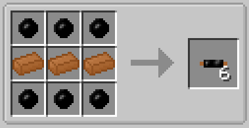Once you have the vanilla basics down you can then start to gather materials for the mod IndustrialCraft2 (IC2). Whilst you're exploring and gathering resources, you may have noticed darker trees with small orange areas on them, these are rubber trees and are crucial for advancing. To get rubber you'll need a treetap, crafted with 5x wooden planks, which you can right-click on orange parts of rubber trees to yield sticky resin. This resin can be smelted in a furnace to obtain rubber. With this rubber you can make copper cables, using 6x rubber and 3x copper ingots.
#### Doubling Your Resources
Now that you have some fundamental resources, you can begin doubling your resources. There are two ways to do this, either without, or with power.
##### Doubling Without Power
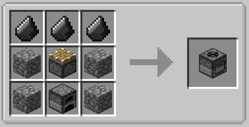The first type of macerator is the **Stone Macerator**, which is powered like a furnace, needing a fuel source to macerate the ore.
##### Doubling With Power
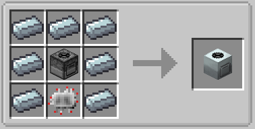A regular **Macerator** needs power to operate. To obtain power you will need to craft a **Generator**, this can be done with 1x RE-Battery, 3x Refined Iron Ingots, and 1x Iron Furnace. Generators produce Energy Units (EU) when they are given a fuel source, such as coal or wooden logs.
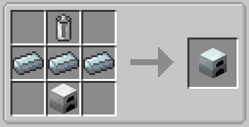With the copper cables previously created, you can attach the generator and macerator together, allowing the macerator to become powered and start working.
## Transmutation
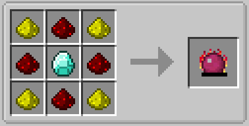Transmutation is the art of transforming low value items into more high value items. In early game this is done via the **Philosopher's Stone**, crafted using 4x Glowstone, 4x Redstone, and 1x Diamond. Not only can the Philosopher's Stone be used in crafting recipes, but it can be used as a tool to transmute blocks in the world into their counterparts, for example dirt can be turned into sand, stone into cobblestone and vice versa, wooden logs into different types of wood, as well as leaves into different types of leaves, and a whole lot more. You can change the range of the Philosopher's Stone using the "V" key, to change the radius to either 3x3, 5x5, 7x7 or 9x9, or you can press "Shift + V" to reduce the size. Additionally, you can also press "G" to change the shape to either panel mode, cube mode, or line mode.
---
If you're not new to Tekkit SMP, here are a few good starting points depending on your preferred play style:
| **Play style** | **Where to Start** |
| Technology | Start with BuildCraft to get basic automation going, then move into IndustrialCraft for power generation and processing. ProjectE is a strong mid-game target once you have autocrafting set up. |
| Magic | Begin with Thaumcraft by crafting a Thaumonomicon and scanning items around the world to unlock research. Once you have a solid foundation, Electro-Magic Tools bridges Thaumcraft into the technical side of the pack. |
| Exploration | Explore the overworld and take advantage of the expanded mob variety from Mo' Creatures. Mystcraft lets you write and travel to custom dimensions for unique resources and experiences. |
| Relaxed / Nature | Forestry offers a deep and rewarding progression path through bee and tree breeding that doesn't require automation or combat to enjoy. |
### Technology and Magic
Tekkit SMP merges technical mods like IndustrialCraft, BuildCraft, and ProjectE with magic-based mods like Thaumcraft and Mystcraft. Rather than choosing one path, players can draw from both, combining powerful machinery with arcane research to create systems and contraptions that neither side could achieve alone. Electro-Magic Tools is the centrepiece of this integration, offering tools and machines that require both IC2 power and Thaumcraft research to use.
### Automation and Industry
Players can automate complex tasks including mining, smelting, and item transport using BuildCraft, Logistics Pipes, and ProjectRed. Machinery can be powered through multiple energy systems and upgraded for greater efficiency. Combined with ProjectE and IndustrialCraft, a well-built automation setup can produce almost anything the pack has to offer with minimal manual input.
### Exploration and Creatures
Mo' Creatures and Mo' Creatures Extended add a wide variety of new mobs to the overworld, including horses, sharks, birds, insects, and many more. Mystcraft adds the ability to write and travel to custom Age dimensions, each with their own unique properties and resources. Between the expanded overworld and the ability to create entirely new dimensions, there is no shortage of new places to explore.
To install Tekkit SMP and learn more about banned items, scheduled restarts, and dimension resets, visit the [Tekkit SMP Server Card](https://wiki.siriusmc.net/link/115#bkmrk-tekkit-2).
It is recommended to allocate between 3GB and 5GB of RAM for Tekkit SMP.
SiriusMC bans certain items to protect server performance, the in-game economy, and claimed player bases. Use **/banneditems** in-game to see the full list of banned items on the server, or expand the Banned Items list below.
Banned Items ▼
IC2 explosives
Item-based chunk loaders
RainMaker
Nuke
Nova Cataclysm
Nova Catalyst (placement only)
Dynamite
---
| Ready to Play?
Open Minecraft, select Multiplayer, and add a new server with the address below.
tekkitsmp.siriusmc.net
[Installation guide](https://wiki.siriusmc.net/link/115#bkmrk-installing-a-modpack-1) [Server rules](https://wiki.siriusmc.net/books/the-siriusmc-networks-servers-and-staff/page/server-rules-siriusmc) [Join Discord](https://discord.gg/siriusmc)
|