# Introduction | Stoneblock 4

<table border="1" id="bkmrk--14" style="border-collapse: collapse; width: 100%; background-color: #332941; border: hidden;"><tbody><tr><td style="text-align: center; padding: 0; height: 200px; overflow: hidden; vertical-align: middle;">![Icon.png](https://siriusmc-bookstack.s3.amazonaws.com/uploads/images/gallery/2026-04/scaled-1680-/oFitrxUZLmc4gn79-icon.png)</td></tr><tr><td style="padding: 10px 16px; text-align: center; background-color: #2e2040; hyphens: none;"><span style="font-family: monospace; font-size: 1em; color: #e0b8e0; letter-spacing: 0.05em; background: rgba(168,85,160,0.2); border: 1.5px solid rgba(168,85,160,0.4); border-radius: 4px; padding: 5px 14px; display: inline-block;">sb4.siriusmc.net</span> <span style="font-size: 0.75em; color: rgba(200,160,200,0.55); display: block; margin-top: 6px; letter-spacing: 0.04em;">Version · 1.11.0</span></td></tr></tbody></table>

<table border="0" id="bkmrk-getting-started-in-s" style="border-collapse: collapse !important; width: 100%; border-left: 4px solid #a855a0; border-top: none; border-right: none; border-bottom: none; background-color: rgba(168, 85, 160, 0.08);"><tbody><tr><td style="padding: 8px 16px; overflow: visible; hyphens: none;">Getting started in Stoneblock 4 on SiriusMC? This guide covers everything you need to know, from choosing your starting base to crafting hammers, crooks, and brushes to begin gathering resources.

Stoneblock 4 is a skyblock-style modpack where you start in the middle of your own dimension, surrounded by stone. Rather than punching trees, you will be breaking stone into pebbles, converting materials through hammering and brushing, and building up your base from just a small hole deep within the dimension's core. This guide will walk you through your first steps to getting started on SiriusMC's version of Stoneblock 4.

</td></tr></tbody></table>

## The Echo of Guidance and Creating Your Base
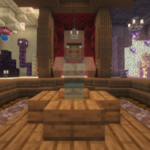
![Echo of Guidance](https://siriusmc-bookstack.s3.amazonaws.com/uploads/images/gallery/2026-04/thumbs-150-150/auJoyi9st3snaxny-echo-of-guidance.png)When you first join the server you will spawn at a dedicated spawn point. Ahead of you is the **Echo of Guidance**, an NPC you must interact with before you can access your dimension. Walk over to them and right-click to open the dialogue GUI. After reading, or listening through an audio button, you will notice at the bottom there is a **Complete Stage** button. Press this button to unlock access to the "Getting Started" chapter in your quest book, and to access the World Selection Portal.

Head up the stairs behind the Echo and walk through the large portal at the far end. Here you can choose which type of starting base you would like. Once selected, you will be taken to your dimension and can begin your adventure.

<p class="callout info">After completing the quest **Initialization**, you can purchase a Quest Book from the Echo of Guidance for 1 coin. Alternatively, it can be found in the top-left corner of your inventory screen at any time.</p>

<div id="bkmrk--1" style="clear: both;">  
</div>### Base Types

There are 6 different types of bases you can start with, with varying difficulties:

<table border="0" id="bkmrk-a-dark-and-eerie-bla" style="border-collapse: collapse; width: 100%; border-style: hidden;"><tbody><tr><td style="padding: 12px 14px; overflow: visible; vertical-align: top; border: 1px solid rgba(168,85,160,0.2); border-left: 3px solid #a855a0; border-radius: 8px; width: 50%;">A dark and eerie blackout zone

A small area covered with Black AntiBlocks. The player is unable to see anything.

<span style="display: inline-block; font-size: 0.8em; font-weight: bold; padding: 2px 8px; border-radius: 4px; background: rgba(220,50,50,0.1); color: #b03030; border: 1px solid rgba(220,50,50,0.25);">Extreme</span></td><td style="width: 12px; border: none;"> </td><td style="padding: 12px 14px; overflow: visible; vertical-align: top; border: 1px solid rgba(168,85,160,0.2); border-left: 3px solid #a855a0; border-radius: 8px; width: 50%;">A dark and mysterious cave

A small area similar to the blackout zone, but with a single torch to prevent mob spawning.

<span style="display: inline-block; font-size: 0.8em; font-weight: bold; padding: 2px 8px; border-radius: 4px; background: rgba(220,120,50,0.1); color: #b06020; border: 1px solid rgba(220,120,50,0.25);">Hard</span></td></tr><tr><td colspan="3" style="border: none; height: 10px;"> </td></tr><tr><td style="padding: 12px 14px; overflow: visible; vertical-align: top; border: 1px solid rgba(168,85,160,0.2); border-left: 3px solid #a855a0; border-radius: 8px; width: 50%;">A vibrant and colorful cherry tree

A larger lit area featuring a custom-built tree with cherry leaves, grass, moss, and mud blocks.

<span style="display: inline-block; font-size: 0.8em; font-weight: bold; padding: 2px 8px; border-radius: 4px; background: rgba(168,85,160,0.1); color: #7b3d7b; border: 1px solid rgba(168,85,160,0.25);">Medium</span></td><td style="border: none;"> </td><td style="padding: 12px 14px; overflow: visible; vertical-align: top; border: 1px solid rgba(168,85,160,0.2); border-left: 3px solid #a855a0; border-radius: 8px; width: 50%;">A ruined pre-industrial complex

Stone brick pillars with spruce wood platforms, ladders, and torches to prevent mob spawning.

<span style="display: inline-block; font-size: 0.8em; font-weight: bold; padding: 2px 8px; border-radius: 4px; background: rgba(168,85,160,0.1); color: #7b3d7b; border: 1px solid rgba(168,85,160,0.25);">Medium</span></td></tr><tr><td colspan="3" style="border: none; height: 10px;"> </td></tr><tr><td style="padding: 12px 14px; overflow: visible; vertical-align: top; border: 1px solid rgba(168,85,160,0.2); border-left: 3px solid #a855a0; border-radius: 8px; width: 50%;">A rugged and resilient tuff cave

Walls of tuff, cobblestone, and moss with braziers and cobblestone staircases.

<span style="display: inline-block; font-size: 0.8em; font-weight: bold; padding: 2px 8px; border-radius: 4px; background: rgba(168,85,160,0.1); color: #7b3d7b; border: 1px solid rgba(168,85,160,0.25);">Medium</span></td><td style="border: none;"> </td><td style="padding: 12px 14px; overflow: visible; vertical-align: top; border: 1px solid rgba(168,85,160,0.2); border-left: 3px solid #a855a0; border-radius: 8px; width: 50%;">A lush and warm mangrove cave

Mangrove trees, a lily pad pond, braziers for lighting, and several types of stone. Recommended for new players.

<span style="display: inline-block; font-size: 0.8em; font-weight: bold; padding: 2px 8px; border-radius: 4px; background: rgba(50,150,80,0.1); color: #2a6e40; border: 1px solid rgba(50,150,80,0.25);">Easy</span></td></tr></tbody></table>

<div id="bkmrk--2" style="margin: 48px 0; text-align: center;">  
</div>## Getting Started

In Stoneblock 4, stone replaces wood as the primary crafting material. You can craft stone crafting tables, stone sticks, and stone tools using the same recipes you would normally use for their wooden equivalents.

Start by breaking stone with your fists to collect pebbles. Each stone block you break will drop between 1 and 3 pebbles. You can then combine 4 pebbles together to craft 1 cobblestone, this will act as your wood equivalent for now. You make a stone crafting table using 4 cobblestone, or stone sticks using two cobblestone to help you get started.

### Crafting and Using Hammers, Brushes and Crooks

Next you will need some specialised tools to progress, these include hammers, crooks, and brushes. There are two different types of hammers, ones from the mod FTB Stuff &amp; Things allows you to transform blocks into different blocks, the hammers from the mod Just Hammers allows you to break several blocks at once, stone crooks can be used on different blocks to gain materials associated with them, and brushes allow you to brush blocks for essential items.

#### Hammers
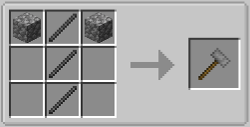
![FTB stone hammer](https://siriusmc-bookstack.s3.amazonaws.com/uploads/images/gallery/2026-04/scaled-1680-/qSqaIDFkNYzhayJQ-stone-hammer-ftb.png)Using stone sticks and cobblestone you can craft a **Stone Hammer** from the mod FTB Stuff &amp; Things. These types of hammers break down blocks into different ones, forming the core of your early resource chain:

Cobblestone ⮕ Gravel ⮕ Dirt ⮕ Sand ⮕ Dust
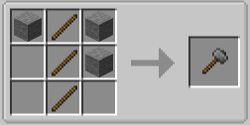
![Just Hammers stone hammer](https://siriusmc-bookstack.s3.amazonaws.com/uploads/images/gallery/2026-04/scaled-1680-/L5Mda323JBo3krpR-stone-hammer-just.png)You can also use hammers from the Just Hammers mod, these allow you to break blocks in certain patterns, at the start it will be in a 3x3x1 pattern, but you can upgrade these hammers to break in a 3x3x3, 5x5x1, 5x5x3, or 5x5x5 pattern. To make one of these hammers you will need to smelt cobblestone into stone, and use wooden sticks instead of stone sticks.

<div id="bkmrk--3" style="clear: both;">  
</div>#### Stone Crook

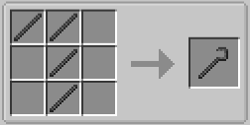
![Stone crook](https://siriusmc-bookstack.s3.amazonaws.com/uploads/images/gallery/2026-04/scaled-1680-/kMgtSCD25FR60whJ-stone-crook.png)Craft a **Crook** using 4 stone sticks. The crook is used to break blocks into a variety of different items. For example, using a crook on dirt can yield a range of saplings, using it on sand will yield a bunch of different crops, ranging from sugarcane, cactus, kelp and bamboo, all the way to Demon's Dream seeds, cocoa seeds, and canola seeds. It is an essential tool for generating resources early on.

<div id="bkmrk--4" style="clear: both;">  
</div>#### Brushes

![Crude Brush](https://siriusmc-bookstack.s3.amazonaws.com/uploads/images/gallery/2026-04/scaled-1680-/W7JEt3wn612W01xr-crude-brush.png)Brushes are your main source of material gathering, these are what allow for you to get various ores, seeds, and gems. However, to gather better materials you will need to increase your Unearther level, this is done by completing quests that have the level up icon ![Unearther level icon](https://siriusmc-bookstack.s3.amazonaws.com/uploads/images/gallery/2026-04/scaled-1680-/292IaPsmZucDefXZ-unearther-level.png) in their rewards.

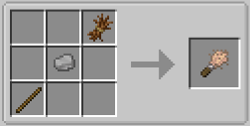
The type of brush you use doesn't change the items blocks drop, however, it can help the process be less tedious. The first brush you will get is the Crude Brush, made using a wooden stick, a pebble, and a piece of straw, it's good, but it will only brush 128 blocks before breaking. As you gather more materials you will be able to upgrade your brushes:

Crude Brush ⮕ 128 blocks  
Brush ⮕ 384 blocks  
Reinforced Brush ⮕ 1,152 blocks  
Unbreakable Brush ⮕ infinite blocks

**<span style="text-decoration: underline;">How to Upgrade Brushes  
</span>**Upgrading brushes is a huge quality of life improvement, especially when mass brushing or using Unearthers. Better brushes last longer, reducing how often you need to craft replacements. Each tier requires progressively better materials, but all are achievable in early to mid-game.

<div id="bkmrk--5" style="clear: both;">  
</div>#### From Crude Brushes To Brushes

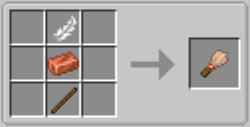
![Brush.png](https://siriusmc-bookstack.s3.amazonaws.com/uploads/images/gallery/2026-04/nPSaM3i0hFIuolvC-brush.png)Brushes, also known as "regular brushes" are crafted using **1x feather, 1x copper ingot, and 1x wooden stick**. It has a durability of 384 blocks, three times as long as the Crude Brush.

<div id="bkmrk--6" style="clear: both;">  
</div>#### From Brushes To Reinforced Brushes
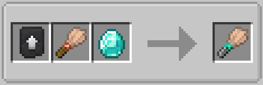
![Reinforced Brush.png](https://siriusmc-bookstack.s3.amazonaws.com/uploads/images/gallery/2026-04/UXDZ6hCeHYmkacma-reinforced-brush.png)The Reinforced Brush is made in a smithing table using **1x brush, 1x diamond, and 1x smithing template**. It has a durability of 1,152 blocks, three times as long as the "Regular" Brush. Diamonds can be obtained by brushing gravel once you reach Unearther Level 3.
<div id="bkmrk--7" style="clear: both;">  
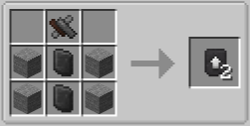
</div>![Smithing Template.png](https://siriusmc-bookstack.s3.amazonaws.com/uploads/images/gallery/2026-04/Q3suzMMu1e1I3d6V-smithing-template.png)Smithing templates can be crafted using **4x stone, 2x gem-fused slates, and 1x mysterious scrap metal**, or purchased from the Echo of Guidance for 10 coins after completing Unknowing - Task 3.

<div id="bkmrk--8" style="clear: both;">  
</div>#### From Reinforced Brushes To Unbreakable Brushes
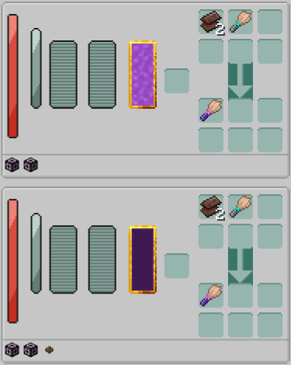
![Unbreakable Brush.png](https://siriusmc-bookstack.s3.amazonaws.com/uploads/images/gallery/2026-04/KXb4HmFPPykriD91-unbreakable-brush.png)Unbreakable brushes are the best tier of brush you can get. These brushes have unlimited durability, but cost a lot more than the previous brushes. The materials you need to craft an unbreakable brush are 2x netherite scrap, and 1x reinforced brush.

In addition to the base materials you will need, you also have to have upgraded your World Engine to contain either:  
1\. 2x Sourcestone and 64x World Engine Machine Block (Ars Nouvaeu Pathway)  
2\. 20x Shadow Casing, 64x World Engine Machine Block (Create Pathway)

**Using the Ars Pathway:**  
When using the Ars Nouvaeu pathway you will need to supply the World Engine with Source. This can only be done once you have completed the "Meet The Magician" quest line from the quest chapter Tier 1: Foundation. You must have a minimum of 1,000 Source in the World Engine for the cores to begin crafting.

**Using the Create Pathway:**  
When using the Create pathway you will need to supply the World Engine with kinetic energy. This can only be done once you have completed the "Meet The Machinist" quest line from the quest chapter Tier 1: Foundation. You must have a minimum of 32 rotations per minute (RPM) before the cores will begin crafting. **Note:** The stress impact during crafting is 16x RPM

Now that you have your core tools and understand the basic resource loop, you are ready to start making your base into a fully fledged home. The next steps are growing your first trees and getting a water source set up, if you haven't chosen a base with water and trees already on it, and eventually automating your brushing and hammering to free up your time for bigger projects. Check out our other guides for more information about Stoneblock 4!

To install Stoneblock 4 and learn more about the server and scheduled restarts, visit the [Stoneblock 4 Server Card](https://wiki.siriusmc.net/link/115#bkmrk-stoneblock-4).

<p class="callout info">It is recommended to allocate between 8GB and 10GB of RAM for Stoneblock 4.</p>

<p class="callout info">SiriusMC bans certain items to protect server performance, the in-game economy, and claimed player bases. Use **/banneditems** in-game to see the full list of banned items on the server, or expand the Banned Items list below.</p>

<details id="bkmrk-banned-items-%E2%96%BC-item-" style="margin-bottom: 10px;"><summary style="background: #fff; border: 2px solid #f90101; border-radius: 10px; padding: 12px 16px; cursor: pointer; list-style: none; display: flex; align-items: center; gap: 10px; font-family: sans-serif;"><span style="flex: 1;">Banned Items</span> <span style="color: #f90101; font-size: 13px; font-weight: bold;">▼</span></summary>

<div style="background: #fff; border: 2px solid #f90101; border-top: none; border-radius: 0 0 10px 10px; padding: 14px 16px;"><div style="display: grid; grid-template-columns: repeat(2,1fr); gap: 7px;"><div style="background: #f5f0ff; border-left: 3px solid #7c3aed; border-radius: 6px; padding: 7px 9px; font-size: 11px; color: #3d2d5a;">Item-based chunk loaders</div><div style="background: #f5f0ff; border-left: 3px solid #7c3aed; border-radius: 6px; padding: 7px 9px; font-size: 11px; color: #3d2d5a;">Watch of Flowing Time</div><div style="background: #f5f0ff; border-left: 3px solid #7c3aed; border-radius: 6px; padding: 7px 9px; font-size: 11px; color: #3d2d5a;">Nuke</div><div style="background: #f5f0ff; border-left: 3px solid #7c3aed; border-radius: 6px; padding: 7px 9px; font-size: 11px; color: #3d2d5a;">Ice Bomb</div><div style="background: #f5f0ff; border-left: 3px solid #7c3aed; border-radius: 6px; padding: 7px 9px; font-size: 11px; color: #3d2d5a;">Paradox Machine</div><div style="background: #f5f0ff; border-left: 3px solid #7c3aed; border-radius: 6px; padding: 7px 9px; font-size: 11px; color: #3d2d5a;">Infinity Nuke</div><div style="background: #f5f0ff; border-left: 3px solid #7c3aed; border-radius: 6px; padding: 7px 9px; font-size: 11px; color: #3d2d5a;">Harvest Goddess Band</div><div style="background: #f5f0ff; border-left: 3px solid #7c3aed; border-radius: 6px; padding: 7px 9px; font-size: 11px; color: #3d2d5a;">Dimensional Stabilizer</div><div style="background: #f5f0ff; border-left: 3px solid #7c3aed; border-radius: 6px; padding: 7px 9px; font-size: 11px; color: #3d2d5a;">Advanced Time Wand</div><div style="background: #f5f0ff; border-left: 3px solid #7c3aed; border-radius: 6px; padding: 7px 9px; font-size: 11px; color: #3d2d5a;">Time Twister</div><div style="background: #f5f0ff; border-left: 3px solid #7c3aed; border-radius: 6px; padding: 7px 9px; font-size: 11px; color: #3d2d5a;">Spatial Anchor</div><div style="background: #f5f0ff; border-left: 3px solid #7c3aed; border-radius: 6px; padding: 7px 9px; font-size: 11px; color: #3d2d5a;">Ticker</div><div style="background: #f5f0ff; border-left: 3px solid #7c3aed; border-radius: 6px; padding: 7px 9px; font-size: 11px; color: #3d2d5a;">Time Sand Pouch</div><div style="background: #f5f0ff; border-left: 3px solid #7c3aed; border-radius: 6px; padding: 7px 9px; font-size: 11px; color: #3d2d5a;">Time Wand</div><div style="background: #f5f0ff; border-left: 3px solid #7c3aed; border-radius: 6px; padding: 7px 9px; font-size: 11px; color: #3d2d5a;">Confiscation Module</div><div style="background: #f5f0ff; border-left: 3px solid #7c3aed; border-radius: 6px; padding: 7px 9px; font-size: 11px; color: #3d2d5a;">Upgrade Anchor</div><div style="background: #f5f0ff; border-left: 3px solid #7c3aed; border-radius: 6px; padding: 7px 9px; font-size: 11px; color: #3d2d5a;">ItemStack Insert Transfer Label</div><div style="background: #f5f0ff; border-left: 3px solid #7c3aed; border-radius: 6px; padding: 7px 9px; font-size: 11px; color: #3d2d5a;">ItemStack Extract Transfer Label</div><div style="background: #f5f0ff; border-left: 3px solid #7c3aed; border-radius: 6px; padding: 7px 9px; font-size: 11px; color: #3d2d5a;">FluidStack Insert Transfer Label</div><div style="background: #f5f0ff; border-left: 3px solid #7c3aed; border-radius: 6px; padding: 7px 9px; font-size: 11px; color: #3d2d5a;">FluidStack Extract Transfer Label</div></div></div></details><div id="bkmrk--9" style="margin: 48px 0; text-align: center;">---

</div><table border="0" id="bkmrk-ready-to-play%3F-open-" style="border-collapse: collapse; width: 100%; background: rgba(168,85,160,0.06); border: 1px solid rgba(168,85,160,0.25); border-radius: 6px;"><tbody><tr><td style="padding: 20px 16px; text-align: center; hyphens: none;">Ready to Play?

Open Minecraft, select Multiplayer, and add a new server with the address below.

<span style="display: inline-block; font-family: monospace; font-size: 1.1em; color: #4a1f4a; background: rgba(168,85,160,0.1); border: 1.5px solid rgba(168,85,160,0.45); border-radius: 5px; padding: 8px 22px; letter-spacing: 0.05em;">sb4.siriusmc.net</span>

[Installation guide](https://wiki.siriusmc.net/link/115#bkmrk-installing-a-modpack-1) [Server rules](https://wiki.siriusmc.net/books/the-siriusmc-networks-servers-and-staff/page/server-rules-siriusmc) [Join Discord](https://discord.gg/siriusmc)

</td></tr></tbody></table>

<table border="1" id="bkmrk-guide-automation-gui" style="border-collapse: collapse; width: 100%; border-style: hidden;"><tbody><tr><td style="padding: 14px 16px; overflow: visible; vertical-align: top; border: 1px solid rgba(168,85,160,0.15);">Guide

[Automation Guide](https://wiki.siriusmc.net/books/modpack-guides-and-tutorials/page/automation-guide-stoneblock-4)

Set up cobble generators, auto hammers, and Unearthers to automate your resource chain.

</td><td style="padding: 14px 16px; overflow: visible; vertical-align: top; border: 1px solid rgba(168,85,160,0.15);">Boss Guide

[Mighty Ender Chicken](https://wiki.siriusmc.net/books/modpack-guides-and-tutorials/page/boss-guide-mighty-ender-chicken-stoneblock-4)

Defeat this boss to keep progressing, learn how to summon and defeat it.

</td><td style="padding: 14px 16px; overflow: visible; vertical-align: top; border: 1px solid rgba(168,85,160,0.15);">Boss Guide

[Chesed](https://wiki.siriusmc.net/books/modpack-guides-and-tutorials/page/boss-guide-chesed-stoneblock-4)

The first major boss. Learn how to defeat it and what drops you can earn.

</td></tr></tbody></table>