# Troubleshooting and Support

Running into issues? Find fixes for common problems, performance tips, and support guidance for all SiriusMC servers here.

# FAQs, and Common Issues and Fixes

Here you can find frequently asked questions, and fixes to commonly encountered issues.

# Errors "Failed to login - null" or "Failed to login - invalid session" when joining a server

## Issue Description

These errors mostly happen when there is a Microsoft account authentication issue on your launcher, whether it is Technic or CurseForge.

<table border="0" id="bkmrk-" style="border-collapse: collapse; width: 100%; border-style: hidden;"><tbody><tr><td style="padding: 4px; text-align: center; width: 50%;">[![Authentication error example 1](https://siriusmc-bookstack.s3.eu-west-1.amazonaws.com/uploads/images/gallery/2024-01/scaled-1680-/DlmnjQ2HxQdVsKMn-image.png)](https://siriusmc-bookstack.s3.eu-west-1.amazonaws.com/uploads/images/gallery/2024-01/DlmnjQ2HxQdVsKMn-image.png)</td><td style="padding: 4px; text-align: center; width: 50%;">[![Authentication error example 2](https://siriusmc-bookstack.s3.eu-west-1.amazonaws.com/uploads/images/gallery/2024-01/WtZSfmsfgxFRFs1w-image.png)](https://siriusmc-bookstack.s3.eu-west-1.amazonaws.com/uploads/images/gallery/2024-01/WtZSfmsfgxFRFs1w-image.png)</td></tr></tbody></table>

## Solution(s)

1\. Closing the game and launcher completely, logging out from the launcher, and relogging back in are the most common fixes.

2\. If that still doesn't work, you can navigate to **%appdata%/roaming/.technic** and delete the **oauth** folder.

If this still doesn't resolve the issue, you can open a support ticket on our [Discord](https://discord.gg/SiriusMC) server.

# Updating Java 8

<table border="0" id="bkmrk-recently%2C-mojang-cha" style="border-collapse: collapse !important; width: 100%; border-left: 4px solid #a855a0; border-top: none; border-right: none; border-bottom: none; background-color: rgba(168, 85, 160, 0.08);"><tbody><tr><td style="padding: 8px 16px; overflow: visible; hyphens: none;">Recently, Mojang changed its authentication system. Players using **Java 8 versions older than Update 91** can no longer log in to Minecraft servers, including ours. To resolve this issue, update Java 8 on your computer.

</td></tr></tbody></table>

## Step 1: Uninstall Your Existing Java 8 Version

<p class="callout info">**CurseForge users may not have an existing Java 8 version installed. If not, skip to Step 2.**</p>

Older Java 8 versions lack critical security fixes and must be removed before installing the new version.

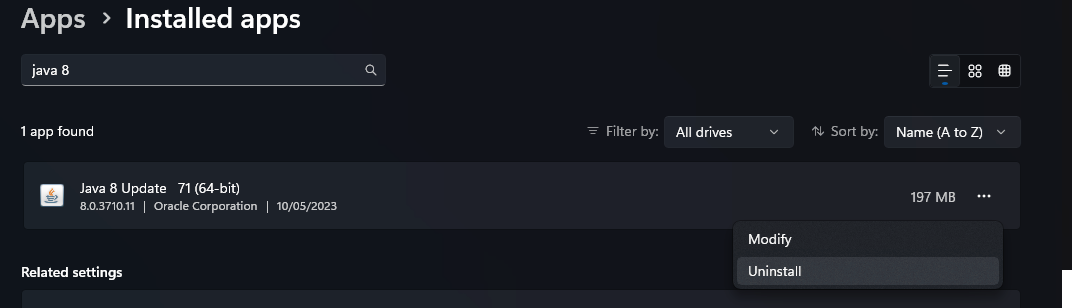
1. Open **Settings** → **Apps** → **Installed Apps**.
2. Search for **Java 8** in the list.
3. Select it and press **Uninstall**.
4. Follow the confirmation prompts until it's entirely removed.

[![Uninstall Java 8](https://siriusmc-bookstack.s3.amazonaws.com/uploads/images/gallery/2025-10/scaled-1680-/ZIndunrdQHtiOr0D-image.png)](https://siriusmc-bookstack.s3.amazonaws.com/uploads/images/gallery/2025-10/ZIndunrdQHtiOr0D-image.png)
## Step 2: Install the Latest Version of Java 8

<table border="0" id="bkmrk-this-guide-covers-in" style="border-collapse: collapse !important; width: 100%; border-left: 4px solid #a855a0; border-top: none; border-right: none; border-bottom: none; background-color: rgba(168, 85, 160, 0.08);"><tbody><tr><td style="padding: 8px 16px; overflow: visible; hyphens: none;">This guide covers installing Oracle Java. Other Java binaries also exist from organisations such as Adoptium and Amazon, which can also be used.

</td></tr></tbody></table>

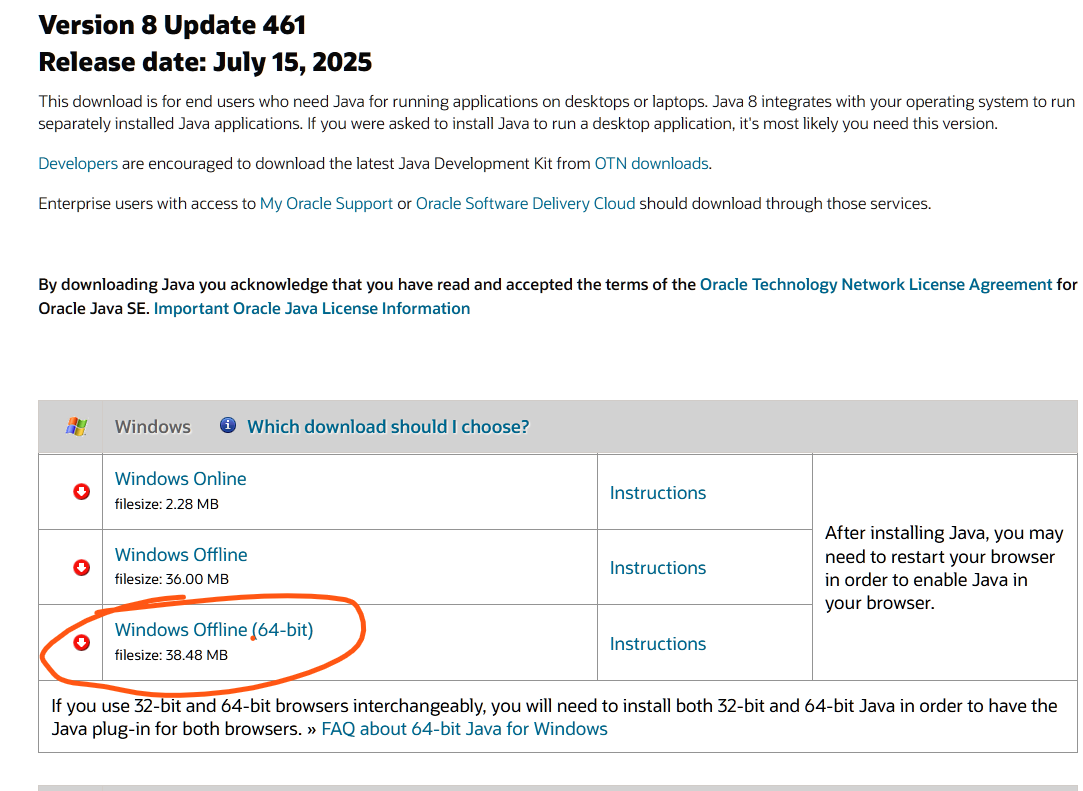
1. Go to the official Java download page: [Java 8 Manual Downloads](https://www.java.com/en/download/manual.jsp).
2. Under Windows, choose **Java 8 (Offline 64-bit)** and download the installer.
3. Once downloaded, run the installer and follow the on-screen instructions.

[![Java 8 download page](https://siriusmc-bookstack.s3.amazonaws.com/uploads/images/gallery/2025-10/scaled-1680-/jkgaBbHcgvk8Sxfv-image.png)](https://siriusmc-bookstack.s3.amazonaws.com/uploads/images/gallery/2025-10/jkgaBbHcgvk8Sxfv-image.png)
Following this, you should have the latest Java 8 installed.

<p class="callout warning">If you have other versions of Java installed, you may need to uninstall them or select the correct Java version in the relevant launcher settings.</p>

## Step 3: (CurseForge Only) Update Java Path in CurseForge Launcher

If you use the CurseForge launcher, you may need to change the Java path to point to the correct Java version.

1. Open the CurseForge launcher.
2. Select the settings cog on the bottom left of the launcher.
3. Select **Minecraft** and scroll down to **Java Versions**.  
    [![CurseForge Java Versions setting](https://siriusmc-bookstack.s3.amazonaws.com/uploads/images/gallery/2025-10/scaled-1680-/AjnFyquPSpxipr26-image.png)](https://siriusmc-bookstack.s3.amazonaws.com/uploads/images/gallery/2025-10/AjnFyquPSpxipr26-image.png)
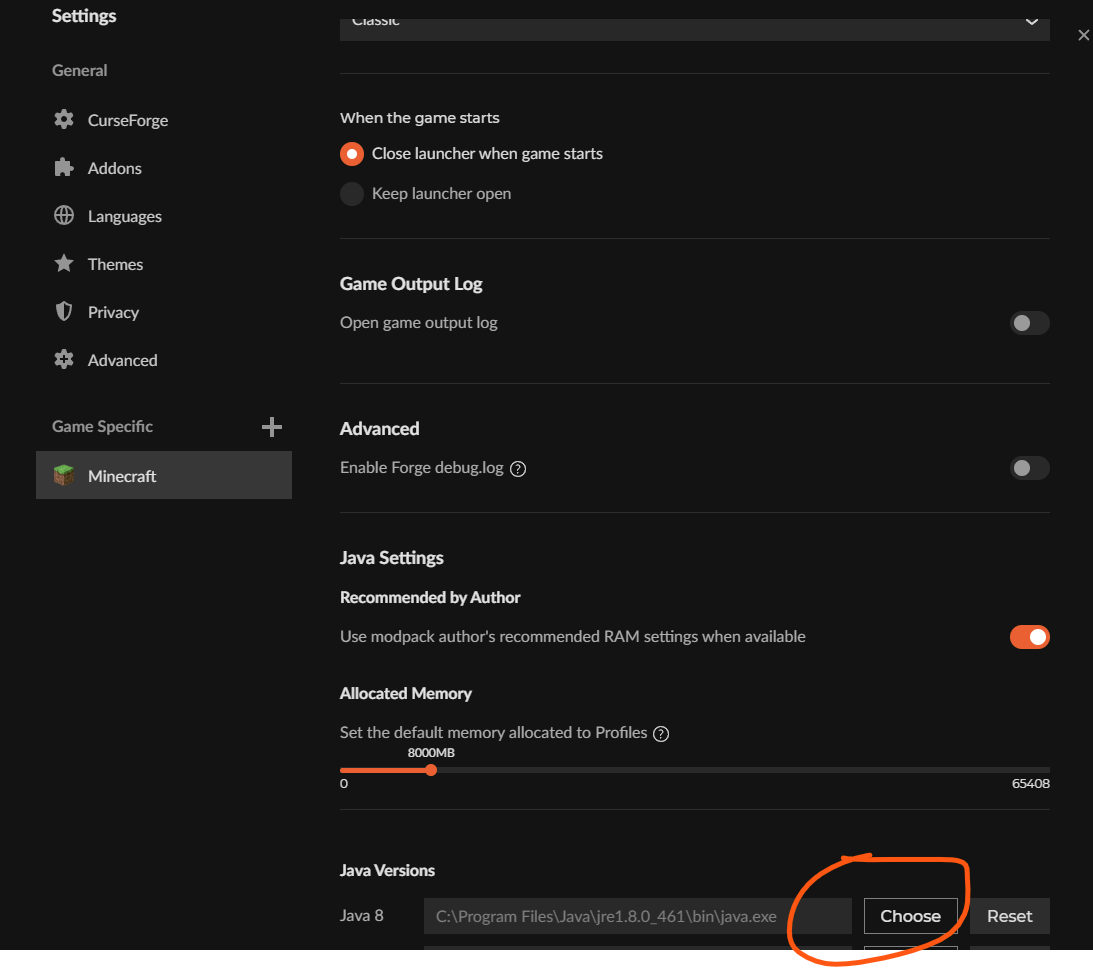
4. Select **Choose**.
5. Type **C:\\Program Files\\Java\\jre1.8.0\_461\\bin** as the file name and press Enter.  
    [![Java path in file browser](https://siriusmc-bookstack.s3.amazonaws.com/uploads/images/gallery/2025-10/scaled-1680-/3j0elj6n0mPE82T4-image.png)](https://siriusmc-bookstack.s3.amazonaws.com/uploads/images/gallery/2025-10/3j0elj6n0mPE82T4-image.png)

6. Select **java.exe**.  
    [![Select java.exe](https://siriusmc-bookstack.s3.amazonaws.com/uploads/images/gallery/2025-10/scaled-1680-/7skJ1M2aJVYG2XMi-image.png)](https://siriusmc-bookstack.s3.amazonaws.com/uploads/images/gallery/2025-10/7skJ1M2aJVYG2XMi-image.png)
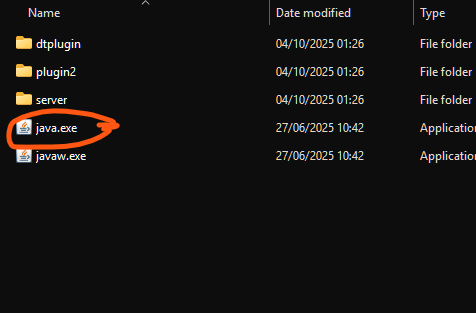
<p class="callout warning">The file location may differ on certain systems. Contact staff if you are unable to find java.exe.</p>

<p class="callout success">After this you should be able to join our servers using the CurseForge launcher.</p>

# Machines Not Breaking Blocks Inside of Claims

## Step 1: Verify the Machine's Setup

1. **Redstone Control**
    - **Ignore:** The machine operates without a redstone signal.
    - **Low:** The machine runs when it receives a low redstone signal.
    - **High:** The machine runs only when it receives a strong redstone signal.
    - **Pulse:** The machine operates only when it receives redstone pulses.
2. **Orientation:** Confirm the machine is facing the correct work area.
3. **Range Upgrades:** Check that any required range upgrades are installed.
4. **Power:** Ensure the machine has sufficient power.
5. **Output Inventory:** Verify there is enough space for output items, if applicable.
6. **Input Inventory:** Verify there are sufficient input items, if applicable.

## Still Not Working? Check Claim Permissions

If the machine still isn't working after completing the setup checks, it may not have permission to break blocks inside your claim.

1. Stand inside your claim and run **/autotrust**  
    *Automatically trusts any block-breaking action for 30 seconds.*
2. Power on and activate the machine.
3. The machine should now function correctly within your claim.

<p class="callout info">If the server you are on uses mods with "fake players", such as *Just Dire Things*, you can trust them manually using **/trust &lt;fake\_player\_name&gt;**. For example, the fake player name for Industrial Foregoing is **\#\[IF\]**.</p>

# Claim Expiry / Regeneration on SiriusMC

<div id="bkmrk-faq---claim-expiry-%2F" style="border-left: 4px solid #a855a0; margin-top: 8px; overflow: hidden;"><div style="background-color: rgb(71, 51, 85); padding: 6px 16px;">**FAQ - Claim Expiry / Regeneration**</div></div>**Q: How long do I have to be inactive before my claims are subject to regeneration?**

120 days. Inactivity is tracked network-wide, not per server. So if you haven't logged into RLCraft for 120 days but have been active on ATM10, your RLCraft claims are still protected and cannot be regenerated regardless of any requests made.

---

**Q: I want to claim somewhere, but someone who was last online 200 days ago has already claimed nearby. Can I get their claim removed?**

Yes. If a player has been inactive across the entire network for more than 120 days, their claims become eligible for regeneration. To request the removal of someone's claim, you will need to open a [support ticket](https://wiki.siriusmc.net/books/troubleshooting-and-support/page/opening-a-support-ticket-siriusmc).

---

**Q: When staff clears an inactive claim, will the area be regenerated and does that delete everything?**

Yes. When a claim regeneration is requested, any builds, containers, and entities within the claim will be removed.

<p class="callout warning">Claim regeneration is never automatic - it only occurs when another player specifically requests it.</p>

# What Are Banned Items on SiriusMC?

<div id="bkmrk-faq---claim-expiry-%2F" style="border-left: 4px solid #a855a0; margin-top: 8px; overflow: hidden;"><div style="background-color: rgb(71, 51, 85); padding: 6px 16px;">**FAQ - Banned Items**</div></div>**Q: Why is &lt;item&gt; banned?**

SiriusMC optimises gameplay for our players, and some more destructive items are banned. These items are banned due to their potential to harm server performance or the economy, or because they may be used to destroy claimed player bases.

---

**Q: How do I know what items are banned?**

 Use **/banneditems** in-game to see the full list.

---

**Q: What should I do if I think an item should be banned?**

If you notice items or mods causing dupe glitches, claim bypassing, or imbalanced gameplay, please create a ticket on our [Discord server](https://discord.com/invite/SiriusMC).

# How Much RAM Should I Allocate?

<div id="bkmrk-faq---claim-expiry-%2F" style="border-left: 4px solid #a855a0; margin-top: 8px; overflow: hidden;"><div style="background-color: rgb(71, 51, 85); padding: 6px 16px;">**FAQ - How Much RAM Should I Allocate?**</div></div>**Q: How much RAM should I allocate to play on a server?**

Modded servers often tell you how much RAM is needed for a smooth play through. We've compiled a list of our servers and their RAM recommendations [here](https://wiki.siriusmc.net/books/the-siriusmc-networks-servers-and-staff/page/server-list-siriusmc). However, you can find a compact list below:

<table border="1" id="bkmrk-ip-address%3A-tekkit.s" style="border-collapse: collapse; width: 100%; border-width: 1px; border-style: hidden; height: 165.4px;"><colgroup><col style="width: 29.5238%;"></col><col style="width: 70.4762%;"></col></colgroup><tbody><tr style="height: 29.3px;"><td class="align-left" style="height: 29.3px;">**Tekkit SMP**</td><td style="height: 29.3px;">3–5 GB recommended</td></tr><tr style="height: 29.8px;"><td class="align-left" style="height: 29.8px;">**Tekkit 2**</td><td style="height: 29.8px;">3–5 GB recommended</td></tr><tr style="height: 29.8px;"><td class="align-left" style="height: 29.8px;">**The 1.12.2 Pack**

</td><td style="height: 29.8px;">5–8 GB recommended</td></tr><tr style="height: 29.8px;"><td class="align-left" style="height: 29.8px;">**RLCraft**

</td><td style="height: 29.8px;">2–5 GB recommended</td></tr><tr style="height: 17.4px;"><td class="align-left" style="height: 17.4px;">**ATM10 (All The Mods 10)**

</td><td style="height: 17.4px;">8–10 GB recommended</td></tr><tr style="height: 29.3px;"><td class="align-left" style="height: 29.3px;">**ATM10: To The Sky (ATM10:TTS)**

</td><td style="height: 29.3px;">6–8 GB recommended</td></tr></tbody></table>

---

**Q: How do I know if I've not allocated enough RAM?**

1. <span class="T286Pc" data-processed="true" data-sfc-cb="" data-sfc-cp="">**Rubber-banding:** You walk forward, and the game teleports you back to your previous location repeatedly.</span>
2. <span class="T286Pc" data-processed="true" data-sfc-cb="" data-sfc-cp="">**Chunks Not Loading:** Nothing generating when walking into new areas.</span>
3. <span class="T286Pc" data-processed="true" data-sfc-cb="" data-sfc-cp="">**Stuttering and Lag Spikes:** The game freezes for ~2 seconds, usually every 30–60 seconds.</span>
4. <span class="T286Pc" data-processed="true" data-sfc-cb="" data-sfc-cp="">**Out of Memory Crash:** The game crashes entirely, showing an "Out of Memory" or "java.lang.OutOfMemoryError" error.</span>
5. <span class="T286Pc" data-processed="true" data-sfc-cb="" data-sfc-cp="">**Slow Inventory/GUI Interaction:** Opening chests, crafting tables, or JEI items takes several seconds to load.</span>

<span class="T286Pc" data-processed="true" data-sfc-cb="" data-sfc-cp=""><span class="uJ19be notranslate" data-processed="true" data-sfc-cb="" data-wiz-uids="qQtmT_17,qQtmT_18"><span class="vKEkVd" data-animation-atomic="" data-processed="true" data-wiz-attrbind="class=qQtmT_16/TKHnVd"><span aria-hidden="true" data-processed="true">This can be fixed by closing the game down, and going into the mod pack settings from your launcher and changing the allocated RAM to the recommended amount.</span></span></span></span>

# Cannot Extract Native Jar | Prism Launcher

## Issue Description

When attempting to launch a modpack using Prism Launcher an error in the console states "Cannot Extract Native Jar".

## Solution(s)

**1. Stopping javaw.exe**

1. 1. Open command prompt as an Admin
    2. Run tasklist and look for the process javaw.exe
    3. Run taskkill /f /IM javaw.exe
    4. When it says successful close command prompt and launch the modpack again

**2. Linking Your Microsoft Account**

1. 1. Click "Profile" in top right
    2. Select "Manage Accounts"
    3. Select your account
    4. Click add Microsoft
    5. Sign in with your Microsoft account

**3. Re-linking Your Microsoft Account**

1. 1. If your account is already linked you can re-link it
    2. Click "Profile" in top right
    3. Select "Manage Accounts"
    4. Right-click your account
    5. Click remove
    6. Click add Microsoft
    7. Sign in with your Microsoft account

# Support Guidance

Guidance on where and how to submit bug reports, player reports, support tickets, and suggestions.

# Before You Open a Ticket | SiriusMC

<table border="0" id="bkmrk-before-opening-a-tic" style="border-collapse: collapse !important; width: 100%; border-left: 4px solid #a855a0; border-top: none; border-right: none; border-bottom: none; background-color: rgba(168, 85, 160, 0.08);"><tbody><tr><td style="padding: 8px 16px;">Before opening a ticket, we encourage you to read through the following, as it may help answer your questions.

</td></tr></tbody></table>

<div id="bkmrk-check-the-wiki-and-f" style="border-left: 4px solid #a855a0; margin-top: 8px; overflow: hidden;"><div style="background-color: rgb(71, 51, 85); padding: 6px 16px;">**Check the Wiki and FAQs**</div></div>Many frequently asked questions and known behaviours are already documented. Before opening a ticket, please check:

- [Common Issues and Fixes page](https://wiki.siriusmc.net/books/troubleshooting-and-support/chapter/faqs-and-common-issues-and-fixes) (also known as our FAQ page)
- [Server Information page](https://wiki.siriusmc.net/books/the-siriusmc-networks-servers-and-staff/chapter/about-our-servers)
- [Rules page](https://wiki.siriusmc.net/books/the-siriusmc-networks-servers-and-staff/page/server-rules-siriusmc)

<div id="bkmrk-basic-troubleshootin" style="border-left: 4px solid #a855a0; margin-top: 8px; overflow: hidden;"><div style="background-color: rgb(71, 51, 85); padding: 6px 16px;">**Basic Troubleshooting**</div></div>If nothing in those pages helps, try the following basic troubleshooting steps where applicable:

- Restart your Minecraft client
- Re-log or reconnect to the server
- Remove shaders or resource packs
- Ensure your modpack is fully up-to-date

Many visual or interaction issues are client-side and resolve after restarting.

<div id="bkmrk-make-sure-the-behavi" style="border-left: 4px solid #a855a0; margin-top: 8px; overflow: hidden;"><div style="background-color: rgb(71, 51, 85); padding: 6px 16px;">**Make Sure the Behaviour Isn't Intentional**</div></div>At SiriusMC, our modded servers sometimes have mechanics that differ from default mod behaviour for balance or performance reasons. Common examples include:

- Banned items
- Nerfed items
- Scheduled dimension resets

If something is not working as expected, check:

- **/BannedItems** in-game
- Change-logs on our Discord
- Information boards at spawn

<div id="bkmrk-still-need-help%3F" style="border-left: 4px solid #a855a0; margin-top: 8px; overflow: hidden;"><div style="background-color: rgb(71, 51, 85); padding: 6px 16px;">**Still Need Help?**</div></div>If you've checked everything above and still need assistance, open a ticket through our **[Discord](https://discord.gg/siriusmc)** or the **[Ticket Website](https://support.siriusmc.net/)**:

- [Bug Report](https://wiki.siriusmc.net/books/troubleshooting-and-support/page/reporting-bugs-siriusmc)
- [Support Ticket](https://wiki.siriusmc.net/books/troubleshooting-and-support/page/opening-a-support-ticket-siriusmc)
- [Player Report](https://wiki.siriusmc.net/books/troubleshooting-and-support/page/reporting-players-siriusmc)
- [Submitting a Suggestion](https://wiki.siriusmc.net/books/troubleshooting-and-support/page/submitting-a-suggestion-siriusmc)
- [Ban Appeals](https://wiki.siriusmc.net/books/troubleshooting-and-support/page/ban-appeals-siriusmc)

Thank you for helping us keep support efficient and our servers running smoothly.

# Ban Appeals | SiriusMC

<table border="0" id="bkmrk-if-a-player-sanction" style="border-collapse: collapse !important; width: 100%; border-left: 4px solid #a855a0; border-top: none; border-right: none; border-bottom: none; background-color: rgba(168, 85, 160, 0.08);"><tbody><tr><td style="padding: 8px 16px; overflow: visible; hyphens: none;">If a player sanction (Mute or Ban) has been issued against you, you have broken a server rule and/or staff believed that your behaviour on the server was worthy of sanction. The length and severity of the punishment varies depending on the rule broken and the context behind it. Your previous player history also contributes to determining a fair ban length.

If you do not know the reason for your sanction, a searchable list of all bans and their reasons can be found at: [https://bans.siriusmc.net/](https://bans.siriusmc.net/)

</td></tr></tbody></table>

<div id="bkmrk-how-do-i-appeal-my-s" style="border-left: 4px solid #a855a0; margin-top: 8px; overflow: hidden;"><div style="background-color: rgb(71, 51, 85); padding: 6px 16px;">**How Do I Appeal My Sanction?**</div></div>If you feel you have been sanctioned unfairly, or believe the sanction issued to be too harsh, you can request a review by submitting a ban appeal. A review may result in one of the following outcomes:

- Sanction being rescinded (i.e. Unbanned/Unmuted)
- Sanction length being reduced
- Sanction length left unchanged
- Sanction length being increased

<p class="callout warning">Warnings cannot be appealed. Only Bans and Mutes are eligible for appeal.</p>

<div id="bkmrk-the-appeal-process" style="border-left: 4px solid #a855a0; margin-top: 8px; overflow: hidden;"><div style="background-color: rgb(71, 51, 85); padding: 6px 16px;">**The Appeal Process**</div></div>SiriusMC has a set process for dealing with all Ban Appeals, which we believe delivers a methodology that fairly evaluates every appeal. Please view the flowchart below for full details on how your appeal will be handled:

<table border="1" id="bkmrk-" style="border-collapse: collapse; width: 100%; background-color: rgb(51, 41, 65); border: hidden;"><tbody><tr><td style="text-align: center; padding: 0; overflow: hidden; vertical-align: middle;">![Ban appeal process flowchart](https://siriusmc-bookstack.s3.amazonaws.com/uploads/images/gallery/2026-03/scaled-1680-/MqslsienJpYill9K-image.png)</td></tr></tbody></table>

<div id="bkmrk-before-you-submit" style="border-left: 4px solid #a855a0; margin-top: 8px; overflow: hidden;"><div style="background-color: rgb(71, 51, 85); padding: 6px 16px;">**Before You Submit**</div></div>Please keep the following in mind before submitting your appeal:

- You only have **one opportunity** to appeal your sanction. Any further appeals will be automatically rejected.
- Make sure your appeal is honest, clear, and respectful. Appeals that are disrespectful or dishonest may negatively impact the outcome.
- Ensure you have reviewed the ban reason at [https://bans.siriusmc.net/](https://bans.siriusmc.net/) before submitting.

<div id="bkmrk-submitting-your-appe" style="border-left: 4px solid #a855a0; margin-top: 8px; overflow: hidden;"><div style="background-color: rgb(71, 51, 85); padding: 6px 16px;">**Submitting Your Appeal**</div></div>![Ban appeals Discord channel](https://siriusmc-bookstack.s3.amazonaws.com/uploads/images/gallery/2026-03/scaled-1680-/7169JehTpregtrKJ-image.png)

When you are ready, submit your appeal by creating a ban appeal ticket in our [Discord server](https://discord.gg/SiriusMC), found under the support section, in the channel titled **ban-appeals**.

<div id="bkmrk--2" style="clear: both;">  
</div><p class="callout info">All tickets are confidential and can only be seen by SiriusMC staff.</p>

# Reporting Bugs | SiriusMC

<table border="0" id="bkmrk-here-at-siriusmc%2C-we" style="border-collapse: collapse !important; width: 100%; border-left: 4px solid #a855a0; border-top: none; border-right: none; border-bottom: none; background-color: rgba(168, 85, 160, 0.08);"><tbody><tr><td style="padding: 8px 16px; overflow: visible; hyphens: none;">Here at SiriusMC, we strongly encourage players to report any bugs they encounter in-game. As a reward, we offer **Bug Bounties** - a set amount of in-game currency based on the severity of the bug reported.

Before submitting a ticket, players are encouraged to review the [**Before You Open a Ticket**](https://wiki.siriusmc.net/books/troubleshooting-and-support/page/before-you-open-a-ticket-siriusmc) page.

</td></tr></tbody></table>

## Bug Report Procedure

There are two ways to report a bug:

- **Through our [Discord](https://discord.gg/siriusmc)**
- **Through our [Ticket Website](https://support.siriusmc.net/)**

Both methods use the same layout and process.

## How to Report a Bug

**1.** Open a ticket and include the following information:

- Your in-game name
- The server where the bug occurred
- A clear description of the bug (as detailed as possible)
- Steps to reproduce the bug
- (Optional) Screenshots or videos

**2.** Some bugs can be difficult to reproduce, so staff may ask follow-up questions to gather more information. Staff will attempt to replicate the bug and determine the bug bounty:

- If the bug cannot be replicated, the ticket may remain open for further investigation.
- If the bug can be replicated, you will receive a message in the ticket confirming the bug that was reproduced, the bug bounty you will receive, and the severity of the bug.

**3.** Once the bug bounty has been awarded, the ticket will be closed. At this point, the bug is moved to our Issue Tracker, where it is assigned to the Development Team.

# Reporting Players | SiriusMC

<table border="0" id="bkmrk-siriusmc-is-a-commun" style="border-collapse: collapse !important; width: 100%; border-left: 4px solid #a855a0; border-top: none; border-right: none; border-bottom: none; background-color: rgba(168, 85, 160, 0.08);"><tbody><tr><td style="padding: 8px 16px; overflow: visible; hyphens: none;">SiriusMC is a community-focused network, and we strive to maintain a friendly and welcoming environment for all players. While our staff team actively monitors and supports the community, we also encourage players to report anyone who is breaking the rules or causing issues.

</td></tr></tbody></table>

## Player Report Procedure

There are two ways to report a player:

- **Through our [Discord](https://discord.gg/siriusmc)**
- **Through our [Ticket Website](https://support.siriusmc.net/)**

Both methods use the same layout and process.

## How to Report a Player

**1.** Open a ticket and include the following information:

- Your in-game name
- The in-game name(s) of the player(s) you are reporting
- The reason for the report (as detailed as possible)
- Evidence, if available
- *(Optional)* The Discord name(s) of the player(s) you are reporting

**2.** Staff will review the report and may ask for additional information, such as:

- Additional context
- Further evidence
- A timeframe for when the incident occurred (if not already provided)

**3.** Once all information has been reviewed, staff will issue the appropriate sanction(s) to the reported player(s), if necessary.

# Submitting a Suggestion | SiriusMC

<table border="0" id="bkmrk-as-a-community-focus" style="border-collapse: collapse !important; width: 100%; border-left: 4px solid #a855a0; border-top: none; border-right: none; border-bottom: none; background-color: rgba(168, 85, 160, 0.08);"><tbody><tr><td style="padding: 8px 16px;">As a community-focused network, we love hearing your suggestions and ideas!

</td></tr></tbody></table>

<div id="bkmrk-suggestion-submissio" style="border-left: 4px solid #a855a0; margin-top: 8px; overflow: hidden;"><div style="background-color: rgb(71, 51, 85); padding: 6px 16px;">**Suggestion Submission Procedure**</div></div>There are two ways to submit a suggestion:

- **Through our [Discord](https://discord.gg/siriusmc)**
- **Through our [Ticket Website](https://support.siriusmc.net/)**

Both methods use the same layout and process.

<div id="bkmrk-how-to-submit-a-sugg" style="border-left: 4px solid #a855a0; margin-top: 8px; overflow: hidden;"><div style="background-color: rgb(71, 51, 85); padding: 6px 16px;">**How to Submit a Suggestion**</div></div>**1.** Open a ticket and include the following information:

- Your in-game name
- The server the suggestion applies to (if applicable)
- A clear description of your suggestion

**2.** Staff will review and discuss the feasibility and appropriateness of your suggestion. After review, your suggestion will be accepted or rejected.

**3.** If your suggestion is rejected, we will provide an explanation for the decision where possible.

<div id="bkmrk-common-questions" style="border-left: 4px solid #a855a0; margin-top: 8px; overflow: hidden;"><div style="background-color: rgb(71, 51, 85); padding: 6px 16px;">**Common Questions**</div></div>**My suggestion was rejected without an explanation. Why?**

If no explanation was provided, your suggestion likely fell into one of the following categories:

- Hosting a new modpack
- Adding a mod to an existing server
- Allowing players to sell items to the admin shop

**How are suggestions reviewed?**

When reviewing suggestions, we primarily consider two factors:

- The estimated development time required
- Whether the expected benefit justifies that development time

# Opening a Support Ticket | SiriusMC

<table border="0" id="bkmrk-support-tickets-are-" style="border-collapse: collapse !important; width: 100%; border-left: 4px solid #a855a0; border-top: none; border-right: none; border-bottom: none; background-color: rgba(168, 85, 160, 0.08);"><tbody><tr><td style="padding: 8px 16px; overflow: visible; hyphens: none;">Support tickets are one of the primary ways to contact our staff team for help with issues that cannot be resolved using the Help-and-Issues channel on our Discord, or through reading the Wiki or FAQ pages.

Before opening a ticket, please ensure you have reviewed the [**Before You Open a Ticket**](https://wiki.siriusmc.net/books/troubleshooting-and-support/page/before-you-open-a-ticket-siriusmc) page to avoid unnecessary delays in your ticket being handled.

</td></tr></tbody></table>

## Support Ticket Procedure

There are two ways to open a support ticket:

- **Through our [Discord](https://discord.gg/siriusmc)**
- **Through our [Ticket Website](https://support.siriusmc.net/)**

Both methods use the same layout and process.

## How to Open a Support Ticket

**1.** Open a ticket and include the following information:

- Your in-game name (if applicable)
- A clear description of the issue you are experiencing

**2.** Staff will review your ticket and may ask for additional information if needed. Once all required information is provided, staff will assist you either within the ticket or in-game, depending on the situation.