Modpack Guides and Tutorials
Guides, tips, and getting started pages for every modpack on SiriusMC - from RLCraft survival to ATM10 endgame progression.
- Tekkit 2
- Introduction | Tekkit 2
- Optimising Pipe Usage | Tekkit 2
- Industrial Craft - Power Production | Tekkit 2
- ProjectE - EMC Guide | Tekkit 2
- Tekkit SMP
- The 1.12.2 Pack
- RLCraft
- All The Mods 10
- Introduction | ATM10
- AllTheModium Ores Guide | ATM10
- SiriusMC's ATM Star Guide | ATM10
- Mekanism Fission Reactor | ATM10
- ATM 10 To The Sky
- Stoneblock 4
- Introduction | Stoneblock 4
- Automation Guide | Stoneblock 4
- Boss Guide (Chesed) | Stoneblock 4
- Boss Guide (Mighty Ender Chicken) | Stoneblock 4
- Boss Guide (Malkuth) | Stoneblock 4
- General Guides
Tekkit 2
Guides and tutorials for Tekkit 2!
Introduction | Tekkit 2
| tekkit.siriusmc.net Version · 1.2.6 |

|
Tekkit 2 is a casual kitchen sink modpack on Minecraft 1.12.2, available on the Technic Launcher. It draws inspiration from Tekkit Classic and Tekkit Legends, with IndustrialCraft Classic, ProjectE, BuildCraft, Logistics Pipes, and ProjectRed at the core of its progression. Unlike Tekkit Legends, several features have been adjusted, including nerfs to ProjectE to create a more complex and rewarding gameplay experience. Galacticraft is also included, adding space exploration as an entirely new avenue of progression. |
Getting Started
Tekkit 2 is a kitchen sink pack, covering technology, magic, farming, exploration and more. You have no quest book, so progression is largely up to you. One of the most effective early goals is to get into ProjectE and craft a Transmutation Table, then build an EMC farm to begin producing a wide variety of items automatically.
Due to ProjectE nerfs, far fewer items have EMC values than in Tekkit Legends, meaning more automated crafting is required. For autocrafting, ProjectRed Pipes and Logistics Pipes are both strong choices, and which to use comes down to personal preference. Connecting an autocrafting setup to your EMC farm allows you to produce items that don't have EMC values themselves by crafting them from items that do, giving you an effectively unlimited supply.
Your First Resources
Like most Minecraft mod packs the first thing you need to do is gather supplies. In Tekkit 2, this is similar to vanilla Minecraft, gathering resources such as wood, cobblestone, coal, copper and iron ore.
 Once you have the vanilla basics down you can then start to gather materials for the mod IndustrialCraft2 (IC2). Whilst you're exploring and gathering resources, you may have noticed darker trees with small orange areas on them, these are rubber trees and are crucial for advancing. To get rubber you'll need a treetap, crafted with 5x wooden planks, which you can right-click on orange parts of rubber trees to yield sticky resin. This resin can be smelted in a furnace to obtain rubber. With this rubber you can make copper cables, using 6x rubber and 3x copper ingots.
Doubling Your Resources
Now that you have some fundamental resources, you can begin doubling your resources. There are two ways to do this, either without, or with power.
Doubling Without Power
 The first type of macerator is the Stone Macerator, which is powered like a furnace, needing a fuel source to macerate the ore.
Doubling With Power
 A regular Macerator needs power to operate. To obtain power you will need to craft a Generator, this can be done with 1x RE-Battery, 3x Refined Iron Ingots, and 1x Iron Furnace. Generators produce Energy Units (EU) when they are given a fuel source, such as coal or wooden logs.
 With the copper cables previously created, you can attach the generator and macerator together, allowing the macerator to become powered and start working.
Transmutation
 Transmutation is the art of transforming low value items into more high value items. In early game this is done via the Philosopher's Stone, crafted using 4x Glowstone, 4x Redstone, and 1x Diamond. Not only can the Philosopher's Stone be used in crafting recipes, but it can be used as a tool to transmute blocks in the world into their counterparts, for example dirt can be turned into sand, stone into cobblestone and vice versa, wooden logs into different types of wood, as well as leaves into different types of leaves, and a whole lot more. You can change the range of the Philosopher's Stone using the "V" key, to change the radius to either 3x3, 5x5, 7x7 or 9x9, or you can press "Shift + V" to reduce the size. Additionally, you can also press "G" to change the shape to either panel mode, cube mode, or line mode.
Later Game
Later in the game, Tekkit 2 opens up into a wide range of mods offering very different play styles. The three main areas of late-game content are ComputerCraft, Galacticraft, and Forestry.
We also offer a guide on Pipe Optimisation.
ComputerCraft
 ComputerCraft allows players to build automated systems using the Lua programming language. Computers and turtles can be programmed to interact with the world, move items, mine blocks, control redstone, and much more. A manual for Lua 5.4 covering basic syntax and modules can be found here. ComputerCraft also adds its own modules for interacting directly with in-game mechanics such as inventory management and peripheral devices.
Galacticraft
 Galacticraft adds space exploration to the game, including several new dimensions: the Moon, Mars, Venus, the Asteroid Belt, and player-built Space Stations. To reach these destinations, you'll need to construct and launch a rocket. Rockets come in three tiers, with higher tiers required to reach more distant planets. Each dimension offers unique resources, challenges, and structures to explore.
Forestry
 Forestry is centred around the breeding and genetic manipulation of three core organism types: bees, trees, and butterflies. Each naturally occurring species carries a set of genes, and breeding different species together produces new hybrids with unique traits and outputs. Mastering bee breeding in particular is a deep and rewarding progression path that can produce a wide range of materials.
Binnie's Mods, included as an addon for Forestry, adds flowers as a fourth organism type, introduces new species across all categories, provides tools for direct genetic modification, and adds a brewing system producing both alcoholic and non-alcoholic beverages.
Server Rules
Tekkit 2 has a number of server-specific rules in addition to the general server rules. These exist primarily due to the presence of ProjectE, which can make the economy difficult to balance without additional restrictions.
| Rule | Details |
| No gifting of items | Giving items to other players for free is not permitted. |
| Minimum prices | Items must not be sold below the minimum price set by the server. Use /price in-game to check the minimum price of any held item. |
To install Tekkit 2 and learn more about banned items, scheduled restarts, and dimension resets, visit the Tekkit 2 Server Card.
It is recommended to allocate between 3GB and 5GB of RAM for Tekkit 2.
SiriusMC bans certain items to protect server performance, the in-game economy, and claimed player bases. Use /banneditems in-game to see the full list of banned items on the server, or expand the Banned Items list below.
Banned Items ▼
|
Ready to Play? Open Minecraft, select Multiplayer, and add a new server with the address below. tekkit.siriusmc.net |
|
Guide Learn how to optimise your ProjectRed pipes. |
Guide Industrial Craft - Power Production An introduction into IC2 power generation and power transfer. |
Guide An introduction into EMC generation from ProjectE. |
Optimising Pipe Usage | Tekkit 2
|
Tekkit 2 offers many different pipes and solutions to route items. This page covers the most commonly used pipes and some information on how to use them effectively. |
ProjectRed Transportation
Transportation is a module of ProjectRed that adds pipes and chips to the game, enabling automated item routing between inventories and machines.
Item Transport pipes can only pass items along to another connected pipe. They will NOT connect to inventories. At any junction with more than one possible direction, items will travel in a randomly selected direction.
Pipe Connections
All ProjectRed pipes will connect to each other. This means it is important to be deliberate about how your pipes are laid out, as unintended connections can cause items to loop endlessly through your network rather than reaching their destination.
Connections between pipes can be blocked using multipart blocks such as covers, which sit on the face of a pipe and prevent it from connecting to adjacent pipes. This is the most effective way to prevent looping in a ProjectRed pipe network.
Without covers (negative):

With covers (positive):

The images below show how all ProjectRed pipes connect to one another by default, and how covers placed on pipe faces break those connections to prevent unwanted routing paths.


Logistic Pipes
Logistic Pipes is a powerful item transport and routing system with significantly more control than ProjectRed pipes. It can handle both items and fluids, and supports autocrafting, machine automation, stock keeping, and remote item ordering from storage.
While Logistic Pipes has a steeper learning curve than ProjectRed pipes, the advantages are considerable. They are better for server performance, offer faster and more responsive item routing, and give you precise control over how items move through your system. For a full breakdown of every pipe type, module, chassis, and block, visit the Logistics Pipes wiki.
Autocrafting and Requester Setup

One of the most powerful features of Logistic Pipes is the ability to automate crafting through a request-based system. A requester pipe can be configured to request specific items, which are then crafted on demand by connected autocrafting setups. This allows for highly efficient factories where items are only produced when needed, rather than constantly running.
Supplier and Provider Modules

Supplier and provider modules allow items to be moved around in a request-based manner, meaning items are only sent when a request is received rather than being pushed constantly. This gives you precise control over item flow and prevents networks from becoming overwhelmed. The image above shows a simple EMC generator setup using supplier and provider modules to move items around efficiently.
Default Route and Void Chest

It is strongly recommended to always set a default route pointing to a void chest in any Logistic Pipes network. Without a default route, items that cannot reach their intended destination will spill out into the world, which can cause lag and clutter. A void chest set as the default route acts as a safety net, silently deleting any items that have nowhere else to go.
Logistic Pipes offer a huge amount of flexibility for automating and routing items throughout your factory. Take the time to learn their systems and you will find them one of the most valuable tools in Tekkit 2.
|
Introduction An introduction into Tekkit 2, including how to get started and what mods are featured. |
Guide An introduction into EMC generation from ProjectE. |
Guide Industrial Craft - Power Production An introduction into IC2 power generation and power transfer. |
Industrial Craft - Power Production | Tekkit 2
| IndustrialCraft 2 (IC2) uses its own energy system called EU (Energy Units). Understanding how EU tiers, generators, storage, and cables interact is essential for building a reliable power network. This guide does not go over generators that produce steam instead of EU. |
Understanding EU and Voltage Tiers
IC2 power is measured in EU per tick (EU/t). Every machine and storage block belongs to a voltage tier, which defines the maximum size of EU packet it can safely receive.
The tiers are as follows:
Tier 1: Low Voltage (LV) | Max EU: 32
Tier 2: Medium Voltage (MV) | Max EU: 128
Tier 3: High Voltage (HV) | Max EU: 512
Generators
EU is produced by generators. The right generator for your current stage determines how fast your machines run and how quickly you can expand. Below is a summary of all main generator types available in Tekkit 2 on SiriusMC, organised by progression stage.
Early Game
Basic Generator
Output: 10 EU/t | Tier: LV
The starting point for any IC2 setup. Burns coal, charcoal, wood, and most other furnace fuels. Charcoal is the most practical early fuel, yielding 4,000 EU per piece. The Generator outputs 10 EU/t as a single packet, which is well within the LV limit, so it is safe to connect directly to Copper Cable and basic machines.
Slag Generator
Output: 12.5 EU/t | Tier: LV
The Slag Generator is an upgrade to the basic Generator that produces 25% more power. Additionally, the Slag Generator collects scrap randomly every 4-12 seconds, however if the generator is fuelled using the scrap it will not produce any scrap as a byproduct.
Wind Mill
Output: Variable (up to 32 EU/t in peak conditions) | Tier: LV
Wind mills produce EU based on altitude, weather, and surrounding open space. They require a clear 5-block radius in all horizontal directions and perform best at Y=126 or above. Output increases with weather, for an optimised wind mill that produces 32 EU/t you would need stormy weather at an altitude of 126. They are a niche early option for players who have built up high, but are generally superseded by Geothermals, due to the wind mill's sporadic nature.
Mid-Game
Geothermal Generator
Output: 20 EU/t | Tier: LV
Burns lava, producing 10,000 EU per bucket at a rate of 20 EU/t. This makes it twice as efficient per tick as a basic Generator and a reliable mid-game workhorse. Pair with a pump pulling from a Nether lava lake and pipe the lava in via BuildCraft fluid pipes for a fully automated, high-yield supply. A bank of Geothermal Generators feeding into a Multi-Functional Energy storage (MFE) covers most mid-game machine needs comfortably.
Thermal Generator
Output: 25 EU/t | Tier: LV
The Thermal Generator is the upgraded version of the Geothermal Generator. It produces 25 EU/t instead of 20 EU/t, and also gives off a small amount of passive energy from the environment throughout the day-night cycle. Using lava as a fuel source, the Thermal Generator can produce 31,250 EU per bucket at a rate of 25 EU/t.
Water Mill
Output: 4 EU/t | Tier: LV
Output: 32 EU/t | Tier: MV
Output: 250 EU/t | Tier: HV
When submerged in water and connected via cables to a machine or Batbox, it will produce EU continuously with no fuel cost. For maximum passive output, ensure all sides within the search area of the water mill are fully flooded. The search area differs depending on the tier of water mill: for LV water mills the search area is 3x3x3, for MV and HV water mills the search area is 5x5x5.
Alternatively, water buckets or water cells can be piped in directly for higher active output, at the cost of consuming the water as fuel. Higher tiers produce significantly more power and have a larger water search area, but are considerably more expensive to craft and run.
Solar Panel
Output: 8 EU/t | Tier: LV
Output: 64 EU/t | Tier: MV
Output: 512 EU/t | Tier: HV
Produces power during daylight with no fuel cost. Individual Solar Panels are only useful for charging tools or supplementing small setups. They are most valuable when combined into Solar Arrays. Note that Solar Panels require a clear, unobstructed view of the sky and produce nothing at night or during rain.
Solar Turbine
Output: 10 EU/t | Tier: LV
The Solar Turbine is a cheaper upgrade from the Solar Panel. It combines heat from the sun and water into steam, which is converted into energy. The Solar Turbine slowly heats up and cools down throughout the day-night cycle, increasing by 1% every 6 seconds during the day, and decreasing by 0.5% every 6 seconds at night.
Late Game
Nuclear Reactor
Output: 0 - 2048 EU/t (configuration dependent) | Tier: LV - HV
The most powerful EU source in IC2, and the most dangerous. A nuclear reactor's output depends entirely on how it is configured with Uranium Cells, Coolant Cells, and Heat Exchangers. An improperly configured reactor will overheat and explode. Before building a large scale nuclear reactor, you can check the design using a Reactor Planner. This will show statistics from a live simulation, such as EU/t produced, core heat, melting heat, heat effect chance, and much more. You can change what statistics you are looking at using the different tabs along the left side of the planner.
For most players, a well-tuned smaller scale reactor combined with an MFSU provides enough EU to run any late-game setup.
Situational and Environmental
Wave Generator
Output: 0 - 144 EU/t | Tier: LV - HV
The Wave Generator is a long-range single direction water generator that checks up to 50 blocks in one direction for water. The more water it detects, the more EU/t it produces, up to a maximum of 144 EU/t. Power production only begins once there are at least 4 solid water blocks in front of the generator. Output is sporadic and will vary between 0 and 144 EU/t.
Ocean Generator
Output: 0 - 100 EU/t | Tier: LV - HV
The Ocean Generator scans a much larger area of water than the Wave Generator (31x31x31) and produces more EU/t the more water it detects, up to a maximum of 100 EU/t. Power production requires at least a 31x31x31 body of water to the sides and above the generator. Output will vary depending on how obstructed the water within the search area is.
EU Storage
Energy storage blocks act as batteries and buffers between generators and machines. They accept power from multiple sources simultaneously and re-emit it at a fixed output voltage. The output voltage of an energy storage block is fixed at its tier regardless of how it was charged, so connecting LV Tier machines directly to an MFE or MFSU output will destroy them.
| Block | Capacity | Max Input / Output |
|---|---|---|
| BatBox | 40,000 EU | 32 EU/packet |
| MFE | 600,000 EU | 128 EU/packet |
| MFSU | 10,000,000 EU | 512 EU/packet |
Energy storage blocks output from the face marked with a dot, which faces the player when placed. All other faces are inputs. Use a Wrench to reorient the output face.
Energy storage blocks also reset cable loss calculations, making them useful as mid-line repeaters when running power over long distances.
Cables and Energy Loss
All IC2 cables lose EU over distance. Loss is calculated per EU packet, not per EU/t total. This means higher voltage is always more efficient over long distances: one 128 EU packet on Gold Cable loses less than four 32 EU packets covering the same run on Copper Cable.
In the table below the Mean Packet Loss is calculated through the loss of one EV packet (2048 EU) that travelled through the cable split into as many packets as needed.
For example: if a cable has a max packet of 32 EU, it will need to move 64 packets to meet the 2048 EU threshold, and each one of those 64 packets will result in small amounts of EU loss, which adds up significantly over time, unlike cables that have a max packet of 512 EU, where only 4 packets are moved to get to the 2048 EU threshold, resulting in less loss.
| Cable | Max Packet (EU) | Mean Packet Loss (EU) |
|---|---|---|
| Ultra-Low-Current Cable | 5 | 10.24 |
| Copper Cable / Uninsulated Copper Cable | 32 / 32 | 12.80 / 19.20 |
| Gold Cable / Insulated Gold Cable / 2xIns. Gold Cable | 128 / 128 / 128 | 8.00 / 7.20 / 6.40 |
| Bronze Cable / Insulated Bronze Cable / 2xIns. Bronze Cable | 128 / 128 / 128 | 11.20 / 10.40 / 9.60 |
| Glass Fibre Cable | 512 | 0.1 |
Glass Fibre Cable is the most efficient cable available and loses only 1 EU per 40 blocks per packet, making it the best choice for any run longer than a few blocks. It is expensive, requiring diamonds, but it is the correct long-term solution for a serious power network. Use Copper Cable for the final short hops from a transformer or storage block to nearby machines for efficiency!
Transformers
Transformers step voltage up or down between tiers. They are essential any time you want to distribute power from a high-tier storage block to low-tier machines without destroying them. There are three types: LV Transformer (steps between LV and MV), MV Transformer (steps between MV and HV), and HV Transformer (steps between HV and EV).
By default, a transformer steps voltage down from its higher-tier input face to a lower-tier output. Applying a Redstone signal reverses this, stepping voltage up. The faces are marked: the single dot face is the high-voltage side, and the three-dot face is the low-voltage side.
A practical example: an MFSU outputs 512 EU/t (HV). Running this into an MV Transformer steps it down to 128 EU/t. Running that into an LV Transformer steps it further down to 32 EU/t, which is safe for Copper Cable and LV tier machines.
|
Guide Learn how to optimise your ProjectRed pipes. |
Introduction An introduction into Tekkit 2, including how to get started and what mods are featured. |
Guide An introduction into EMC generation from ProjectE. |
ProjectE - EMC Guide | Tekkit 2
| ProjectE is a mod that allows players to convert several items into energy, and use that energy to create different items. This guide covers how EMC works, how to generate it, and how to scale your setup from early game to late game. |
What is EMC?
EMC stands for Energy-Matter Covalence and is the core system of ProjectE, representing the value of several items in game. Almost every item has an EMC value, and items can be freely converted into EMC and then back into other items of less than or equivalent value.
Common items like cobblestone have a low EMC value of 1, while rare items like diamonds have a high EMC value of 8,192. This means you could theoretically convert 8,192 pieces of cobblestone into a single diamond, or break a diamond back down into 8,192 cobblestone worth of EMC.
Items that are crafted have an EMC value equal to the sum of their ingredients, meaning nothing is ever wasted. Any item with an EMC value can be broken down, and its value redirected into something more useful.
Core Items
Transmutation Table
The Transmutation Table is your primary interface with EMC. It acts as a battery for stored EMC, a library of item recipes you have learned, and a fabricator that lets you spend EMC to produce any item you have previously learned. Before the table can create an item, it must first learn it. This is done by placing an item with an EMC value into the flames slot in the GUI, which destroys the item, records its recipe, and adds its EMC value to the table's storage.
Learned items and EMC balance are tied to your player character, not the physical table. When you learn an item at one table, it is learned across all Transmutation Tables you use.
Klein Stars
Klein Stars are portable EMC storage items used to carry EMC with you outside the Transmutation Table. They come in multiple tiers, with each tier holding four times as much EMC as the previous one. They can be charged inside the Transmutation Table and then carried in your inventory, allowing you to spend EMC anywhere.
Philosopher's Stone
The Philosopher's Stone is one of the first crafting goals in ProjectE and is required to craft most other ProjectE items. It also has in-hand functionality, allowing you to transmute blocks in the world directly, such as turning cobblestone into stone, and dirt into sand.
Generating EMC
Early Game | Burning Items and Energy Collectors
The simplest way to generate EMC is to burn items directly in the Transmutation Table by placing them in the flames slot. Everything you mine, loot, or farm has an EMC value. Coal, cobblestone, mob drops, excess tools, and any other items you no longer need can all be fed into the table to build up your balance. This method is slow but costs nothing to set up and is how most players get started.
It is worth learning high-value items before burning them. Once you burn an item and learn it, you can reproduce it from EMC later, so burn duplicates rather than your only copy of something.
Energy Collectors are passive EMC generators that produce EMC from light. They are the foundation of any serious EMC farm and come in three tiers, each producing significantly more EMC per second than the last.
| Tier | EMC per Second (max light) | Internal Buffer |
|---|---|---|
| Energy Collector MK1 | 4 EMC/s | 10,000 EMC |
| Energy Collector MK2 | 16 EMC/s | 50,000 EMC |
| Energy Collector MK3 | 40 EMC/s | 100,000 EMC |
Output scales directly with light level, from 1/16 efficiency in near-darkness up to full efficiency at light level 15. To ensure full output at all times including underground or at night, place a Glowstone block directly above the collector, this provides a constant light level of 15 and requires no power.
Mid-Game | Energy Condensers and Anti-matter Relays
The Energy Condenser looks like a chest but converts any items placed or piped into it into EMC, then uses that stored EMC to produce a single target item of your choice. Set the target by placing the desired item in the top-left slot of the condenser's GUI. This makes it extremely useful for converting low-value bulk output, such as dirt and gravel from a quarry, into something more valuable automatically.
Anti-matter Relays connect Energy Collectors to an Energy Condenser across a distance. If a Collector is placed adjacent to a Relay, and that Relay is connected to a Condenser, EMC will flow from the Collector through the Relay to the Condenser without the Collector and Condenser needing to touch. Relays also come in three tiers, with higher tiers able to transfer and bonus more EMC.
Late Game | The Power Flower
A Power Flower is the standard large-scale passive EMC farm. It consists of multiple Energy Collectors arranged around Anti-matter Relays, all feeding into a central Energy Condenser. The structure gets its name from the flower-like shape it forms when viewed from above.
A full-sized, maximally efficient Power Flower uses 17 Energy Collector MK3s, 5 Anti-matter Relay MK3s, and 1 Energy Condenser. You do not need to build the full structure immediately. Start with a single Collector adjacent to a Condenser, set a target item such as Alchemical Coal, and let it run. Expand by adding more Collectors and Relays as you accumulate enough EMC to afford the upgrades. Three full Power Flowers running simultaneously provides enough passive EMC generation to support most late-game crafting needs.
Energy Condensers will only show that they are taking in EMC once an item has been placed in the top left of their GUI.
Late Game Progression
Dark Matter
Dark Matter in ProjectE consists of Aeternalis Fuel, which is created through the use of the Philosopher's Stone in the following chain:
Coal → Alchemical Coal → Mobius Fuel → Aeternalis Fuel
Creating Dark Matter is required for MK2 upgrades to Collectors and Relays. It has an EMC value of 139,264, which is equivalent to 17 diamonds worth of EMC.
Red Matter
Red Matter in ProjectE consists of Aeternalis Fuel and Dark Matter. Creating Red Matter is required for MK3 upgrades to Collectors and Relays. It has an EMC value of 466,944, equivalent to roughly 57 diamonds worth of EMC.
|
Guide Learn how to optimise your ProjectRed pipes. |
Introduction An introduction into Tekkit 2, including how to get started and what mods are featured. |
Guide Industrial Craft - Power Production An introduction into IC2 power generation and power transfer. |
Tekkit SMP
Guides and tutorials for Tekkit SMP!
Introduction | Tekkit SMP
| tekkitsmp.siriusmc.net Version · 1.0.5 |

|
Tekkit SMP is the modpack that was originally meant to be. Designed as an upgraded continuation of Tekkit 2 and a spiritual successor to the classic Technic Pack SSP from the earliest days of Technic, it brings together the full technical mod line up from Tekkit 2 alongside the magical mods that were dropped in the original transition: primarily Thaumcraft, Mystcraft, and Mo' Creatures.
Tekkit SMP expands further with carefully selected Thaumcraft and Mystcraft addons, Mo' Creatures Extended, Re-Crystallized Wing, and Electro-Magic Tools, an addon bridging IndustrialCraft and Thaumcraft that lets you combine the worlds of technology and magic into powerful hybrid systems. |
Getting Started
Tekkit SMP has no quest book, so there is no single path to follow. The best approach is to gather resources, claim your base, and explore the pack at your own pace.
Your First Resources
Like most Minecraft mod packs the first thing you need to do is gather supplies. In Tekkit SMP, this is similar to vanilla Minecraft, gathering resources such as wood, cobblestone, coal, copper and iron ore.
Once you have the vanilla basics down you can then start to gather materials for the mod IndustrialCraft2 (IC2). Whilst you're exploring and gathering resources, you may have noticed darker trees with small orange areas on them, these are rubber trees and are crucial for advancing. To get rubber you'll need a treetap, crafted with 5x wooden planks, which you can right-click on orange parts of rubber trees to yield sticky resin. This resin can be smelted in a furnace to obtain rubber. With this rubber you can make copper cables, using 6x rubber and 3x copper ingots.
Doubling Your Resources
Now that you have some fundamental resources, you can begin doubling your resources. There are two ways to do this, either without, or with power.
Doubling Without Power
The first type of macerator is the Stone Macerator, which is powered like a furnace, needing a fuel source to macerate the ore.
Doubling With Power
A regular Macerator needs power to operate. To obtain power you will need to craft a Generator, this can be done with 1x RE-Battery, 3x Refined Iron Ingots, and 1x Iron Furnace. Generators produce Energy Units (EU) when they are given a fuel source, such as coal or wooden logs.
With the copper cables previously created, you can attach the generator and macerator together, allowing the macerator to become powered and start working.
Transmutation
Transmutation is the art of transforming low value items into more high value items. In early game this is done via the Philosopher's Stone, crafted using 4x Glowstone, 4x Redstone, and 1x Diamond. Not only can the Philosopher's Stone be used in crafting recipes, but it can be used as a tool to transmute blocks in the world into their counterparts, for example dirt can be turned into sand, stone into cobblestone and vice versa, wooden logs into different types of wood, as well as leaves into different types of leaves, and a whole lot more. You can change the range of the Philosopher's Stone using the "V" key, to change the radius to either 3x3, 5x5, 7x7 or 9x9, or you can press "Shift + V" to reduce the size. Additionally, you can also press "G" to change the shape to either panel mode, cube mode, or line mode.
If you're not new to Tekkit SMP, here are a few good starting points depending on your preferred play style:
| Play style | Where to Start |
| Technology | Start with BuildCraft to get basic automation going, then move into IndustrialCraft for power generation and processing. ProjectE is a strong mid-game target once you have autocrafting set up. |
| Magic | Begin with Thaumcraft by crafting a Thaumonomicon and scanning items around the world to unlock research. Once you have a solid foundation, Electro-Magic Tools bridges Thaumcraft into the technical side of the pack. |
| Exploration | Explore the overworld and take advantage of the expanded mob variety from Mo' Creatures. Mystcraft lets you write and travel to custom dimensions for unique resources and experiences. |
| Relaxed / Nature | Forestry offers a deep and rewarding progression path through bee and tree breeding that doesn't require automation or combat to enjoy. |
Technology and Magic
Tekkit SMP merges technical mods like IndustrialCraft, BuildCraft, and ProjectE with magic-based mods like Thaumcraft and Mystcraft. Rather than choosing one path, players can draw from both, combining powerful machinery with arcane research to create systems and contraptions that neither side could achieve alone. Electro-Magic Tools is the centrepiece of this integration, offering tools and machines that require both IC2 power and Thaumcraft research to use.
Automation and Industry
Players can automate complex tasks including mining, smelting, and item transport using BuildCraft, Logistics Pipes, and ProjectRed. Machinery can be powered through multiple energy systems and upgraded for greater efficiency. Combined with ProjectE and IndustrialCraft, a well-built automation setup can produce almost anything the pack has to offer with minimal manual input.
Exploration and Creatures
Mo' Creatures and Mo' Creatures Extended add a wide variety of new mobs to the overworld, including horses, sharks, birds, insects, and many more. Mystcraft adds the ability to write and travel to custom Age dimensions, each with their own unique properties and resources. Between the expanded overworld and the ability to create entirely new dimensions, there is no shortage of new places to explore.
To install Tekkit SMP and learn more about banned items, scheduled restarts, and dimension resets, visit the Tekkit SMP Server Card.
It is recommended to allocate between 3GB and 5GB of RAM for Tekkit SMP.
SiriusMC bans certain items to protect server performance, the in-game economy, and claimed player bases. Use /banneditems in-game to see the full list of banned items on the server, or expand the Banned Items list below.
Banned Items ▼
|
Ready to Play? Open Minecraft, select Multiplayer, and add a new server with the address below. tekkitsmp.siriusmc.net |
The 1.12.2 Pack
Guides and tutorials for The 1.12.2 Pack!
Introduction | The 1.12.2 Pack
| 1122.siriusmc.net Version · 1.6.6 |

|
The 1.12.2 Pack is a large, carefully curated modpack featuring over 200 mods, optimised for high performance, stability, and a balanced multiplayer experience. Whether you want to explore dimensions, master magic, build automated tech systems, or simply enjoy the world at your own pace, the pack offers something for every type of player.
Alongside classics such as IndustrialCraft 2, BuildCraft, Logistics Pipes, Twilight Forest, Thaumcraft, Thermal Expansion, and Applied Energistics 2, the pack includes unique additions like Galacticraft, ExtraPlanets, Planet Progression, Gravitation Suite, Witchery: Resurrected, Growthcraft, ICBM, Modular Powersuits, Mystcraft, Tinkers' Construct, and AmbientSounds, alongside many carefully selected addons and backported features. |
Getting Started
The 1.12.2 Pack has no single path to follow, so progression is largely up to you.
Your First Resources
Like most Minecraft mod packs the first thing you need to do is gather supplies. In The 1.12.2 Pack, this is similar to vanilla Minecraft, gathering resources such as wood, cobblestone, coal, copper and iron ore.
Once you have the vanilla basics down you can then start to gather materials for the mod IndustrialCraft2 (IC2). Whilst you're exploring and gathering resources, you may have noticed darker trees with small orange areas on them, these are rubber trees and are crucial for advancing. To get rubber you'll need a treetap, crafted with 5x wooden planks, which you can right-click on orange parts of rubber trees to yield sticky resin. This resin can be smelted in a furnace to obtain rubber. With this rubber you can make copper cables.
 Unlike most mod packs that contain copper cables, you cannot directly craft them from the rubber and copper ingots you obtained, instead you must manufacture them using several different steps. Firstly, you'll need two different tools, a Forge Hammer and a Cutter. You can then use the Forge Hammer to turn copper and iron ingots into copper and iron plates, then using the iron plates you can craft a Cutter. The cutter is used to cut the copper plates into cables. However, these cables are uninsulated, and insulating them is as easy as just putting those cables and rubber into a crafting grid.
Doubling Your Resources
Now that you have some fundamental resources, you can begin doubling your resources. In the early stages of the game, this is done using a Macerator.
 A Macerator needs power to operate. To obtain power you will need to craft a Generator, this can be done with 1x RE-Battery, 3x Iron Plates, and 1x Iron Furnace. Generators produce Energy Units (EU) when they are given a fuel source, such as coal or wooden logs. The Macerator is crafted using 3x Flint, 2x Cobblestone, 1x Basic Machine Casing, and 1x Electronic Circuit. With the copper cables previously created, you can attach the generator and macerator together, allowing the macerator to become powered and start working.
If you're not new to The 1.12.2 Pack, here are a few good starting points depending on your preferred play style:
| Play style | Where to Start |
| Technology | Start with Mekanism for power generation and ore processing, then branch into Applied Energistics 2 for storage and autocrafting as your base grows. |
| Magic | Begin with Thaumcraft by crafting a Thaumonomicon and scanning items to unlock research. Witchery: Resurrected is a strong companion mod once you have a foundation in Thaumcraft. |
| Exploration | Head into the Twilight Forest early for structured dungeon progression, then work toward Galacticraft and Planet Progression for space exploration later in the game. |
| Relaxed / Nature | Forestry and Growthcraft offer deep farming, brewing, and bee breeding progression that can be enjoyed entirely at your own pace without combat or automation. |
Planet Progression and Space Exploration
The 1.12.2 Pack completely overhauls space exploration through the combination of Galacticraft, ExtraPlanets, and Planet Progression. Rather than simply visiting planets, players must research and unlock them through a progression system that spans multiple galaxies. Each planet offers unique resources, structures, and challenges, making space exploration a deep and rewarding late-game pursuit rather than a single destination.
Technology and Magic
The pack covers both technical and magical play styles in depth. On the tech side, IndustrialCraft 2, Mekanism, Thermal Expansion, BuildCraft, Applied Energistics 2, and Modular Powersuits provide a rich and interconnected automation and energy system. On the magic side, Thaumcraft, Witchery: Resurrected, and Mystcraft offer entirely different progression paths rooted in research, rituals, and dimensional travel. Both sides of the pack are fully supported and complement each other well.
Tinkers' Construct
Tinkers' Construct replaces the standard tool and weapon system with a fully modular crafting experience. Tools are built from individual parts, each made from a different material with its own properties and stats. Tinkers' Levelling allows your tools to gain experience and unlock additional modifier slots over time, making even basic tools worth investing in early. The combination provides a deep and satisfying crafting system that rewards experimentation.
Ambience
AmbientSounds fills the Minecraft world with environmental audio, adding the sounds of insects, birds, wind, and water that respond dynamically to your surroundings. Whether you're deep in a dense forest, exploring a magical biome, or working in your base, the ambient soundscape makes the world feel noticeably more alive.
To install The 1.12.2 Pack and learn more about banned items, scheduled restarts, and dimension resets, visit the 1.12.2 Pack Server Card.
It is recommended to allocate between 5GB and 8GB of RAM for The 1.12.2 Pack.
SiriusMC bans certain items to protect server performance, the in-game economy, and claimed player bases. Use /banneditems in-game to see the full list of banned items on the server, or expand the Banned Items list below.
Banned Items ▼
|
Ready to Play? Open Minecraft, select Multiplayer, and add a new server with the address below. 1122.siriusmc.net |
RLCraft
Guides and tutorials for RLCraft!
Introduction | RLCraft
| rl.siriusmc.net Version · 2.9.3 |

|
RLCraft is a meticulously curated, survival-focused modpack featuring over 100 mods, fine-tuned for immersion and difficulty. It completely overhauls the standard Minecraft experience with modified crafting recipes, thirst and temperature mechanics, diverse and hostile creature encounters, and a character skill system. Every decision matters from the moment you spawn, and survival is never guaranteed. |
Getting Started
RLCraft has a steep learning curve. The tips below are essential for surviving your first few days, and are based on Shivaxi's official guide on CurseForge.
Your First Tools
- Right-click to pick up an item you're looking at, or crouch to pick up items in a radius around you.
- Get flint by breaking gravel. Get sticks by breaking tree leaves.
- Hold flint and right-click on a stone surface to smash it into flint shards. Combine a stick and a flint shard to make a flint knife.
- Use the knife to cut grass for fibre. Three fibre makes one grass string.
- Craft a flint hatchet using a stick, grass string, and flint shard.
- Place wood on the ground and right-click it with the hatchet to chop it into planks. Do the same with planks to get sticks.
- Rocks are scattered on the ground. Right-click to pick them up. Craft four together in a 2x2 to make cobblestone. A stick and cobblestone makes a dagger, a good starting weapon.
Survival Basics
- Drink water by crouching and right-clicking on a water source block with an empty hand. You can also drink from rain.
- Combat heat and cold with campfires, wool clothing, potions, ice armour, and similar items.
- Three wool makes a sleeping bag. Note that sleeping bags do not set your spawn point. Waystones set your spawn.
- Press H to see locational hit damage. Helmets are important. Without one, you will take headshot damage.
- At level 5, press L to choose your specialisation. Items list their skill requirements, so check these before assuming you can use new gear.
- String and grass string can both be crafted into wool. Birch wood can be crafted into paper.
- Exploring early and finding shelter is strongly recommended. Structures may contain useful starting items.
- If it looks like it will kill you, it probably will.
Key Features
Survival from the Ground Up
RLCraft throws out the standard Minecraft survival loop entirely. You cannot punch trees for wood, blocks only drop items when harvested with the correct tool, and your first priority is finding sticks and flint just to craft a basic knife. Hydration and temperature are persistent threats that require constant management. Hostile creatures are significantly more dangerous than in vanilla, and many can kill you before you have any meaningful gear. The pack rewards patience, preparation, and careful play.
Character Progression and Skills
RLCraft adds a skill and level system that gates equipment and abilities behind progression. Items list their skill requirements directly, so an iron sword might require level 8 in the Attack skill before you can use it. At level 5 you choose a specialisation that shapes how your character develops from that point. This makes early decisions meaningful and gives long-term progression a clear direction.
Exploration and Creature Encounters
The world of RLCraft is filled with a huge variety of hostile and passive creatures from Lycanites Mobs, Animania, and other mods. Many enemies have unique abilities and attack patterns that require different strategies to deal with. Exploration is dangerous but rewarding, with structures around the world that can provide starting items and shelter if you can reach them safely.
To install RLCraft and learn more about banned items, scheduled restarts, and dimension resets, visit the RLCraft Server Card.
It is recommended to allocate between 2GB and 5GB of RAM for RLCraft.
SiriusMC bans certain items to protect server performance, the in-game economy, and claimed player bases. Use /banneditems in-game to see the full list of banned items on the server, or expand the Banned Items list below.
Banned Items ▼
|
Ready to Play? Open Minecraft, select Multiplayer, and add a new server with the address below. rl.siriusmc.net |
All The Mods 10
Guides and tutorials for ATM10!
Introduction | ATM10
| atm10.siriusmc.net Version · 6.6 |

|
All The Mods 10 (ATM10) is a massive Minecraft modpack featuring 470+ mods and a comprehensive quest system to guide your progression. Designed for long-term gameplay, ATM10 includes a built-in endgame goal in the form of the ATM Star, a powerful craftable item that requires mastery of many of the pack's mods to complete. Whether you enjoy technology, magic, exploration, or a mix of everything, ATM10 has a path for you. |
Key Features
Technology and Magic
ATM10 covers both technical and magical play styles in depth. On the tech side, mods like Mekanism, Applied Energistics 2, Thermal Expansion, and Create provide deep automation, power generation, and storage systems. On the magic side, Botania, Blood Magic, Ars Nouveau, and Mahou Tsukai offer entirely different progression paths. Both sides of the pack are fully fleshed out and can be pursued independently or combined for more powerful setups.
Exploration and Dimensions
ATM10 expands the world significantly with new biomes, structures, and dimensions to explore. The Mining World provides a dedicated resource dimension that resets weekly, keeping the Overworld pristine for long-term builds. Additional dimensions such as the Twilight Forest, The Other, the Undergarden, the Bumblezone, and the Deeper Dark each offer unique environments, mobs, and loot.
The ATM Star
The ATM Star is the endgame goal of ATM10. Crafting it requires progressing deeply into many of the pack's mods and obtaining some of the most difficult materials in the game. It is a long-term challenge that gives the entire playthrough direction and purpose, with creative-tier rewards for those who complete it.
If you'd like to see an interactive ATM Star guide, see our SiriusMC ATM Star Guide.
Beginner Tips and Tricks
Vein Miner (Ultimine)
ATM10 includes the Ultimine mod, commonly referred to as Vein Miner. It allows you to mine multiple blocks of the same type at once, making early resource gathering significantly faster. It also supports mining large 3x3 tunnels or staircases, which is useful for reaching lower Y levels where better materials are found.
Finding Biomes and Structures
Two compasses make navigation in ATM10 much easier. Nature's Compass lets you search for any biome in the game and points you toward it with a distance readout. Explorer's Compass works the same way but for locating generated structures. Both are cheap to craft and should be made early.
Early Power Generation
Mekanism wind generators are one of the best early power sources in ATM10. They require no fuel and generate energy passively as long as they are placed. The higher you build them, the more power they produce, so always place them as high as possible. They are an accessible and reliable way to power your early machines before you have the resources for more advanced generation methods.
Getting Started
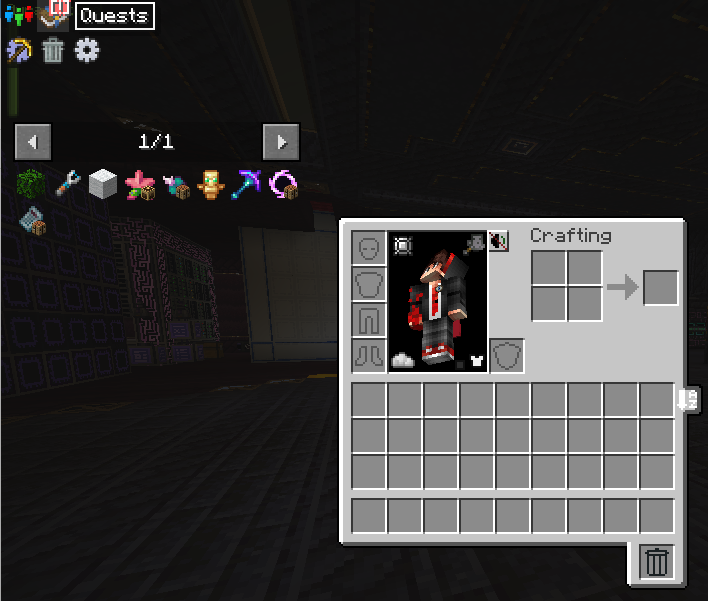
ATM10 can feel overwhelming at first. With hundreds of mods included, knowing where to begin isn't always obvious. The best starting point is the quest book, found in the top-left corner of your inventory screen. It walks you through the pack step by step, introduces the different mods in a structured way, and rewards you for completing each quest to give you a helpful early boost. Following the quest book is the approach we recommend to all new players on SiriusMC.
| Play style | Where to Start |
| Technology | Start with Mekanism for early power generation and ore processing, then move into Applied Energistics 2 for storage and autocrafting as your base grows. |
| Magic | Begin with Ars Nouveau or Botania for accessible early magic progression, then branch into Blood Magic or Mahou Tsukai for more complex and powerful systems. |
| Exploration | Head into the Twilight Forest early for structured dungeon progression, then work toward the Mining World and other dimensions for unique resources later in the game. |
| Endgame | Work toward crafting the ATM Star. This requires deep progression across many of the pack's mods and is the ultimate long-term challenge ATM10 has to offer. |
To install ATM10 and learn more about banned items, scheduled restarts, and dimension resets, visit the ATM10 Server Card.
It is recommended to allocate between 8GB and 10GB of RAM for ATM10.
SiriusMC bans certain items to protect server performance, the in-game economy, and claimed player bases. Use /banneditems in-game to see the full list of banned items on the server, or expand the Banned Items list below.
Banned Items ▼
|
Ready to Play? Open Minecraft, select Multiplayer, and add a new server with the address below. atm10.siriusmc.net |
|
Guide ATM10 features a tier progression system of unique ores beyond Netherite. This guide shows you where to find them, and how to use them. |
Guide SiriusMC's guide to obtaining the ATM star. |
Guide A helpful guide on creating a fission reactor from the mod Mekanism. |
AllTheModium Ores Guide | ATM10
| atm10.siriusmc.net Version · 6.6 |

|
ATM10 features a tier progression system of unique ores beyond Netherite, each found in different dimensions and requiring increasingly powerful tools to mine. The progression order is:
Netherite (Vanilla) ➜ AllTheModium ➜ Vibranium ➜ Unobtainium |
AllTheModium
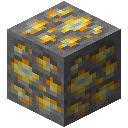
AllTheModium ore can be found in the Deep Dark biome in the Overworld, or in the Mining dimension added by Aroma1997's Dimensional World. In the Deep Dark, look on the walls and roof of caverns or within Ancient Cities. In the Mining dimension, focus on the Deepslate layer.
|
ⓘ Requires Netherite quality tools or better to mine. ⓘ Found in the Deep Dark biome in the Overworld. ⓘ Found in the Mining dimension at the Deepslate layer. |
Finding the AllTheModium Smithing Template
Use a Brush on Suspicious Clay blocks inside Ancient Cities. Suspicious Clay looks similar to regular clay but has a slightly different texture.

Smithing Upgrade
| Slot | Item |
| Template | AllTheModium Smithing Template |
| Gear | Netherite tool or armour piece |
| Material | AllTheModium Ingot |

Duplicating the Template
| Ingredient | Amount |
| AllTheModium Smithing Template | 1 |
| Netherite Ingot | 7 |
| Deepslate | 1 |

Vibranium
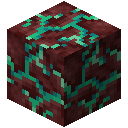
Vibranium ore can only be found in the Crimson Forest and Warped Forest biomes of the Nether. The Crimson Forest is characterised by red fungi and hoglins, while the Warped Forest is teal-coloured and generally safer to explore. Vibranium spawns at high Y altitudes; look near the Nether ceiling rather than the floor.
|
ⓘ Requires AllTheModium quality tools or better to mine. ⓘ Found in the Crimson Forest and Warped Forest biomes of the Nether. ⓘ Spawns at high Y altitudes, normally near the ceiling. |
Finding the Vibranium Smithing Template
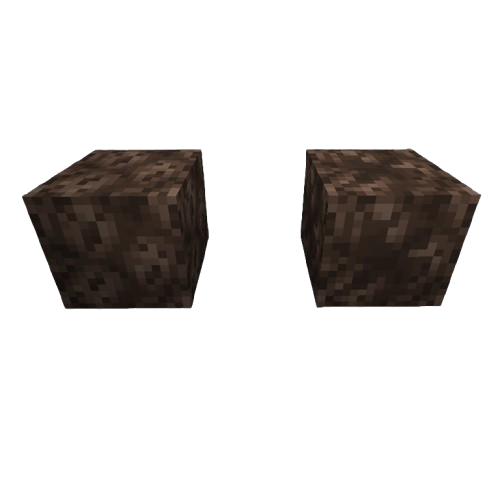
Use a Brush on Suspicious Soul Sand inside Bastion Remnants in the Nether. Bastions are large blackstone fortress structures home to Piglins and Piglin Brutes. Bring gold armour to avoid aggravating the Piglins. Suspicious Soul Sand can be found on the floors and in treasure rooms.
Smithing Upgrade
| Slot | Item |
| Template | Vibranium Smithing Template |
| Gear | AllTheModium tool or armour piece |
| Material | Vibranium Ingot |

Duplicating the Template
| Ingredient | Amount |
| Vibranium Smithing Template | 1 |
| AllTheModium Ingot | 7 |
| Ancient Stone | 1 |

Unobtainium
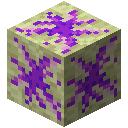
Unobtainium ore can only be found in the End Highlands, the outer islands of The End dimension. To reach the outer islands, travel through the End Gateway portal that appears after defeating the Ender Dragon, or fly away from the main island. The Highlands biome is identifiable by its elevated terrain and chorus plants. Unobtainium spawns within the island's crust at any Y level, so you can find it by searching on the surface.
|
ⓘ Requires Vibranium quality tools or better to mine. ⓘ Found in the Highlands biome within The End. ⓘ Spawns within the island's crust at any Y level. |
Finding the Unobtainium Smithing Template
Loot chests within the Library of Dungeons, large underground dungeon structures found in The Other dimension. Explore thoroughly as chests can be spread across multiple rooms within the structure.
Smithing Upgrade
| Slot | Item |
| Template | Unobtainium Smithing Template |
| Gear | Vibranium tool or armour piece |
| Material | Unobtainium Ingot |

Duplicating the Template
| Ingredient | Amount |
| Unobtainium Smithing Template | 1 |
| Vibranium Ingot | 7 |
| End Stone | 1 |

Other Methods of Obtaining These Ores
Method A: Laser Drills
Using Laser Drills and Laser Bases from Industrial Foregoing with the correct Laser Lens in the correct biomes can generate the respective ore for that biome.
Method B: Mystical Agriculture
Seeds from Mystical Agriculture can produce Essence of these ores, which can then be converted into ingots.
Method C: Productive Bees
Bees from the Productive Bees mod can produce combs of these ores, which can be converted into ingots using a centrifuge.
|
Guide SiriusMC's guide to obtaining the ATM star. |
Guide A helpful guide on creating a fission reactor from the mod Mekanism. |
Introduction An introduction into ATM10, including how to get started and what mods are featured. |
SiriusMC's ATM Star Guide | ATM10
|
This guide covers the complete ATM Star recipe for All the Mods 10 (ATM10). The ATM Star is the endgame item crafted at the Runic Star Altar, requiring 8 unique components and 3 ATM Alloys sourced from dozens of mods. Use the interactive guide below to see every ingredient for each component. |

 Dragon Soul ▼
 Improbable Probability Device ▼
 Dimensional Seed ▼
 Miniature Nether
 Miniature End
 Miniature Exit
 Wither's Compass ▼
 Philosopher's Fuel ▼
 Nexium Emitter ▼
 Oblivion Shard ▼
 Pulsating Black Hole ▼

 1,000,000,000 FE required
 10,000 Source required
 100mb Soul Lava required
|
Guide ATM10 features a tier progression system of unique ores beyond Netherite. This guide shows you where to find them, and how to use them. |
Guide A helpful guide on creating a fission reactor from the mod Mekanism. |
Introduction An introduction into ATM10, including how to get started and what mods are featured. |
Mekanism Fission Reactor | ATM10
|
The Fission Reactor is a multiblock structure, in the Mekanism mod, used to generate large amounts of power by burning nuclear fuel. It produces heat which converts water into steam for power generation, and generates nuclear waste as a by-product. |
Requirements
Reactor Components
- Fission Reactor Casing
- Fission Reactor Port
- Fission Fuel Assembly
- Control Rod Assembly
- Reactor Glass (optional)
Supporting Systems
Coolant Supply
A constant water source is required. Options include:
- Sink (recommended)
- Mechanical Pipes (the longer the pipes, the more water is available to pump into the multiblock)
- Eternal Water Block (EvilCraft)
Fuel Production
Fission Fuel must be produced through a chemical chain:
Uranium → Uranium Hexafluoride → Fission Fuel
Required machines:
- Chemical Oxidizer
- Chemical Infuser
- Isotopic Centrifuge
Waste Handling
- Pressurized Tubes
- Radioactive Waste Barrel (temporary storage)
Structure
Construction Steps
1. Build the Outer Casing
To begin, construct a 5×5×5 hollow cube using Fission Reactor Casing. 5x5x5 is the smallest a Fission Reactor can be.
2. Install Internal Components
Inside the structure:
- Place Fission Fuel Assemblies vertically
- Place Control Rod Assemblies directly on top of each fuel assembly
3. Add Ports
Install the following ports on the reactor casing:
- Fuel Input Port
- Coolant Input Port
- Steam Output Port
- Waste Output Port
Additional ports can be added as needed.
4. Optional: Reactor Glass
Replace casing blocks with Reactor Glass for visibility into the reactor interior. The corners of the reactor must be casing blocks to allow for the multiblock to take shape.
Setup
Connections
Connect each port on the reactor casing to its corresponding system using Mechanical Pipes or Pressurized Tubes as appropriate.
| Port | Connection |
| Coolant Input Port | Connect to your water supply. Ensure constant flow at all times. |
| Fuel Input Port | Pipe Fission Fuel in from your fuel production chain. |
| Steam Output Port | Extract steam and route it to an Industrial Turbine for power generation. |
| Waste Output Port | Extract nuclear waste continuously. Store in Radioactive Waste Barrels or process further. |
Activation
- Enable the reactor.
- Confirm water is flowing.
- Confirm waste output is connected.
Power Increase
Gradually increase the burn rate. Increasing it too fast can cause the reactor to explode.
Recommended Operating Range
- Temperature: below 800 K
- Burn Rate: 0.5–2.0 mB/t (early setup)
Power Generation
Industrial Turbine (Recommended)
- Converts steam into energy efficiently
- Required for optimal performance
Without a turbine, most generated energy is wasted.
Safety
Meltdown Causes
- Insufficient coolant
- Excessive burn rate
- Waste backup
- Blocked output systems
Safety Guidelines
- Maintain constant water supply
- Ensure waste is continuously removed
- Increase burn rate gradually
- Monitor reactor temperature
Scaling
Increase Output
- Increase burn rate slowly
- Add more fuel assemblies
- Expand reactor size (e.g. 7×7×7 or larger)
Common Mistakes
- Activating reactor at high burn rate
- Failing to supply enough coolant
- Ignoring waste management
- Not using a turbine
Recommended Starter Setup
- 5×5×5 reactor
- 4–6 fuel assemblies
- Burn rate ~1.0 mB/t
- Connected industrial turbine
- Infinite water source
|
Guide ATM10 features a tier progression system of unique ores beyond Netherite. This guide shows you where to find them, and how to use them. |
Guide SiriusMC's guide to obtaining the ATM star. |
Introduction An introduction into ATM10, including how to get started and what mods are featured. |
ATM 10 To The Sky
Guides and tutorials for ATM10:TTS!
Introduction | ATM10: To The Sky
| atm10tts.siriusmc.net Version · 2.0.2 |

|
All The Mods 10: To The Sky (ATM10:TTS) is a skyblock version of ATM10, featuring 300+ mods and a progression experience far beyond traditional skyblock gameplay. Start from a small island in your own dedicated dimension, then expand, automate, and explore your way through a massive modded tech and magic ecosystem. The ultimate goal is the same as ATM10: craft the ATM Star, this time starting with nothing but a small island in the sky. |
Getting Started

ATM10:TTS can feel overwhelming at first given how different its opening is from a standard Minecraft playthrough. The best starting point is the quest book, found in the top-left corner of your inventory screen. It walks you through the pack step by step, introduces sieving, automation, and the different mods in a structured way, and rewards you for completing each quest. Following the quest book is the approach we recommend to all new players on SiriusMC.
If you prefer to explore freely, here are some good starting points depending on your preferred play style:
| Play style | Where to Start |
| Technology | Set up a sieve and auto-sieving system as early as possible to generate resources passively, then move into Mekanism for power and Applied Energistics 2 for storage and autocrafting. |
| Magic | Begin with Botania or Ars Nouveau once you have a basic resource supply running. Both mods work well in a skyblock environment and don't require large amounts of world exploration to get started. |
| Building | Focus on expanding your island early and establishing a clean, organised layout. Having space for dedicated automation and storage areas will make later progression significantly easier. |
| Endgame | Work toward crafting the ATM Star. Completing it from a skyblock starting point is one of the most challenging goals in any ATM pack and is the defining long-term objective of ATM10:TTS. |
Skyblock Progression
ATM10:TTS reimagines the ATM10 experience as a skyblock pack. Rather than exploring a generated world for resources, you start on a small island and must build your resource supply from the ground up through sieving, automation, and careful progression. The pack goes far beyond traditional skyblock, with hundreds of mods providing deep crafting, automation, and exploration options that open up as your island grows.
Technology and Magic
ATM10:TTS includes the same broad range of tech and magic mods as ATM10. Mekanism, Applied Energistics 2, Create, and Thermal Expansion cover the automation and power side, while Botania, Ars Nouveau, and Blood Magic offer deep magic progression. Both paths are fully supported and can be combined for more powerful and efficient setups as your island scales up.
The ATM Star
The ATM Star is the endgame goal of ATM10:TTS, just as it is in ATM10. Crafting it from a skyblock starting point is a significantly greater challenge, requiring deep automation and resource generation before the late-game materials become accessible. It is the ultimate long-term goal and gives the entire playthrough direction and purpose.
Beginner Tips and Tricks
Vein Miner (Ultimine)
ATM10:TTS includes the Ultimine mod, commonly referred to as Vein Miner. It allows you to mine multiple blocks of the same type at once, which is useful when breaking down structures or clearing your island. It also supports mining 3x3 areas or long 1x1 tunnels.
Early Game Flight
Once a Wandering Trader visits your island, he will be accompanied by two llamas on leads. Take the leads from the llamas and you can craft a balloon on a stick, which grants creative flight within a limited area. This is one of the earliest flight options available in the pack and is very useful for building and expanding your island safely.
Instant Compacting
After setting up your auto-sieving system, you can route ore chunks directly through a Sophisticated Storage chest fitted with a compacting upgrade. This gives you a no-power, instant compacting machine that removes the need for a dedicated compactor early in the game.
To install ATM10:TTS and learn more about banned items, scheduled restarts, and dimension resets, visit the ATM10:TTS Server Card.
It is recommended to allocate between 6GB and 8GB of RAM for ATM10:TTS.
SiriusMC bans certain items to protect server performance, the in-game economy, and claimed player bases. Use /banneditems in-game to see the full list of banned items on the server, or expand the Banned Items list below.
Banned Items ▼
|
Ready to Play? Open Minecraft, select Multiplayer, and add a new server with the address below. atm10tts.siriusmc.net |
Sieving Guide | ATM10:TTS
| Sieving is one of the primary ways to gather resources in ATM10: To the Sky. Using Ex Deorum sieves with different mesh tiers, you can obtain ores, seeds, and a wide variety of materials from basic blocks like dirt, gravel, and sand. This guide covers how to get started, what to expect from each mesh tier, and how to move into automation. |
Getting Started
Crafting a Sieve and Mesh
To begin sieving, you need to craft a Wooden Sieve. Any vanilla wood type works, as does Archwood if you have access to it. Once placed, the sieve is empty and cannot be used without a mesh installed.
Your first mesh will be a String Mesh, crafted from 9 string arranged in a full crafting grid. String can be obtained by killing spiders that spawn at night, or by harvesting Industrial Hemp Fiber from Industrial Hemp plants, the seeds for which can be found by breaking grass around your island. To install the mesh, right-click the sieve with it in your main hand.
Sieves can also be arranged in a square pattern to sieve the same block simultaneously, increasing efficiency. The valid sizes are 1x1, 3x3, and 5x5. Additionally, meshes can be enchanted to improve their performance, there are more details on this below.
Using the Sieve
Hold a sievable block (such as dirt, gravel, or sand) and right-click the sieve to load it. Then hold right-click on the sieve to begin processing. The block will gradually disappear and items will pop out of the top. You can hold right-click to process continuously without releasing.
To remove a mesh you can shift-right-click the sieve with an empty hand.
Improving Meshes
Meshes can be improved in two ways, through enchanting and improving their tier.
Enchanting
Enchanting can be done using a standard Enchanting Table or Anvil. Two enchantments are relevant to sieving:
- Fortune - Increases the chance of receiving drops, effectively boosting resource yield per block sieved.
- Efficiency - Increases the speed of which the sieve processes each block.
Enchanting a mesh before automating is strongly recommended.
Mesh Tiers
Ex Deorum has six mesh tiers. Higher tiers generally provide better drop rates and access to rarer resources. Each mesh must be crafted before it can be used, and crafting typically requires the material the mesh is named after.
| Mesh | Tier |
| String Mesh | 1 |
| Flint Mesh | 2 |
| Iron Mesh | 3 |
| Gold Mesh | 4 |
| Diamond Mesh | 5 |
| Netherite Mesh | 6 |
What Can Be Sieved
Sievable blocks are crushed end stone, crushed netherrack, crushed blackstone, crushed deepslate, gravel, dirt, soul sand, moss block, sand, red sand, and dust.
Each block produces a different set of drops. The table below covers what each block drops, the chances, and the differences between mesh tiers.
For information on what items can be recieved when sieving, along with their quantities and percentage chance can be found below.
Automation
Once you want to automate sieving, you can use a Clicker or Advanced Clicker from JustDireThings. These act as fake players, able to right-click blocks into sieves automatically. You can pipe blocks into the clickers to control what gets sieved. Both clickers can have their click speed set in ticks. On SiriusMC, clicks are limited to once per second (20 ticks).
Clicker Requires no power. Clicks one block directly in front of it, so it must be placed facing the sieve.
Advanced Clicker Requires FE (stores 100,000 FE). Its active area can be repositioned, so it does not need to be placed directly in front of a sieve. Also supports item whitelisting and blacklisting to control what gets clicked.
Sieving Drop Tables
| Block | Mesh | Drops | Quantity | Chance % |
| Crushed End Stone | String |
Chorus Fruit Ender Pearl Chorus Flower Eye of Ender |
0-1 0-1 0-1 0-1 |
9 7 4 2 |
| Flint | Chorus Fruit Ender Pearl Chorus Flower Eye of Ender |
0-1 0-1 0-1 0-1 |
11 7 6 3 |
|
| Iron | Chorus Fruit Ender Pearl Chorus Flower Eye of Ender |
0-1 0-1 0-1 0-1 |
13 10 7 4 |
|
| Gold | Chorus Fruit Ender Pearl Eye of Ender Chorus Flower |
0-1 0-1 0-1 0-1 |
12 12 7 6 |
|
| Diamond | Ender Pearl Chorus Fruit Eye of Ender Draconium Dust Chorus Flower |
0-1 0-1 0-1 0-1 0-1 |
15 10 9 6 4 |
|
| Netherite | Draconium Dust Ender Pearl Chorus Fruit Eye of Ender Sculk Chorus Flower Echo Shard Sculk Shrieker |
0-2 0-1 0-1 0-1 0-1 0-1 0-1 0-1 |
Avg. Output: 0.18 17 10 9 7.5 4 3 1 |
| Block | Mesh | Drops | Quantity | Chance % |
| Crushed Netherrack | String |
Blackstone Pebble Basalt Pebble Nether Quartz Gunpowder Blaze Powder Magma Cream Warped Nylium Spores Crimson Nylium Spores |
0-3 0-3 0-1 0-1 0-1 0-1 0-1 0-1 |
Avg. Output: 1.8 Avg. Output: 0.9 8 8 8 5 5 5 |
| Flint |
Blackstone Pebble Basalt Pebble Gunpowder Nether Quartz Blaze Powder Warped Nylium Spores Crimson Nylium Spores Magma Cream |
0-4 0-4 0-1 0-1 0-1 0-1 0-1 0-1 |
Avg. Output: 2.0 Avg. Output: 1.6 9 9 9 7 7 6 |
|
| Iron |
Blackstone Pebble Basalt Pebble Nether Quartz Gunpowder Blaze Powder Warped Nylium Spores Crimson Nylium Spores Magma Cream |
0-4 0-4 0-1 0-1 0-1 0-1 0-1 0-1 |
Avg. Output: 2.4 Avg. Output: 1.8 11 10 10 8 8 7 |
|
| Gold |
Blackstone Pebble Basalt Pebble Nether Quartz Gunpowder Blaze Powder Warped Nylium Spores Crimson Nylium Spores Magma Cream Raw Gold |
0-4 0-4 0-1 0-1 0-1 0-1 0-1 0-1 0-1 |
Avg. Output: 2.4 Avg. Output: 1.8 13 11 11 8 8 8 3 |
|
| Diamond |
Blackstone Pebble Blaze Powder Gunpowder Nether Quartz Magma Cream |
0-4 0-1 0-1 0-1 0-1 |
Avg. Output: 2.4 14 13 13 10 |
|
| Netherite |
Blackstone Pebble Nether Quartz Blaze Powder Gunpowder Magma Cream |
0-5 0-1 0-1 0-1 0-1 |
Avg. Output: 3.25 15 15 13 10 |
| Block | Mesh | Drops | Quantity | Chance % |
| Crushed Blackstone | String |
Blackstone Pebble Basalt Pebble Magma Cream Black Dye Gunpowder Ancient Debris |
0-4 0-3 0-1 0-1 0-1 0-1 |
Avg. Output: 2.4 Avg. Output: 1.5 8 7 7 2 |
| Flint |
Blackstone Pebble Basalt Pebble Magma Cream Gunpowder Black Dye Ancient Debris |
0-4 0-3 0-1 0-1 0-1 0-1 |
Avg. Output: 2.6 Avg. Output: 1.65 9 9 8 3 |
|
| Iron |
Blackstone Pebble Basalt Pebble Magma Cream Gunpowder Black Dye Ancient Debris |
0-5 0-4 0-1 0-1 0-1 0-1 |
Avg. Output: 3.25 Avg. Output: 2.2 9 9 8 4 |
|
| Gold |
Blackstone Pebble Basalt Pebble Gunpowder Magma Cream Black Dye Ancient Debris |
0-5 0-4 0-1 0-1 0-1 0-1 |
Avg. Output: 3.5 Avg. Output: 2.0 10 10 6 5 |
|
| Diamond |
Blackstone Pebble Gunpowder Magma Cream Ancient Debris Allthemodium Nugget |
0-5 0-1 0-1 0-1 0-1 |
Avg. Output: 3.5 11 11 6 4 |
|
| Netherite |
Blackstone Pebble Allthemodium Nugget Magma Cream Gunpowder Ancient Debris |
0-5 0-1 0-1 0-1 0-1 |
Avg. Output: 3.75 15 12 11 10 |
| Block | Mesh | Drops | Quantity | Chance % |
| Crushed Deepslate | String |
Iron Ore Chunk Copper Ore Chunk Gold Ore Chunk Osmium Ore Chunk Tin Ore Chunk Silver Ore Chunk Lead Ore Chunk Amethyst Shard Lapis Lazuli Uranium Ore Chunk Nickel Ore Chunk Platinum Ore Chunk |
0-1 0-1 0-1 0-1 0-1 0-1 0-1 0-1 0-1 0-1 0-1 0-1 |
12 12 8 6 5 5 5 5 4 4 4 3 |
| Flint |
Calcite Pebble Basalt Pebble Tuff Pebble Iron Ore Chunk Copper Ore Chunk Lead Ore Chunk Gold Ore Chunk Silver Ore Chunk Osmium Ore Chunk Tin Ore Chunk Amethyst Shard Nickel Ore Chunk Uranium Ore Chunk Lapis Lazuli Platinum Ore Chunk |
0-4 0-4 0-4 0-1 0-1 0-1 0-1 0-1 0-1 0-1 0-1 0-1 0-1 0-1 0-1 |
Avg. Output: 1.6 Avg. Output: 1.6 Avg. Output: 1.6 13 11 8 8 8 8 7 6 6 6 5 5 |
|
| Iron |
Iron Ore Chunk Tin Ore Chunk Silver Ore Chunk Copper Ore Chunk Osmium Ore Chunk Lead Ore Chunk Nickel Ore Chunk Gold Ore Chunk Uranium Ore Chunk Lapis Lazuli Platinum Ore Chunk Amethyst Shard |
0-1 0-1 0-1 0-1 0-1 0-1 0-1 0-1 0-1 0-1 0-1 0-1 |
15 11 10 10 10 10 9 9 8 8 6.5 6 |
|
| Gold |
Gold Ore Chunk Silver Ore Chunk Iron Ore Chunk Tin Ore Chunk Nickel Ore Chunk Lead Ore Chunk Copper Ore Chunk Osmium Ore Chunk Platinum Ore Chunk Amethyst Shard Uranium Ore Chunk Lapis Lazuli Raw Gold |
0-1 0-1 0-1 0-1 0-1 0-1 0-1 0-1 0-1 0-1 0-1 0-1 0-1 |
15 15 15 12 11 9 9 9 9 8 7 7 5 |
|
| Diamond |
Iron Ore Chunk Gold Ore Chunk Tin Ore Chunk Lapis Lazuli Osmium Ore Chunk Lead Ore Chunk Nickel Ore Chunk Silver Ore Chunk Uranium Ore Chunk Copper Ore Chunk Platinum Ore Chunk Amethyst Shard |
0-1 0-1 0-1 0-1 0-1 0-1 0-1 0-1 0-1 0-1 0-1 0-1 |
18 13 13 12 12 11 11 11 10 9 7.5 7 |
|
| Netherite |
Iron Ore Chunk Tin Ore Chunk Gold Ore Chunk Nickel Ore Chunk Osmium Ore Chunk Lapis Lazuli Silver Ore Chunk Lead Ore Chunk Uranium Ore Chunk Amethyst Shard Copper Ore Chunk Platinum Ore Chunk |
0-1 0-1 0-1 0-1 0-1 0-1 0-1 0-1 0-1 0-1 0-1 0-1 |
20 16 15 15 14 14 12 12 12 10 10 9 |
| Block | Mesh | Drops | Quantity | Chance % |
| Gravel | String |
Flint Coal Iron Ore Chunk Copper Ore Chunk Tin Ore Chunk Lead Ore Chunk Silver Ore Chunk Nickel Ore Chunk Aluminum Ore Chunk Zinc Ore Chunk Gold Ore Chunk Osmium Ore Chunk Lapis Lazuli Amethyst Shard |
0-1 0-1 0-1 0-1 0-1 0-1 0-1 0-1 0-1 0-1 0-1 0-1 0-1 0-1 |
20 10 10 8 6 4 4 4 4 3.5 3 3 3 1 |
| Flint |
Flint Pointed Dripstone Coal Iron Ore Chunk Copper Ore Chunk Tin Ore Chunk Nickel Ore Chunk Silver Ore Chunk Lead Ore Chunk Lapis Lazuli Aluminum Ore Chunk Osmium Ore Chunk Gold Ore Chunk Zinc Ore Chunk Amethyst Shard |
0-1 0-1 0-1 0-1 0-1 0-1 0-1 0-1 0-1 0-1 0-1 0-1 0-1 0-1 0-1 |
25 15 12.5 12 10 7 5.5 5 5 5 5 4 4 4 1.5 |
|
| Iron |
Flint Coal Iron Ore Chunk Copper Ore Chunk Tin Ore Chunk Lapis Lazuli Nickel Ore Chunk Aluminum Ore Chunk Lead Ore Chunk Gold Ore Chunk Zinc Ore Chunk Silver Ore Chunk Osmium Ore Chunk Kivi Asurine Veridium Amethyst Shard Crimsite Ochrum Diamond Emerald |
0-1 0-1 0-1 0-1 0-1 0-1 0-1 0-1 0-1 0-1 0-1 0-1 0-1 0-1 0-1 0-1 0-1 0-1 0-1 0-1 0-1 |
15 15 14 12 9 8 7 6 6 6 6 5.5 4.5 4 4 4 4 4 4 1 1 |
|
| Gold |
Coal Iron Ore Chunk Flint Silver Ore Chunk Gold Ore Chunk Lapis Lazuli Amethyst Shard Tin Ore Chunk Copper Ore Chunk Aluminum Ore Chunk Lead Ore Chunk Nickel Ore Chunk Asurine Kivi Veridium Ochrum Crimsite Osmium Ore Chunk Zinc Ore Chunk Diamond Emerald Raw Gold |
0-1 0-1 0-1 0-1 0-1 0-1 0-1 0-1 0-1 0-1 0-1 0-1 0-1 0-1 0-1 0-1 0-1 0-1 0-1 0-1 0-1 0-1 |
20 14 13 12 10 10 8 7 7 7 7 7 6 6 6 6 6 5 5 4 3 2 |
|
| Diamond |
Iron Ore Chunk Lapis Lazuli Tin Ore Chunk Nickel Ore Chunk Lead Ore Chunk Zinc Ore Chunk Aluminum Ore Chunk Gold Ore Chunk Silver Ore Chunk Crimsite Asurine Veridium Osmium Ore Chunk Kivi Ochrum Copper Ore Chunk Coal Amethyst Shard Diamond Flint Emerald |
0-1 0-1 0-1 0-1 0-1 0-1 0-1 0-1 0-1 0-1 0-1 0-1 0-1 0-1 0-1 0-1 0-1 0-1 0-1 0-1 0-1 |
15 11 11 9 9 8 8 8 8 7 7 7 7 7 7 7 6 6 6 5 4 |
|
| Netherite |
Iron Ore Chunk Diamond Tin Ore Chunk Silver Ore Chunk Lapis Lazuli Lead Ore Chunk Copper Ore Chunk Emerald Nickel Ore Chunk Osmium Ore Chunk Gold Ore Chunk Aluminum Ore Chunk Ochrum Kivi Crimsite Veridium Asurine Zinc Ore Chunk Amethyst Shard Coal |
0-1 0-2 0-1 0-1 0-1 0-1 0-1 0-2 0-1 0-1 0-1 0-1 0-1 0-1 0-1 0-1 0-1 0-1 0-1 0-1 |
17 Avg. Output: 0.12 12 11 11 11 10 Avg. Output: 0.10 10 9 9 9 8 8 8 8 8 8 8 6 |
| Block | Mesh | Drops | Quantity | Chance % |
| Dirt | String |
Stone Pebble Flint Wheat Seeds Pumpkin Seeds Beetroot Seeds Sugar Cane Carrot Grass Seeds Melon Seeds Potato Poisonous Potato Bamboo Mycelium Spores |
0-7 0-1 0-1 0-1 0-1 0-1 0-1 0-1 0-1 0-1 0-1 0-1 0-1 |
Avg. Output: 4.2 25 12.5 10 10 10 10 10 10 10 5 4 3 |
| Flint |
Stone Pebble Diorite Pebble Granite Pebble Andesite Pebble Flint Grass Seeds Sugar Cane Wheat Seeds Potato Carrot Melon Seeds Pumpkin Seeds Rose Bush Flax Seeds (Silent Gear) Canola Seeds Coffee Beans Sunflower Flax Seeds (Actually Additions) Sweet Berries Mycelium Spores Bamboo Pink Petals Poisonous Potato Sourceberry |
0-7 0-7 0-7 0-7 0-1 0-1 0-1 0-1 0-1 0-1 0-1 0-1 0-1 0-1 0-1 0-1 0-1 0-1 0-1 0-1 0-1 0-1 0-1 0-1 |
Avg. Output: 4.2 Avg. Output: 2.8 Avg. Output: 2.8 Avg. Output: 2.8 30 15 15 15 13 13 12 12 6 6 6 6 6 6 5 5 4 3 3 3 |
|
| Iron |
Stone Pebble Deepslate Pebble Flint Grass Seeds Wheat Seeds Pumpkin Seeds Carrot Melon Seeds Potato Sugar Cane Mycelium Spores Flax Seeds (Silent Gear) Flax Seeds (Actually Additions) Rose Bush Canola Seeds Sunflower Coffee Beans Torchflower Seeds Bamboo Iron Nugget |
0-8 0-3 0-1 0-1 0-1 0-1 0-1 0-1 0-1 0-1 0-1 0-1 0-1 0-1 0-1 0-1 0-1 0-1 0-1 0-1 |
Avg. Output: 5.2 Avg. Output: 1.35 30 17.5 17.5 15 15 15 15 15 10 8 8 8 8 8 8 8 6 5 |
|
| Gold |
Stone Pebble Deepslate Pebble Grass Seeds Wheat Seeds Flint Potato Carrot Pumpkin Seeds Melon Seeds Mycelium Spores Torchflower Seeds Sunflower Flax Seeds (Actually Additions) Flax Seeds (Silent Gear) Rose Bush Coffee Beans Canola Seeds Iron Nugget Bamboo Golden Carrot |
0-8 0-3 0-1 0-1 0-1 0-1 0-1 0-1 0-1 0-1 0-1 0-1 0-1 0-1 0-1 0-1 0-1 0-1 0-1 0-1 |
Avg. Output: 5.6 Avg. Output: 1.65 25 20 20 17.5 17.5 16.5 16.5 13 8 8 8 8 8 8 8 5 5 2 |
|
| Diamond |
Stone Pebble Deepslate Pebble Flint Carrot Potato Grass Seeds Rose Bush Torchflower Seeds Canola Seeds Sunflower Flax Seeds (Actually Additions) Coffee Beans Flax Seeds (Silent Gear) Mycelium Spores Bamboo |
0-8 0-3 0-3 0-1 0-1 0-1 0-1 0-1 0-1 0-1 0-1 0-1 0-1 0-1 0-1 |
Avg. Output: 5.6 Avg. Output: 1.8 Avg. Output: 0.9 25 25 15 11 11 11 11 11 11 11 10 6 |
|
| Netherite |
Deepslate Pebble Stone Pebble Flint Potato Carrot Flax Seeds (Silent Gear) Canola Seeds Rose Bush Sunflower Coffee Beans Flax Seeds (Actually Additions) Torchflower Seeds Mycelium Spores Grass Seeds Bamboo Golden Carrot Golden Apple |
0-4 0-5 0-3 0-1 0-1 0-2 0-2 0-2 0-2 0-2 0-2 0-2 0-1 0-1 0-1 0-1 0-1 |
Avg. Output: 2.6 Avg. Output: 2 Avg. Output: 1.2 30 30 Avg. Output: 0.22 Avg. Output: 0.22 Avg. Output: 0.22 Avg. Output: 0.22 Avg. Output: 0.22 Avg. Output: 0.22 Avg. Output: 0.22 20 20 6 1 0.25 |
| Block | Mesh | Drops | Quantity | Chance % |
| Soul Sand | String |
Nether Quartz Bone Gunpowder Glowstone Dust Nether Wart Ghast Tear |
0-1 0-1 0-1 0-1 0-1 0-1 |
12 8 7 6 6 6 |
| Flint |
Nether Quartz Bone Gunpowder Ghast Tear Glowstone Dust Nether Wart Crimson Nylium Spores Warped Nylium Spores |
0-1 0-1 0-1 0-1 0-1 0-1 0-1 0-1 |
14 10 8 7 7 6 3 3 |
|
| Iron |
Prosperity Shard Nether Quartz Bone Gunpowder Glowstone Dust Ghast Tear Nether Wart |
0-1 0-1 0-1 0-1 0-1 0-1 0-1 |
20 15 8 7 6 6 5 |
|
| Gold |
Prosperity Shard Nether Quartz Bone Gunpowder Glowstone Dust Ghast Tear Nether Wart |
0-1 0-1 0-1 0-1 0-1 0-1 0-1 |
20 17 11 10 9 8 8 |
|
| Diamond |
Prosperity Shard Nether Quartz Gunpowder Glowstone Dust Nether Wart Ghast Tear Soulium Dust |
0-1 0-1 0-1 0-1 0-1 0-1 0-1 |
20 19 11 11 10 9 5 |
|
| Netherite |
Prosperity Shard Nether Quartz Gunpowder Glowstone Dust Nether Wart Ghast Tear Soulium Dust |
0-2 0-1 0-1 0-1 0-1 0-1 0-1 |
Avg. Output: 0.36 21 14 13 12 11 10 |
| Block | Mesh | Drops | Quantity | Chance % |
| Moss Block | String |
Oak Sapling Spruce Sapling Cherry Sapling Acacia Sapling Jungle Sapling Dark Oak Sapling Mangrove Propagule Birch Sapling Azalea Small Dripleaf Big Dripleaf Glow Berries Spore Blossom Sourceberry Blazing Archwood Sapling Flourishing Archwood Sapling Cascading Archwood Sapling Vexing Archwood Sapling |
0-1 0-1 0-1 0-1 0-1 0-1 0-1 0-1 0-1 0-1 0-1 0-1 0-1 0-1 0-1 0-1 0-1 0-1 |
13 11 11 11 11 11 11 11 8 7 5 4 3 1 0.5 0.5 0.5 0.5 |
| Flint |
Oak Sapling Glow Berries Mangrove Propagule Spruce Sapling Cherry Sapling Dark Oak Sapling Birch Sapling Jungle Sapling Acacia Sapling Small Dripleaf Azalea Big Dripleaf Spore Blossom Lily Pad Glow Lichen Flowering Azalea Sweet Berries Sourceberry Blazing Archwood Sapling Flourishing Archwood Sapling Cascading Archwood Sapling Vexing Archwood Sapling |
0-1 0-1 0-1 0-1 0-1 0-1 0-1 0-1 0-1 0-1 0-1 0-1 0-1 0-1 0-1 0-1 0-1 0-1 0-1 0-1 0-1 0-1 |
13 11.5 11 11 11 11 11 11 11 9.5 9 7 4.5 4 4 3 3 1 0.5 0.5 0.5 0.5 |
|
| Iron |
Glow Berries Oak Sapling Small Dripleaf Spruce Sapling Birch Sapling Mangrove Propagule Dark Oak Sapling Acacia Sapling Cherry Sapling Jungle Sapling Azalea Big Dripleaf Spore Blossom Menril Sapling Sourceberry Growing Edelwood Flashing Archwood Sapling Vexing Archwood Sapling Cascading Archwood Sapling Flourishing Archwood Sapling Blazing Archwood Sapling |
0-1 0-1 0-1 0-1 0-1 0-1 0-1 0-1 0-1 0-1 0-1 0-1 0-1 0-1 0-1 0-1 0-1 0-1 0-1 0-1 0-1 |
19 13 12 11 11 11 11 11 11 11 10 9 6 1 1 1 1 0.5 0.5 0.5 0.5 |
|
| Gold |
Glow Berries Small Dripleaf Oak Sapling Azalea Spruce Sapling Mangrove Propagule Acacia Sapling Jungle Sapling Big Dripleaf Cherry Sapling Birch Sapling Dark Oak Sapling Spore Blossom Menril Sapling Growing Edelwood Flashing Archwood Sapling Sourceberry Vexing Archwood Sapling Flourishing Archwood Sapling Cascading Archwood Sapling Blazing Archwood Sapling |
0-1 0-1 0-1 0-1 0-1 0-1 0-1 0-1 0-1 0-1 0-1 0-1 0-1 0-1 0-1 0-1 0-1 0-1 0-1 0-1 0-1 |
26.5 14.5 13 11 11 11 11 11 11 11 11 11 7.5 2 2 2 1 0.5 0.5 0.5 0.5 |
|
| Diamond |
Glow Berries Small Dripleaf Big Dripleaf Oak Sapling Azalea Mangrove Propagule Jungle Sapling Dark Oak Sapling Cherry Sapling Spruce Sapling Birch Sapling Acacia Sapling Spore Blossom Growing Edelwood Flashing Archwood Sapling Menril Sapling Sourceberry Flourishing Archwood Sapling Cascading Archwood Sapling Blazing Archwood Sapling Vexing Archwood Sapling |
0-1 0-1 0-1 0-1 0-1 0-1 0-1 0-1 0-1 0-1 0-1 0-1 0-1 0-1 0-1 0-1 0-1 0-1 0-1 0-1 0-1 |
34 17 13 13 12 11 11 11 11 11 11 11 9 3 3 3 1 0.5 0.5 0.5 0.5 |
|
| Netherite |
Glow Berries Small Dripleaf Big Dripleaf Azalea Oak Sapling Mangrove Propagule Spruce Sapling Birch Sapling Jungle Sapling Dark Oak Sapling Acacia Sapling Cherry Sapling Spore Blossom Flashing Archwood Sapling Menril Sapling Growing Edelwood Sourceberry Blazing Archwood Sapling Vexing Archwood Sapling Cascading Archwood Sapling Flourishing Archwood Sapling |
0-1 0-1 0-1 0-1 0-1 0-1 0-1 0-1 0-1 0-1 0-1 0-1 0-1 0-1 0-1 0-1 0-1 0-1 0-1 0-1 0-1 |
41.5 19.5 15 13 13 11 11 11 11 11 11 11 10.5 4 4 4 1 0.5 0.5 0.5 0.5 |
| Block | Mesh | Drops | Quantity | Chance % |
| Sand | String |
Flint Iron Nugget Cactus Kelp Dead Bush Sea Pickle Certus Quartz Crystal Charged Certus Quartz Crystal |
0-1 0-1 0-1 0-1 0-1 0-1 0-1 0-1 |
20 13 13 10 8 5 3 0.5 |
| Flint |
Flint Iron Nugget Random Pottery Sherd Certus Quartz Crystal Dead Bush Charged Certus Quartz Crystal |
0-2 0-1 0-1 0-1 0-1 0-1 |
Avg. Output: 0.4 16 4 4 3 0.5 |
|
| Iron |
Flint Iron Nugget Fluorite Cactus Black Quartz Dead Bush Kelp Certus Quartz Crystal Prismarine Shard Prismarine Crystals Sea Pickle Charged Certus Quartz Crystal |
0-1 0-1 0-1 0-1 0-1 0-1 0-1 0-1 0-1 0-1 0-1 0-1 |
23 18 15 13 10 8 7 6 6 6 3 1.25 |
|
| Gold |
Flint Iron Nugget Fluorite Black Quartz Cactus Prismarine Shard Prismarine Crystals Certus Quartz Crystal Dead Bush Kelp Raw Gold Sea Pickle Random Armor Trim Charged Certus Quartz Crystal |
0-1 0-1 0-1 0-1 0-1 0-1 0-1 0-1 0-1 0-1 0-1 0-1 0-1 0-1 |
18 16 15 11 10 8 8 7 6 5 4 3 2 1.5 |
|
| Diamond |
Flint Iron Nugget Fluorite Cactus Black Quartz Prismarine Shard Certus Quartz Crystal Prismarine Crystals Kelp Uraninite Charged Certus Quartz Crystal Allthemodium Nugget |
0-1 0-1 0-1 0-1 0-1 0-1 0-1 0-1 0-1 0-1 0-1 0-1 |
23 22 15 12 11 9 9 9 7.5 7 2 1 |
|
| Netherite |
Flint Fluorite Iron Nugget Black Quartz Uraninite Cactus Prismarine Shard Prismarine Crystals Kelp Certus Quartz Crystal Sea Pickle Allthemodium Nugget Charged Certus Quartz Crystal |
0-2 0-2 0-1 0-2 0-2 0-1 0-1 0-1 0-1 0-1 0-1 0-1 0-1 |
Avg. Output: 0.46 Avg. Output: 0.24 23 Avg. Output: 0.22 Avg. Output: 0.16 15 12 12 10 9.5 7 6 3.5 |
| Block | Mesh | Drops | Quantity | Chance % |
| Red Sand | String |
Cactus Redstone Dust Dead Bush Raw Gold |
0-1 0-1 0-1 0-1 |
12 8 7 3 |
| Flint |
Cactus Redstone Dust Dead Bush Raw Gold |
0-1 0-1 0-1 0-1 |
12 9 7 4 |
|
| Iron |
Cactus Redstone Dust Dead Bush Raw Gold |
0-1 0-1 0-1 0-1 |
12 11 7 6 |
|
| Gold |
Cactus Raw Gold Dead Bush Redstone Dust |
0-1 0-1 0-1 0-1 |
12 11 7 7 |
|
| Diamond |
Redstone Dust Cactus Raw Gold Dead Bush |
0-1 0-1 0-1 0-1 |
14 10 8 3 |
|
| Netherite |
Redstone Dust Cactus Raw Gold |
0-1 0-1 0-1 |
17 12 10 |
| Block | Mesh | Drops | Quantity | Chance % |
| Dust | String |
Bone Meal Gunpowder Certus Quartz Dust Sky Stone Dust Grains of Infinity Redstone Dust Glowstone Dust Blaze Powder |
0-1 0-1 0-1 0-1 0-1 0-1 0-1 0-1 |
10 10 6 6 6 6 4 3 |
| Flint |
Gunpowder Bone Meal Redstone Dust Sky Stone Dust Glowstone Dust Certus Quartz Dust Grains of Infinity Light Xychorium Gem Red Xychorium Gem Green Xychorium Gem Dark Xychorium Gem Blue Xychorium Gem Blaze Powder |
0-1 0-1 0-1 0-1 0-1 0-1 0-1 0-1 0-1 0-1 0-1 0-1 0-1 |
11 11 9 7 7 7 7 4 4 4 4 4 4 |
|
| Iron |
Salt Sulfur Gunpowder Bone Meal Redstone Dust Glowstone Dust Grains of Infinity Certus Quartz Dust Sky Stone Dust Iron Nugget Green Xychorium Gem Blue Xychorium Gem Red Xychorium Gem Dark Xychorium Gem Blaze Powder Light Xychorium Gem Arcane Crystal |
0-1 0-1 0-1 0-1 0-1 0-1 0-1 0-1 0-1 0-1 0-1 0-1 0-1 0-1 0-1 0-1 0-1 |
15 15 13 12 10 9 9 7.5 7.5 6 5 5 5 5 5 5 5 |
|
| Gold |
Salt Sulfur Gunpowder Redstone Dust Glowstone Dust Grains of Infinity Bone Meal Certus Quartz Dust Sky Stone Dust Blaze Powder Arcane Crystal Raw Gold |
0-1 0-1 0-1 0-1 0-1 0-1 0-1 0-1 0-1 0-1 0-1 0-1 |
15 15 13 12 11 11 11 8 8 6 5 2 |
|
| Diamond |
Sulfur Salt Gunpowder Redstone Dust Grains of Infinity Glowstone Dust Certus Quartz Dust Sky Stone Dust Bone Meal Green Xychorium Gem Red Xychorium Gem Light Xychorium Gem Dark Xychorium Gem Arcane Crystal Blue Xychorium Gem Blaze Powder |
0-1 0-1 0-1 0-1 0-1 0-1 0-1 0-1 0-1 0-1 0-1 0-1 0-1 0-1 0-1 0-1 |
15 15 14 12 12 11 10 10 10 6 6 6 6 6 6 6 |
|
| Netherite |
Sulfur Salt Glowstone Dust Gunpowder Redstone Dust Grains of Infinity Bone Meal Sky Stone Dust Certus Quartz Dust Blaze Powder Dark Xychorium Gem Light Xychorium Gem Iron Nugget Arcane Crystal Green Xychorium Gem Red Xychorium Gem Blue Xychorium Gem |
0-2 0-2 0-1 0-1 0-1 0-1 0-1 0-1 0-1 0-1 0-1 0-1 0-1 0-1 0-1 0-1 0-1 |
Avg. Output: 0.24 Avg. Output: 0.24 15 14 14 13.5 13 11 11 10 8 8 8 8 8 8 8 |
|
Introduction Description |
|
|
Stoneblock 4
Guides and Tutorials for Stoneblock 4!
Introduction | Stoneblock 4
| sb4.siriusmc.net Version · 1.13.0 |

|
Getting started in Stoneblock 4 on SiriusMC? This guide covers everything you need to know, from choosing your starting base to crafting hammers, crooks, and brushes to begin gathering resources.
Stoneblock 4 is a skyblock-style modpack where you start in the middle of your own dimension, surrounded by stone. Rather than punching trees, you will be breaking stone into pebbles, converting materials through hammering and brushing, and building up your base from just a small hole deep within the dimension's core. This guide will walk you through your first steps to getting started on SiriusMC's version of Stoneblock 4. |
The Echo of Guidance and Creating Your Base
 When you first join the server you will spawn at a dedicated spawn point. Ahead of you is the Echo of Guidance, an NPC you must interact with before you can access your dimension. Walk over to them and right-click to open the dialogue GUI. After reading, or listening through an audio button, you will notice at the bottom there is a Complete Stage button. Press this button to unlock access to the "Getting Started" chapter in your quest book, and to access the World Selection Portal.
Head up the stairs behind the Echo and walk through the large portal at the far end. Here you can choose which type of starting base you would like. Once selected, you will be taken to your dimension and can begin your adventure.
After completing the quest Initialization, you can purchase a Quest Book from the Echo of Guidance for 1 coin. Alternatively, it can be found in the top-left corner of your inventory screen at any time.
Base Types
There are 6 different types of bases you can start with, with varying difficulties:
|
A dark and eerie blackout zone A small area covered with Black AntiBlocks. The player is unable to see anything. Extreme |
A dark and mysterious cave A small area similar to the blackout zone, but with a single torch to prevent mob spawning. Hard |
|
|
A vibrant and colorful cherry tree A larger lit area featuring a custom-built tree with cherry leaves, grass, moss, and mud blocks. Medium |
A ruined pre-industrial complex Stone brick pillars with spruce wood platforms, ladders, and torches to prevent mob spawning. Medium |
|
|
A rugged and resilient tuff cave Walls of tuff, cobblestone, and moss with braziers and cobblestone staircases. Medium |
A lush and warm mangrove cave Mangrove trees, a lily pad pond, braziers for lighting, and several types of stone. Recommended for new players. Easy |
|
Getting Started
In Stoneblock 4, stone replaces wood as the primary crafting material. You can craft stone crafting tables, stone sticks, and stone tools using the same recipes you would normally use for their wooden equivalents.
Start by breaking stone with your fists to collect pebbles. Each stone block you break will drop between 1 and 3 pebbles. You can then combine 4 pebbles together to craft 1 cobblestone, this will act as your wood equivalent for now. You make a stone crafting table using 4 cobblestone, or stone sticks using two cobblestone to help you get started.
Crafting and Using Hammers, Brushes and Crooks
Next you will need some specialised tools to progress, these include hammers, crooks, and brushes. There are two different types of hammers, ones from the mod FTB Stuff & Things allows you to transform blocks into different blocks, the hammers from the mod Just Hammers allows you to break several blocks at once, stone crooks can be used on different blocks to gain materials associated with them, and brushes allow you to brush blocks for essential items.
Hammers
 Using stone sticks and cobblestone you can craft a Stone Hammer from the mod FTB Stuff & Things. These types of hammers break down blocks into different ones, forming the core of your early resource chain:
Cobblestone ⮕ Gravel ⮕ Dirt ⮕ Sand ⮕ Dust
 You can also use hammers from the Just Hammers mod, these allow you to break blocks in certain patterns, at the start it will be in a 3x3x1 pattern, but you can upgrade these hammers to break in a 3x3x3, 5x5x1, 5x5x3, or 5x5x5 pattern. To make one of these hammers you will need to smelt cobblestone into stone, and use wooden sticks instead of stone sticks.
Stone Crook
 Craft a Crook using 4 stone sticks. The crook is used to break blocks into a variety of different items. For example, using a crook on dirt can yield a range of saplings, using it on sand will yield a bunch of different crops, ranging from sugarcane, cactus, kelp and bamboo, all the way to Demon's Dream seeds, cocoa seeds, and canola seeds. It is an essential tool for generating resources early on.
Brushes
 Brushes are your main source of material gathering, these are what allow for you to get various ores, seeds, and gems. However, to gather better materials you will need to increase your Unearther level, this is done by completing quests that have the level up icon
  in their rewards.
The type of brush you use doesn't change the items blocks drop, however, it can help the process be less tedious. The first brush you will get is the Crude Brush, made using a wooden stick, a pebble, and a piece of straw, it's good, but it will only brush 128 blocks before breaking. As you gather more materials you will be able to upgrade your brushes:
Crude Brush ⮕ 128 blocks
Brush ⮕ 384 blocks
Reinforced Brush ⮕ 1,152 blocks
Unbreakable Brush ⮕ infinite blocks
How to Upgrade Brushes
Upgrading brushes is a huge quality of life improvement, especially when mass brushing or using Unearthers. Better brushes last longer, reducing how often you need to craft replacements. Each tier requires progressively better materials, but all are achievable in early to mid-game.
From Crude Brushes To Brushes
 Brushes, also known as "regular brushes" are crafted using 1x feather, 1x copper ingot, and 1x wooden stick. It has a durability of 384 blocks, three times as long as the Crude Brush.
From Brushes To Reinforced Brushes
 The Reinforced Brush is made in a smithing table using 1x brush, 1x diamond, and 1x smithing template. It has a durability of 1,152 blocks, three times as long as the "Regular" Brush. Diamonds can be obtained by brushing gravel once you reach Unearther Level 3.
 Smithing templates can be crafted using 4x stone, 2x gem-fused slates, and 1x mysterious scrap metal, or purchased from the Echo of Guidance for 10 coins after completing Unknowing - Task 3.
From Reinforced Brushes To Unbreakable Brushes
 Unbreakable brushes are the best tier of brush you can get. These brushes have unlimited durability, but cost a lot more than the previous brushes. The materials you need to craft an unbreakable brush are 2x netherite scrap, and 1x reinforced brush.
In addition to the base materials you will need, you also have to have upgraded your World Engine to contain either:
1. 2x Sourcestone and 64x World Engine Machine Block (Ars Nouvaeu Pathway)
2. 20x Shadow Casing, 64x World Engine Machine Block (Create Pathway)
Using the Ars Pathway:
When using the Ars Nouvaeu pathway you will need to supply the World Engine with Source. This can only be done once you have completed the "Meet The Magician" quest line from the quest chapter Tier 1: Foundation. You must have a minimum of 1,000 Source in the World Engine for the cores to begin crafting.
Using the Create Pathway:
When using the Create pathway you will need to supply the World Engine with kinetic energy. This can only be done once you have completed the "Meet The Machinist" quest line from the quest chapter Tier 1: Foundation. You must have a minimum of 32 rotations per minute (RPM) before the cores will begin crafting. Note: The stress impact during crafting is 16x RPM
Now that you have your core tools and understand the basic resource loop, you are ready to start making your base into a fully fledged home. The next steps are growing your first trees and getting a water source set up, if you haven't chosen a base with water and trees already on it, and eventually automating your brushing and hammering to free up your time for bigger projects. Check out our other guides for more information about Stoneblock 4!
To install Stoneblock 4 and learn more about the server and scheduled restarts, visit the Stoneblock 4 Server Card.
It is recommended to allocate between 8GB and 10GB of RAM for Stoneblock 4.
SiriusMC bans certain items to protect server performance, the in-game economy, and claimed player bases. Use /banneditems in-game to see the full list of banned items on the server, or expand the Banned Items list below.
Banned Items ▼
|
Ready to Play? Open Minecraft, select Multiplayer, and add a new server with the address below. sb4.siriusmc.net |
|
Guide Set up cobble generators, auto hammers, and Unearthers to automate your resource chain. |
Boss Guide Defeat this boss to keep progressing, learn how to summon and defeat it. |
Boss Guide The first major boss. Learn how to defeat it and what drops you can earn. |
Automation Guide | Stoneblock 4
|
At the beginning in Stoneblock 4 you'll be manually gathering resources through mining, hammering and brushing blocks. But, as you progress you'll unlock a multiblock called an Unearther, and machines called Cobble Generators, and Auto Hammers. This guide will take you through how to unlock them, how they work, and how to set them up. |
Unearthers
 Unearthers are 3x3x3 structures that allow you to use villagers to automate the brushing process. The structure is crafted using 5 tinted glass and 3 polished deepslate slabs, and you only need one Unearther block to build it.
To operate an Unearther you will need the following:
- A Villager Worker Token from an employed villager
- A brush
- Blocks to brush
- Food (optional, but increases brushing speed)
Step 1: Getting a Villager
First, complete the quest Chronon Generator in the Getting Started chapter. This rewards you with Dreadful Dirt, which causes hostile mobs to spawn on it more frequently than usual. Place it in a dark area to allow a zombie villager to spawn.
Next, complete Unknowing Task 3 from the Echo of Guidance to obtain the Ender Lead. Use it to pick up the zombie villager that spawns on the Dreadful Dirt.
Step 2: Healing the Zombie Villager
 Take the zombie villager to the Healing Spring, located to the north of your base's spawn point. Open your map with M to find it; it appears as a colourful circle on the map. Place the zombie villager down inside the Healing Spring, and it will begin converting into a regular villager.
Step 3: Crafting the Echo Encoder
Head to the World Engine and craft an Echo Encoder. You will need the following materials:
- Amethyst Resonance Charm: Crafted from 1 amethyst shard (obtained from the Healing Spring) and 4 leather (from killing cows or smelting rotten flesh on a campfire).
- Iron Stick: Place 1 iron ingot in the top-right corner of the crafting table, with two wooden sticks diagonally below it.
Place the Amethyst Resonance Charm and Iron Stick into the World Engine. It will engage one of its cores and begin crafting the Echo Encoder.
Step 4: Employing a Villager
With the Echo Encoder in hand, you can convert villagers into Worker Tokens. There are three Worker Token types that work in the Unearther, each requiring a specific workstation:
- Archeologist | Workstation: Decorative Pot | Brushes: Dirt, Dust, Mud, Sand
- Geologist | Workstation: Salvaging Table | Brushes: Gravel, Soul Sand, Crushed Kivi
- Dimensionalist | Workstation: Resonanz Engineering Block | Brushes: Netherrack, End Stone, Otherrock
Place down the workstation for the worker type you need, then place the villager nearby, and they will take on that job role. Once employed, use the Echo Encoder on the villager to pick them up as a Worker Token.
Step 5: Setting Up the Unearther
Insert the Worker Token into the Unearther along with a brush and the blocks you want brushed. The villager will begin brushing automatically.
To fully automate the process, connect a chest filled with brushable blocks, brushes (unless using an Unbreakable Brush), and optionally food to increase speed. Use item pipes to feed items into the Unearther from the chest.
It is strongly recommended to use Mekanism Logistical Transporters as your item pipes. They can pull multiple different item types from the same chest simultaneously. Opaque Item Pipes from Oritech Machines will only extract the first item type in the chest and will ignore the rest.
Auto Hammers and Cobble Generators
Once you have a handle on manually hammering and brushing, the next step is automating the process. This guide covers setting up a Stone Cobble Generator and chaining it into an Auto Hammer to produce resources passively.
Step 1: The Stone Cobble Generator
 Craft a Stone Cobble Generator using 6 compressed stone blocks, 1 lava bucket, 1 water bucket, and 1 glass. Once placed, it will automatically generate 1 cobblestone per tick.
The Stone Cobble Generator will generate 1 cobblestone per tick, but can be upgraded to iron, gold, diamond, and netherite versions by placing the generator into a casting basin, and pouring the corresponding molten ore on top of it, for example, to turn the Stone Cobble Generator into an Iron Cobble Generator you will pour molten iron onto it whilst it is inside a casting basin.

Step 2: Collecting the Cobblestone
Place an inventory directly on top of the generator to collect the cobblestone it produces, these can be chests, barrels, or drawers. There are a couple of things to keep in mind:
- Stone Chests from the Stone Chest mod do not work with the generator.
- Compacting Drawers from Functional Storage must have a piece of cobblestone manually placed inside them before they will begin collecting from the generator.
Step 3: Piping into the Auto Hammer
Now you need item pipes to move the cobblestone into the Auto Hammer, when starting out you can use the Opaque Item Pipes from Oritech Machines or Item Pipes from Pipez, however it is recommended to use Logistical Transporters, which are Mekanism's version of item pipes. Several options are available:
- Opaque Item Pipes from Oritech Machines: a good early option
- Item Pipes from Pipez: another early game alternative
- Logistical Transporters from Mekanism: recommended for the best performance and reliability
Step 4: Chaining Auto Hammers
 Auto Hammers can be chained together to convert cobblestone all the way down the conversion chain, into dust, in a single pass. The number of hammers you need depends on the output you are after.
For example, to produce sand for brushing into gold chunks, you would chain 3 Auto Hammers together:
Cobblestone ⮕ Gravel ⮕ Dirt ⮕ Sand
|
Introduction An introduction into Stoneblock 4, including how to get started and what mods are featured. |
Boss Guide Defeat this boss to keep progressing, learn how to summon and defeat it. |
Boss Guide The first major boss. Learn how to defeat it and what drops you can earn. |
Boss Guide (Chesed) | Stoneblock 4

|
Chesed is a powerful boss that cannot be damaged directly. You must use the environment and mechanics of the arena to defeat it. A diamond axe is not just recommended; it is essential. All damage from Chesed ignores resistances, and the arena cannot be easily escaped from. |
Walkthrough
Phase 1
A diamond axe is more than just recommended for defeating Chesed, it is essential. You cannot damage Chesed directly and must use your surroundings to deal damage to it, making the diamond axe the best early game weapon for this purpose. With the diamond axe you can disable the Chesed Monoliths. Chesed Monoliths have 50HP each, and you'll know when they've been disabled because they stop spinning. This is particularly important, because during the ability "Tenebrae Aeternae" Chesed drains power from the monoliths and uses it to unleash a lightning strike that damages everyone in the arena, and the amount of damage given depends on how many monoliths are in an active state. Deactivated monoliths become active again after this ability ends.
 To defeat Chesed, you'll need to wait for the Crystals phase. This is when blue crystals will appear in the corners of the arena. Following this, Chesed activates the "Lightning Ray" ability that follows the player's movement. While charging the attack, Chesed tries to anticipate the player's movements, and aims slightly beyond the target's movement direction, and stops aiming seconds before releasing the lightning ray.
 Using your axe, break one of the blue crystals from the "Crystals" ability, and then find a Lightning Ray Reflector at the far sides of the arena. You'll notice when you approach one with the Energized II effect, it will rise from the ground and glow blue. And, if aimed correctly, means that when Chesed fires a lightning ray, it will reflect from the Reflector and hit Chesed, dealing 1 point of damage.
Phase 2 (below 50% HP)
When Chesed drops below 50% HP it enters its second phase, causing the Monoliths to regenerate with an additional 50 HP, bringing them to 100 HP each. Same as in phase 1, you will need to destroy them again to ensure that during the ability "Tenebrae Aeternae" you are not taking significant damage. Then you can wait again for the Crystals and Lightning Ray phase, and damage Chesed in the same way you did in phase 1.
Abilities
Passive
Mightiness
Chesed cannot be hurt directly, and its arena cannot be easily escaped from. All damage it inflicts ignores resistances. Gives all combatants Night Vision while alive. If a player looks away from Chesed, they are inflicted with Chesed Gaze. Second phase begins when HP drops below 50%.
Electrified Air
The air above Chesed crackles with power. Any entity that interacts with it takes damage.
Monoliths
Spawns 4 monoliths when summoned. Monoliths deactivate upon death and cannot be damaged further. Gain an additional 50 HP in second phase.
Crystals
Cast before the lightning ray attack. Destroys all existing crystals then summons 1 on each side of the battlefield. If a player destroys a crystal, they become Energized II.
Active
Block Barrage
Tears out blocks from the earth and hurls them at the target.
Earthquake
Slams the earth, emitting a shockwave and lightnings that travel outward from Chesed's position. During second phase, more lightnings are summoned and they move faster.
Tempest Core
Releases ball lightnings that travel outward from Chesed. These cannot be reflected.
Rolling Thunder
Rolls around the arena damaging and knocking back anyone in its path. During second phase, leaves a fire trail behind.
Rockfall
Fires a lightning beam at the ceiling causing it to crumble, while summoning lightnings around all combatants. During second phase the frequency and quantity of lightnings are increased.
Kinetic Field (second phase only)
Traps players in a kinetic field that prevents escape. Periodically summons lightnings inside all active kinetic fields.
Drops
Lightning Core
A core that Chesed draws its power from, and can be applied to any weapon by using a crafting table. When attacking entities with a weapon that is enhanced with a Lightning Core there is a 33% chance to strike the target with Chesed lightning, summoning a lightning bolt that will deal 100% of the weapons damage whilst also inflicting the Shocked effect on the target. The Shocked effect reduces the target's outgoing damage by 25% for 200 ticks (10 seconds)
Phase Sphere
The Phase Sphere allows you phase through blocks at high speed for 200 ticks (10 seconds), with a 100 tick (5 second) cooldown before you can use it again. However, you are only immune to suffocating inside blocks, and mobs can still damage you while phasing. So, it is recommended to use this as a mobility and traversal tool, and not to escape from combat.
Chesed Trophy
A trophy of Chesed that you can place down to showcase your heroic deeds in defeating this boss.
|
Introduction An introduction into Stoneblock 4, including how to get started and what mods are featured. |
Guide Set up cobble generators, auto hammers, and Unearthers to automate your resource chain. |
Boss Guide Defeat this boss to keep progressing, learn how to summon and defeat it. |
Boss Guide (Mighty Ender Chicken) | Stoneblock 4

|
The Mighty Ender Chicken is a powerful boss found in the End rings, with several highly dangerous abilities at its disposal, and resembling a huge enderman-style chicken with a zombie on its back. It must be summoned using a specific item and can only be damaged through removing its shield mechanic. |
Finding and Summoning
The Mighty Ender Chicken can be found in the north and south parts of the End ring. To summon it, you will need to locate a Dislocator Receptacle  from the mod Draconic Evolution, then use a Mighty Ender Chicken Egg on it.
 The Mighty Ender Chicken Egg is crafted using the following materials:
- 4 Dimensional Shard Gems
- 4 Ender Pearls
- 1 Dark Matter
Once summoned, the chicken will grow from a regular sized chicken into a giant one and will be protected by a shield that grants it full immunity to damage. To break the shield you must hit the Mighty Ender Chicken 4 times with the Chicken Stick to deactivate the shield before you can deal any damage to it. Once the shield has been deactivated you have 30 seconds to damage it, after 30 seconds the shield regenerates, and you must deactivate it again to continue damaging it.
Abilities
Spinning Attack
Generates a charging up sound before spinning around and shooting out Dragon Eggs that explode on impact.
Clearing an Area
Lets out a cry and quickly moves around the arena, breaking any blocks in its path.
Forcefield Retaliate
Regenerates its shield after 30 seconds. When this happens you will need to hit it with the Chicken Stick again to deactivate it.
Clearing away Entities
If it senses entities nearby it may begin flapping its wings to blow them away from it.
Drops
1x Dragon Egg
6x - 10x Dragonskin
|
Introduction An introduction into Stoneblock 4, including how to get started and what mods are featured. |
Guide Set up cobble generators, auto hammers, and Unearthers to automate your resource chain. |
Boss Guide The first major boss. Learn how to defeat it and what drops you can earn. |
Boss Guide (Malkuth) | Stoneblock 4

|
Malkuth is a powerful boss found in the Void ring, also known as the Void Chasms. The Qliphoth of Malkuth, a benevolent king who ruled over a once-prosperous land, whose blind, excessive generosity became his kingdom's demise. Players cannot directly damage Malkuth and must instead use cannons to fight him on equal ground. |
Locating and Summoning Malkuth
Malkuth is located in the Void ring, also known as the Void Chasms. Once you have found the arena, you can summon him directly from the Boss Spawner, the two swords in the ground, without any summoning requirements.
The Fight
 When getting close to the arena the player's crosshair will have either an orange swirling circle, or a blue swirling circle around it, indicating that the player is currently vulnerable to either Fire or Ice damage. This also means the player has a 100% damage reduction against the opposite type.
Malkuth cannot be directly damaged by a player. The only way to deal damage is by using the cannons on the players' side of the arena. Only the cannon that corresponds to the player's current weakness can be used, for example, blue for Ice damage and orange for Fire damage. Malkuth will periodically jump onto the lava side of the arena, making himself vulnerable. When he does, fire the cannon that corresponds to your current weakness to damage him.
Once Malkuth is at half health the fight enters Phase 2, where crystals will appear out of the ground in the arena. When one of these crystals is active the corresponding cannon will be unable to be used. To destroy these crystals Malkuth must hit them with the opposite damage type from a slash attack.
To get Malkuth to return to the players' side of the arena, move near the lava side to prompt him to jump back.
Flying over to the lava side of the arena will cause instant death.
Malkuth's Marks
All combatants receive a Mark of a Knight at the start of the boss fight. If a combatant leaves the arena before the fight ends, they will be instantly killed in seconds, and the Mark of a Knight transforms into a Mark of a Coward. Stepping back into the arena with a Mark of a Coward will change it back to a Mark of a Knight.
Abilities
Divine Armor
Malkuth wields impenetrable armor, capable of neglecting any damage.
Fire and Ice
While in the arena, combatants may be weak to Fire or Ice. Malkuth's abilities deal three types of damage: Basic (regular damage), Fire (makes targets weaker to Fire damage, deals reduced damage to targets weak to Ice), and Ice (makes targets weaker to Ice damage, deals reduced damage to targets weak to Fire).
Fair Duel
Combatants can use two cannons on their side to fight on equal ground with Malkuth. Right-click a cannon to fire a shot. Combatants can only use the cannon of the type they are currently weak to. After firing a shot, the cannon becomes unusable until the next use of Cannonade.
Knights Duty
During the boss fight all combatants receive Mark of a Knight. When a combatant escapes the arena before the fight ends, Mark of a Knight transforms into Mark of a Coward. When a combatant with Mark of a Coward steps into the arena once again, it changes back to Mark of a Knight.
Slashes
Charges one of his swords and releases an aerial slash traveling towards the target. The damage type of the slash is based on the sword that was charged. This slash is capable of slicing through crystals.
Cannonade
Malkuth jumps on the wall behind him and orders his cannons to fire devastating shots at the target. When this ability is cast, combatants' cannons can be used once again, unless they are broken. Second phase: Malkuth orders his cannons to break the cannons on the combatants' side.
Arcslash
Malkuth charges up his swords and releases aerial slashes in arcs, covering the whole arena.
Boulder Volley
Malkuth tears up boulders from the earth, imbues them with his magic, and hurls them at the player.
Impaling Doom
Malkuth slams the earth, releasing either Fire or Ice spikes that travel in the slam direction. When colliding with combatants, those spikes hurl them up into the air.
Earthshatter
Malkuth leaps to the target and crushes the earth, hurling everyone caught in the attack into the air. During the second phase, if there are broken cannons on the combatants' side, spawns a special crystal at the attack location that is capable of repairing cannons.
Chainpunch
Malkuth pulls every combatant who was in the air and punches them with overwhelming force.
Tsars Wrath
Malkuth summons two giant swords and orders them to slam the ground with devastating force. Second phase: Also fires his cannons before the attack lands.
Hellshaper
Malkuth slams the earth, summoning floating islands, hurling everyone into the air and rendering the floor impossible to walk on. Launches fireballs at these islands thereafter.
Drops
Fire and Ice Core
The core of Malkuth. Can be attached to any item that has durability to summon Malkuth fireballs. Use an item to release a fireball that deals a percentage of item damage and ignites targets. Crouch while using an item to release an iceball that slows targets instead.
Emberfrost Gauntlet
In right hand: acts as a grappling hook for blocks, casting Malkuth's crush attack at the grapple position. If used on the ground while facing downwards, propels the user up into the air. In left hand: acts as a grappling hook for entities, making the user automatically attack the target before knocking them back. Combo: using the item in the left hand and then switching it to the right hand resets its cooldown.
Malkuth Trophy
A trophy of Malkuth to showcase your heroic deeds.
General Guides
Here you can find guides to mods or plugins that are used widely on our servers!
How to Claim Land - GriefPrevention Guide | SiriusMC
|
When it comes to claiming land, the Golden Shovel is your best friend. The information below covers the main commands from GriefPrevention; you can use these to create, extend, or abandon your claims, as well as setting and revoking permissions. |
Claiming and Extending Your Land
Claiming your land takes 3 simple steps:
| Step | Action | Result |
| 1 | Type /kit claim into chat | This will give you a golden shovel, the key tool for claiming land |
| 2 | Right-click a corner of your soon-to-be claim | This sets the first point of your claim, shown as a diamond block |
| 3 | Right-click the opposite corner of your soon-to-be claim | This creates a rectangular 2D claim |
To extend a pre-existing claim, select a corner of your claim by right-clicking it with the golden shovel. Claim borders become visible by right-clicking the ground with a stick or golden shovel. Then select the point you'd like to extend the claim to.
Trusting Other Players and Mods
You may want to invite other players and give them permission to interact within your claim. Whether that means building, opening containers, or pressing buttons, the commands below must be run within your claim.
| Command | Description |
| /Trust <Player_Name> | Gives a player permission to build, open containers, and interact with objects |
| /AccessTrust <Player_Name> | Gives a player permission to use your buttons, levers, and beds |
| /ContainerTrust <Player_Name> | Gives a player permission to use your buttons, levers, beds, crafting gear, containers, and animals |
| /TrustList | Lists the permissions for the claim you're standing in |
| /Untrust <Player_Name> | Revokes any permissions granted to a player in your claim |
| /Untrust All | Revokes any permissions granted to all players in your claim |
Sometimes, Minecraft mods use "fake players", such as the Just Dire Things mod from ATM10. These fake players help automate certain player activities such as breaking, placing, or interacting with blocks. However, they may not work inside your claim by default. The command below will grant them permission:
| Command | Description |
| /AutoTrust | Trusts any player or fake player that breaks a block within 30 seconds |
Subdividing Within Your Claim
Subdividing is when you create a claim within your existing claim. This is useful for creating "plots", allowing players to have certain permissions within that smaller area that they won't have in your main claim.
| Command | Description |
| /SubdivideClaims | Switches your shovel to subdivision mode |
| /RestrictSubclaim | Restricts a subclaim so that it inherits no permissions from your main claim |
| /BasicClaims | Switches your shovel back to basic claims mode |
Abandoning Your Claim(s) / Transferring Ownership
If you no longer wish to have a piece of land claimed, you can choose to abandon it.
| Command | Description |
| /AbandonClaim | Abandons the claim you are currently standing in |
| /AbandonAllClaims | Abandons all claims you have made |
Alternatively, you can transfer ownership of the claim you are standing in to another player.
| Command | Description |
| /TransferClaim <Player_Name> | Transfers ownership of the claim to the selected player |
Earning More Claim Blocks
Need more space? There are several ways to earn or acquire additional claim blocks on SiriusMC:
| Method | How |
| Vote Crate Keys | Claim blocks can be found as rewards inside vote crates, earned by voting for the server. You can find the links here. |
| Play Time | For every hour you are on the server you will earn 500 claim blocks. |
| Player Trading — /transferblocks | Purchase claim blocks directly from other players using the /transferblocks command. |
| SiriusMC Store | Claim blocks can be purchased for real money from the SiriusMC store, found here. |
|
Guide Economy and Earning In-Game Currency Learn how the economy works and how to obtain in-game currency on SiriusMC |
Boss Guide Learn about the playtime and donator ranks on SiriusMC |
|
Economy and Earning In-Game Currency | SiriusMC
|
When you play on our network, you have several ways to earn in-game money. These range from opening your own shop, to voting, to bartering directly with others. Below are short guides on how the economy works and the main points you need to know. |
1. Opening Your Own Shop
When you first join one of SiriusMC's servers you won't automatically have a player shop, but you can create one free of charge. Below guides you through creating a shop, setting prices, searching other players' shops, and viewing your metrics.
Creating a Player Shop

The red section is where other player shops are located.
The green section is where you can view your player shop, search the entire player shop database, and view metrics.
To create your player shop, open the GUI using the command /ps. The green section gives you the ability to:
 View previous pages
 Create / view your player shop
 Search for an item
 View metrics
 Exit the GUI
View the next page
Pressing the chest icon will allow you to create your player shop. After creating it, pressing the chest icon will open your player shop. Alternatively, you can use /ps <Your Username> to open the GUI directly onto your player shop.
Adding Items and Setting Prices
You can add items to your player shop by opening your player shop and left-clicking the item you want to sell. You will then be prompted to enter the amount you wish to sell one item for.
Some items have minimum prices. If you input a price lower than the minimum, it will default to the minimum set price. For example, if diamonds have a minimum price of $400 each and you try to sell them for $100, the listing will default to $400.
Your shop has a limit to how many items you can sell. By default, you start with 10 slots, each holding up to 256 of one item. More slots can be bought using the  icon, however the cost increases with each slot purchased.
Searching the Shops
When looking for something specific, use the search function from the compass icon. This will prompt you to type the item name into chat, or you can use /ps search <item name>. If you don't know the full item name, you can type part of it and the shop will show all items containing that word.
Viewing Shop Metrics
Want to know what items are selling well? Click the enchanted book icon and a link will appear in chat. Clicking it will take you to SiriusMC's metrics page, where you can view everyone's shop on the server you're playing on, including your own!
2. Voting
Voting is also a great way to make money on a regular daily basis. There are 8 links you can vote on; each one rewards you with Crate Keys that can be used in-game, as well as diamonds, steak, and claim blocks and a cash amount based on your rank!
| Rank | Cash Reward | Claim Blocks |
| Newbie | $300 | 200 |
| Amateur | $500 | 300 |
| Novice | $700 | 400 |
| Seasoned | $900 | 500 |
| Respected | $1,100 | 600 |
| Trusted | $1,300 | 700 |
| Expert | $1,500 | 800 |
| Esteemed | $1,700 | 900 |
| Veteran | $2,000 | 1,000 |
| Titan | $2,100 | 1,100 |
| Iron | $2,200 | 1,200 |
| Gold | $2,300 | 1,300 |
| Diamond | $2,400 | 1,400 |
| Emerald | $2,500 | 1,500 |
|
VOTE LINK 1 minecraft-mp.com |
VOTE LINK 2 ftbservers.com |
VOTE LINK 3 tekkitserverlist.com |
|
VOTE LINK 4 minecraftservers.org |
VOTE LINK 5 minecraft-server-list.com |
VOTE LINK 6 topminecraftservers.org |
|
VOTE LINK 7 moddedminecraftservers.com |
VOTE LINK 8 curseforge.com |
3. Bartering With Other Players
Like most servers, we encourage players to trade with one another. This is a great way to make fast sales from items, or even services, such as paying someone to decorate or build for you. This does not apply to real-world currency, and any real-life currency being used for in-game services may lead to sanctions.
However, some of our servers, such as Tekkit 2 and Tekkit SMP, enforce a rule that trades must be priced reasonably and follow the minimum prices set in /price. This means you cannot sell expensive items for $1, or give away items for free, unless in a team. To read the reason for this and our other server rules, see: rules.
|
Guide How to Claim Land - GriefPrevention Guide Learn how to use the GriefPrevention Guide to claim your land on SiriusMC |
Boss Guide Learn about the playtime and donator ranks on SiriusMC |
|
Playtime and Donator Ranks | SiriusMC
|
SiriusMC has two rank systems that run alongside each other. Playtime Ranks are earned by playing on the server, and Donor Ranks are purchased from the store. Playtime ranks reward your time and dedication, while donor ranks provide additional perks and support the server. |
Playtime Ranks
Playtime ranks are awarded automatically as you accumulate hours on the server. Each new rank unlocks additional homes, chunk loaders, and player warps. Your rank is displayed in chat next to your name.
[Newbie]
| Perk | Amount |
| Playtime Required | 0 Hours |
| Homes | 1 |
| Chunk Loaders | 2 |
| Player Warps | 1 |
[Amateur]
| Perk | Amount |
| Playtime Required | 1 Hour |
| Homes | 2 |
| Chunk Loaders | 4 |
| Player Warps | 2 |
[Novice]
| Perk | Amount |
| Playtime Required | 10 Hours |
| Homes | 3 |
| Chunk Loaders | 6 |
| Player Warps | 3 |
[Seasoned]
| Perk | Amount |
| Playtime Required | 20 Hours |
| Homes | 4 |
| Chunk Loaders | 8 |
| Player Warps | 4 |
[Respected]
| Perk | Amount |
| Playtime Required | 40 Hours |
| Homes | 5 |
| Chunk Loaders | 10 |
| Player Warps | 5 |
[Trusted]
| Perk | Amount |
| Playtime Required | 60 Hours |
| Homes | 6 |
| Chunk Loaders | 12 |
| Player Warps | 6 |
[Expert]
| Perk | Amount |
| Playtime Required | 80 Hours |
| Homes | 7 |
| Chunk Loaders | 14 |
| Player Warps | 7 |
[Esteemed]
| Perk | Amount |
| Playtime Required | 100 Hours |
| Homes | 10 |
| Chunk Loaders | 16 |
| Player Warps | 8 |
[Veteran]
| Perk | Amount |
| Playtime Required | 160 Hours |
| Homes | 11 |
| Chunk Loaders | 18 |
| Player Warps | 9 |
[Titan]
| Perk | Amount |
| Playtime Required | 320 Hours |
| Homes | 12 |
| Chunk Loaders | 20 |
| Player Warps | 10 |
|
ⓘ Use /playtime or /siriusranks in-game to check your current playtime and progress toward the next rank. ⓘ Every hour you play on the server you gain an additional 500 claim blocks. |
Donor Ranks
Donor ranks are purchased from the SiriusMC Store and provide a permanent set of enhanced perks on top of your existing playtime rank. Purchasing a donor rank also directly supports the server and helps keep it running.
[Iron]
| Perk | Amount |
| Homes | 50 |
| Chunk Loaders | 30 |
| Player Warps | 11 |
| Starting Money | $25,000 |
| Claim Blocks | 1,500 |
| Extra Commands | /PTime |
[Gold]
| Perk | Amount |
| Homes | 100 |
| Chunk Loaders | 35 |
| Player Warps | 12 |
| Starting Money | $50,000 |
| Claim Blocks | 3,000 |
| Extra Commands | /PTime, /Workbench, /Repair* |
[Diamond]
| Perk | Amount |
| Homes | 1,000 |
| Chunk Loaders | 40 |
| Player Warps | 13 |
| Starting Money | $125,000 |
| Claim Blocks | 6,000 |
| Extra Commands | /PTime, /Workbench, /Repair*, /Nick (Nickname) |
[Emerald]
| Perk | Amount |
| Homes | Unlimited |
| Chunk Loaders | 45 |
| Player Warps | 14 |
| Starting Money | $250,000 |
| Claim Blocks | 12,000 |
| Extra Commands | /PTime, /Workbench, /Repair*, /Nick (Nickname) |
[Custom]
| Perk | Amount |
| Homes | Unlimited |
| Chunk Loaders | 50 |
| Player Warps | 15 |
| Starting Money | $375,000 |
| Claim Blocks | 24,000 |
| Extra Commands | /PTime, /Workbench, /Repair*, /Nick (Nickname), /Custom |
*The /Repair command works with vanilla items only.
|
ⓘ The Custom rank allows you to customise your rank prefix and colours, as well as have a custom join and leave message! ⓘ Donor ranks can be purchased from the SiriusMC Store. |
To add your new custom prefix and/or nickname to your join/leave message, you need to enter your full username; it will be formatted automatically to the prefix and nickname you had at the time.
|
Guide How to Claim Land - GriefPrevention Guide Learn how to use the GriefPrevention Guide to claim your land on SiriusMC |
Guide Economy and Earning In-Game Currency Learn how the economy works and how to obtain in-game currency on SiriusMC |
|