
Automation Guide | Stoneblock 4
|
At the beginning in Stoneblock 4 you'll be manually gathering resources through mining, hammering and brushing blocks. But, as you progress you'll unlock a multiblock called an Unearther, and machines called Cobble Generators, and Auto Hammers. This guide will take you through how to unlock them, how they work, and how to set them up. |
Unearthers
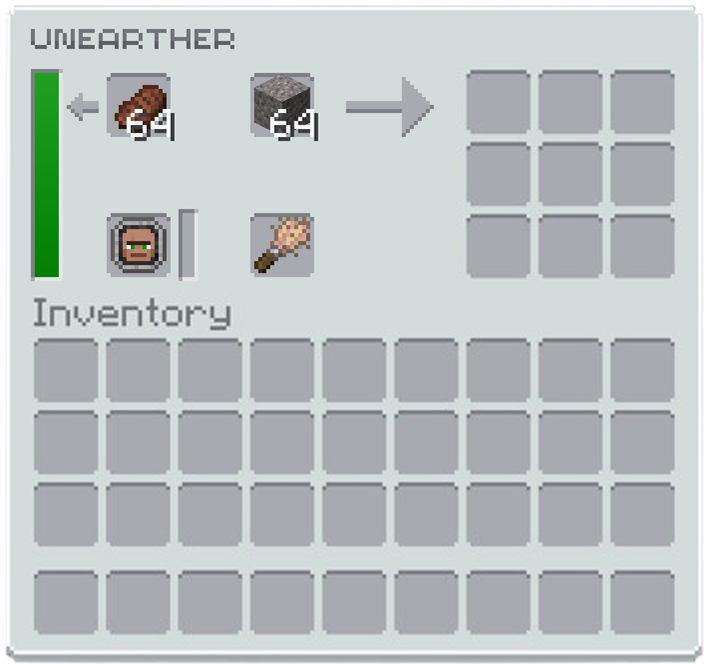 Unearthers are 3x3x3 structures that allow you to use villagers to automate the brushing process. The structure is crafted using 5 tinted glass and 3 polished deepslate slabs, and you only need one Unearther block to build it.
To operate an Unearther you will need the following:
- A Villager Worker Token from an employed villager
- A brush
- Blocks to brush
- Food (optional, but increases brushing speed)
Step 1: Getting a Villager
First, complete the quest Chronon Generator in the Getting Started chapter. This rewards you with Dreadful Dirt, which causes hostile mobs to spawn on it more frequently than usual. Place it in a dark area to allow a zombie villager to spawn.
Next, complete Unknowing Task 3 from the Echo of Guidance to obtain the Ender Lead. Use it to pick up the zombie villager that spawns on the Dreadful Dirt.
Step 2: Healing the Zombie Villager
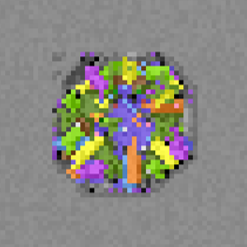 Take the zombie villager to the Healing Spring, located to the north of your base's spawn point. Open your map with M to find it; it appears as a colourful circle on the map. Place the zombie villager down inside the Healing Spring, and it will begin converting into a regular villager.
Step 3: Crafting the Echo Encoder
Head to the World Engine and craft an Echo Encoder. You will need the following materials:
- Amethyst Resonance Charm: Crafted from 1 amethyst shard (obtained from the Healing Spring) and 4 leather (from killing cows or smelting rotten flesh on a campfire).
- Iron Stick: Place 1 iron ingot in the top-right corner of the crafting table, with two wooden sticks diagonally below it.
Place the Amethyst Resonance Charm and Iron Stick into the World Engine. It will engage one of its cores and begin crafting the Echo Encoder.
Step 4: Employing a Villager
With the Echo Encoder in hand, you can convert villagers into Worker Tokens. There are three Worker Token types that work in the Unearther, each requiring a specific workstation:
- Archeologist | Workstation: Decorative Pot | Brushes: Dirt, Dust, Mud, Sand
- Geologist | Workstation: Salvaging Table | Brushes: Gravel, Soul Sand, Crushed Kivi
- Dimensionalist | Workstation: Resonanz Engineering Block | Brushes: Netherrack, End Stone, Otherrock
Place down the workstation for the worker type you need, then place the villager nearby, and they will take on that job role. Once employed, use the Echo Encoder on the villager to pick them up as a Worker Token.
Step 5: Setting Up the Unearther
Insert the Worker Token into the Unearther along with a brush and the blocks you want brushed. The villager will begin brushing automatically.
To fully automate the process, connect a chest filled with brushable blocks, brushes (unless using an Unbreakable Brush), and optionally food to increase speed. Use item pipes to feed items into the Unearther from the chest.
It is strongly recommended to use Mekanism Logistical Transporters as your item pipes. They can pull multiple different item types from the same chest simultaneously. Opaque Item Pipes from Oritech Machines will only extract the first item type in the chest and will ignore the rest.
Auto Hammers and Cobble Generators
Once you have a handle on manually hammering and brushing, the next step is automating the process. This guide covers setting up a Stone Cobble Generator and chaining it into an Auto Hammer to produce resources passively.
Step 1: The Stone Cobble Generator
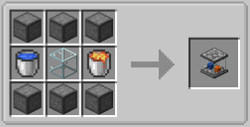 Craft a Stone Cobble Generator using 6 compressed stone blocks, 1 lava bucket, 1 water bucket, and 1 glass. Once placed, it will automatically generate 1 cobblestone per tick.
The Stone Cobble Generator will generate 1 cobblestone per tick, but can be upgraded to iron, gold, diamond, and netherite versions by placing the generator into a casting basin, and pouring the corresponding molten ore on top of it, for example, to turn the Stone Cobble Generator into an Iron Cobble Generator you will pour molten iron onto it whilst it is inside a casting basin.
Step 2: Collecting the Cobblestone
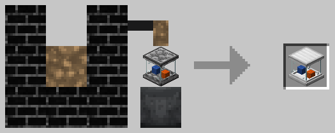
Place an inventory directly on top of the generator to collect the cobblestone it produces, these can be chests, barrels, or drawers. There are a couple of things to keep in mind:
- Stone Chests from the Stone Chest mod do not work with the generator.
- Compacting Drawers from Functional Storage must have a piece of cobblestone manually placed inside them before they will begin collecting from the generator.
Step 3: Piping into the Auto Hammer
Now you need item pipes to move the cobblestone into the Auto Hammer, when starting out you can use the Opaque Item Pipes from Oritech Machines or Item Pipes from Pipez, however it is recommended to use Logistical Transporters, which are Mekanism's version of item pipes. Several options are available:
- Opaque Item Pipes from Oritech Machines: a good early option
- Item Pipes from Pipez: another early game alternative
- Logistical Transporters from Mekanism: recommended for the best performance and reliability
Step 4: Chaining Auto Hammers
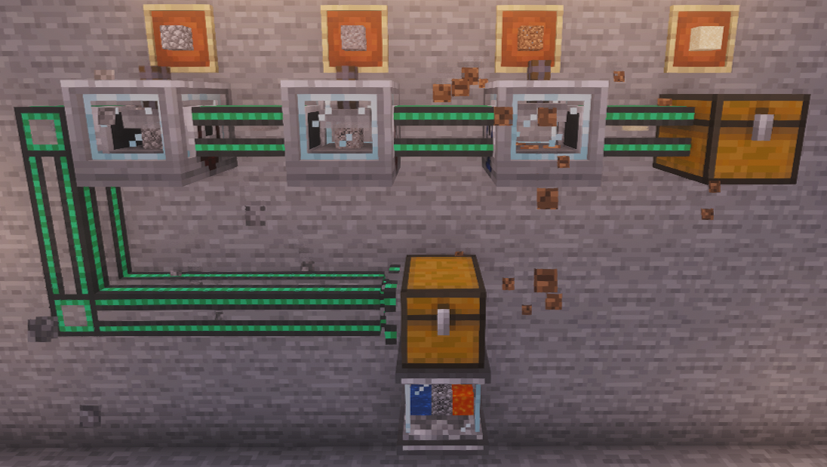 Auto Hammers can be chained together to convert cobblestone all the way down the conversion chain, into dust, in a single pass. The number of hammers you need depends on the output you are after.
For example, to produce sand for brushing into gold chunks, you would chain 3 Auto Hammers together:
Cobblestone ⮕ Gravel ⮕ Dirt ⮕ Sand
|
Introduction An introduction into Stoneblock 4, including how to get started and what mods are featured. |
Boss Guide Defeat this boss to keep progressing, learn how to summon and defeat it. |
Boss Guide The first major boss. Learn how to defeat it and what drops you can earn. |