
Introduction | Tekkit 2
| tekkit.siriusmc.net Version · 1.2.6 |

|
Tekkit 2 is a casual kitchen sink modpack on Minecraft 1.12.2, available on the Technic Launcher. It draws inspiration from Tekkit Classic and Tekkit Legends, with IndustrialCraft Classic, ProjectE, BuildCraft, Logistics Pipes, and ProjectRed at the core of its progression. Unlike Tekkit Legends, several features have been adjusted, including nerfs to ProjectE to create a more complex and rewarding gameplay experience. Galacticraft is also included, adding space exploration as an entirely new avenue of progression. |
Getting Started
Tekkit 2 is a kitchen sink pack, covering technology, magic, farming, exploration and more. You have no quest book, so progression is largely up to you. One of the most effective early goals is to get into ProjectE and craft a Transmutation Table, then build an EMC farm to begin producing a wide variety of items automatically.
Due to ProjectE nerfs, far fewer items have EMC values than in Tekkit Legends, meaning more automated crafting is required. For autocrafting, ProjectRed Pipes and Logistics Pipes are both strong choices, and which to use comes down to personal preference. Connecting an autocrafting setup to your EMC farm allows you to produce items that don't have EMC values themselves by crafting them from items that do, giving you an effectively unlimited supply.
Your First Resources
Like most Minecraft mod packs the first thing you need to do is gather supplies. In Tekkit 2, this is similar to vanilla Minecraft, gathering resources such as wood, cobblestone, coal, copper and iron ore.
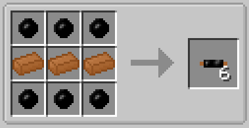 Once you have the vanilla basics down you can then start to gather materials for the mod IndustrialCraft2 (IC2). Whilst you're exploring and gathering resources, you may have noticed darker trees with small orange areas on them, these are rubber trees and are crucial for advancing. To get rubber you'll need a treetap, crafted with 5x wooden planks, which you can right-click on orange parts of rubber trees to yield sticky resin. This resin can be smelted in a furnace to obtain rubber. With this rubber you can make copper cables, using 6x rubber and 3x copper ingots.
Doubling Your Resources
Now that you have some fundamental resources, you can begin doubling your resources. There are two ways to do this, either without, or with power.
Doubling Without Power
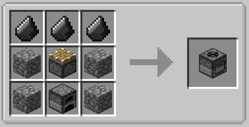 The first type of macerator is the Stone Macerator, which is powered like a furnace, needing a fuel source to macerate the ore.
Doubling With Power
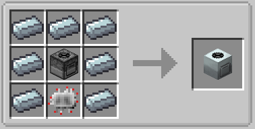 A regular Macerator needs power to operate. To obtain power you will need to craft a Generator, this can be done with 1x RE-Battery, 3x Refined Iron Ingots, and 1x Iron Furnace. Generators produce Energy Units (EU) when they are given a fuel source, such as coal or wooden logs.
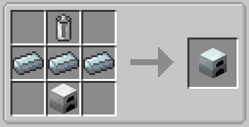 With the copper cables previously created, you can attach the generator and macerator together, allowing the macerator to become powered and start working.
Transmutation
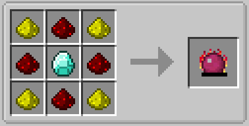 Transmutation is the art of transforming low value items into more high value items. In early game this is done via the Philosopher's Stone, crafted using 4x Glowstone, 4x Redstone, and 1x Diamond. Not only can the Philosopher's Stone be used in crafting recipes, but it can be used as a tool to transmute blocks in the world into their counterparts, for example dirt can be turned into sand, stone into cobblestone and vice versa, wooden logs into different types of wood, as well as leaves into different types of leaves, and a whole lot more. You can change the range of the Philosopher's Stone using the "V" key, to change the radius to either 3x3, 5x5, 7x7 or 9x9, or you can press "Shift + V" to reduce the size. Additionally, you can also press "G" to change the shape to either panel mode, cube mode, or line mode.
Later Game
Later in the game, Tekkit 2 opens up into a wide range of mods offering very different play styles. The three main areas of late-game content are ComputerCraft, Galacticraft, and Forestry.
We also offer a guide on Pipe Optimisation.
ComputerCraft
 ComputerCraft allows players to build automated systems using the Lua programming language. Computers and turtles can be programmed to interact with the world, move items, mine blocks, control redstone, and much more. A manual for Lua 5.4 covering basic syntax and modules can be found here. ComputerCraft also adds its own modules for interacting directly with in-game mechanics such as inventory management and peripheral devices.
Galacticraft
 Galacticraft adds space exploration to the game, including several new dimensions: the Moon, Mars, Venus, the Asteroid Belt, and player-built Space Stations. To reach these destinations, you'll need to construct and launch a rocket. Rockets come in three tiers, with higher tiers required to reach more distant planets. Each dimension offers unique resources, challenges, and structures to explore.
Forestry
 Forestry is centred around the breeding and genetic manipulation of three core organism types: bees, trees, and butterflies. Each naturally occurring species carries a set of genes, and breeding different species together produces new hybrids with unique traits and outputs. Mastering bee breeding in particular is a deep and rewarding progression path that can produce a wide range of materials.
Binnie's Mods, included as an addon for Forestry, adds flowers as a fourth organism type, introduces new species across all categories, provides tools for direct genetic modification, and adds a brewing system producing both alcoholic and non-alcoholic beverages.
Server Rules
Tekkit 2 has a number of server-specific rules in addition to the general server rules. These exist primarily due to the presence of ProjectE, which can make the economy difficult to balance without additional restrictions.
| Rule | Details |
| No gifting of items | Giving items to other players for free is not permitted. |
| Minimum prices | Items must not be sold below the minimum price set by the server. Use /price in-game to check the minimum price of any held item. |
To install Tekkit 2 and learn more about banned items, scheduled restarts, and dimension resets, visit the Tekkit 2 Server Card.
It is recommended to allocate between 3GB and 5GB of RAM for Tekkit 2.
SiriusMC bans certain items to protect server performance, the in-game economy, and claimed player bases. Use /banneditems in-game to see the full list of banned items on the server, or expand the Banned Items list below.
Banned Items ▼
|
Ready to Play? Open Minecraft, select Multiplayer, and add a new server with the address below. tekkit.siriusmc.net |
|
Guide Learn how to optimise your ProjectRed pipes. |
Guide Industrial Craft - Power Production An introduction into IC2 power generation and power transfer. |
Guide An introduction into EMC generation from ProjectE. |